Skip to content

기능 · 20개 앱 · 1 프로젝트 파일

완벽한 스크립트에서 화면까지 툴킷.

하나의 프로젝트 파일을 공유하는 20개의 통합 앱. 첫 번째 초안에서 최종 애니메틱까지, 프로듀서나 감독이 필요로 하는 모든 도구 - 모두 동기화되어 있으며, 모두 Dolly의 힘으로 구동됩니다.

Write

당신을 위해 분해 작업을 작성하는 스크립트 편집기.

Industry-standard formatting, a live scene navigator and DollyAI™ beside every line - the script you write becomes the data every other app runs on.

Open the script writer
스크린라이팅 앱 - 라이브 장면 내비게이터와 AI 작문 도우미가 포함된 전문 스크립트 편집기.
Board

감독이 서명할 스토리보드 - 샷 리스트에서 구축됨.

Every shot becomes a panel with shot-type and camera-movement annotations, version history and one-click PDF - no re-typing what the script already knows.

See the storyboard editor
스토리보드 편집기 - 깔끔한 캔버스에 샷 유형 및 카메라 움직임 주석이 있는 시퀀스.
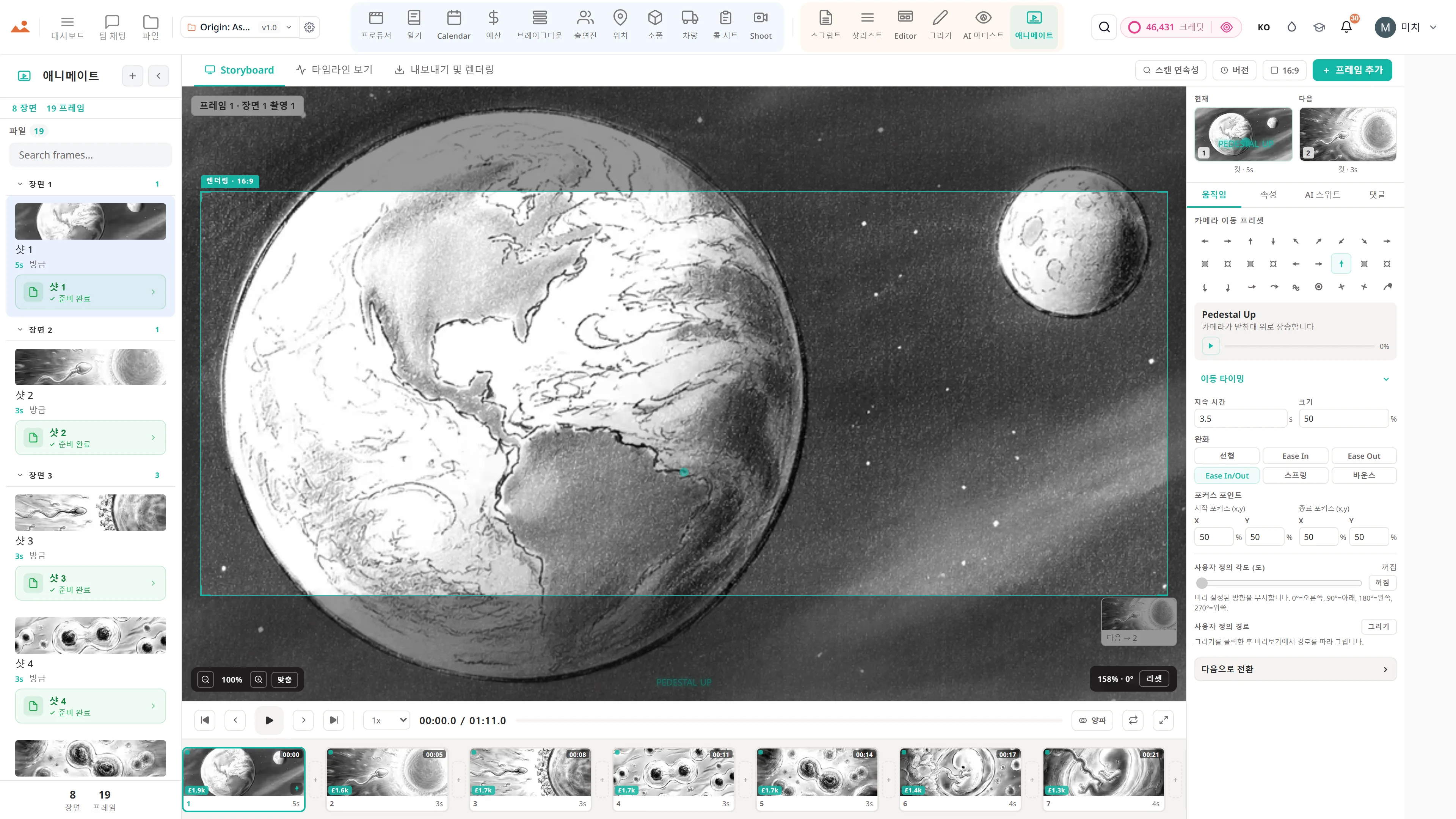
Animatic

당신의 프레임을 느낄 수 있는 움직이는 컷으로 시퀀스화하세요.

Drop your boards onto a timeline with camera moves, transitions, audio and timing - then export to your editing suite or hand it straight to the team.

Explore the animatic
스토리보드 뷰 애니메이션 - 카메라 이동 프리셋과 타이밍 컨트롤이 있는 뷰어의 현재 프레임.
프로듀서 스택

스크립트 → 브레이크다운 → 일정

하나의 데이터베이스를 공유하는 여섯 개의 제작 앱. 스크립트가 변경되고, 브레이크다운이 업데이트되며, 일정이 재조정되고, 콜 시트가 자동으로 다시 렌더링됩니다.

  • 수정 모드와 산업 색상 페이지가 있는 작성 앱
  • AI 태그가 있는 소품, 의상, VFX, 스턴트가 포함된 브레이크다운
  • DOOD 및 일일 순서 최적화기가 있는 실제 스트립보드
  • 자동 생성된 촬영 일정, SMS/이메일로 전달
  • 캐스트, 장소, 소품 및 차량 - 하나의 진실의 원천
SCREENPLAYINT. ROOFTOP - NIGHTSARAH stands at the edge,wind whipping her hair.She turns to face MARCUSwho emerges from thestairwell door.SARAHWhere have you been?MARCUS steps closer,his face half-lit bythe city glow below.AI ⟶3 tokensGENERATEDWSINT. ROOFTOPMSINT. ROOFTOPCUSARAHOTSMARCUS✓ Character continuity: 100%2 characters tracked · 4 framesArt style: Locked · Cinematic180° rule: MaintainedApprove
감독 스택

감독의 캔버스

스크립트에서 샷리스트, 스토리보드, 애니매틱까지의 여섯 가지 창의적인 앱. 손으로 그리거나 AI 아티스트로 생성하거나 둘을 혼합하여 - 모두 같은 캔버스에서 가능합니다.

  • 타이핑된 블록이 있는 전체 스크립트 편집기
  • 각도, 렌즈 및 움직임 메타데이터가 포함된 샷리스트
  • 드래그 스냅, 레이어 및 발표자 모드가 있는 편집기 캔버스
  • 그리기 앱: 60fps에서 GPU 가속 페인팅
  • AI 아티스트: 캐릭터 잠금이 있는 시그니처 스타일 프로필
  • 애니메이트: 승인된 프레임에서 원클릭 애니메틱
WSMS - selectedCU - drag to reorderSNAPM"Looks great! ✓"
당신의 코파일럿

DollyAI™, 모든 앱에서

당신의 대본을 읽고, 스타일을 존중하며, 적절한 순간에 올바른 조치를 제안하는 영화 제작자의 보조 도구. 모든 앱에서 하나의 Dolly, 제로 드리프트.

  • 프로젝트의 모든 문서를 읽습니다
  • 커버리지, 일정, 연속성 수정을 제안합니다
  • 모든 AI 프레임에서 당신의 아트 스타일을 유지합니다
  • 모든 제안을 감사 추적과 함께 설명합니다
  • 한 번의 클릭으로 수락, 한 번의 클릭으로 무시
PAN R →DOLLY IN ↑CRANE ↗MOTION DATA{type: "dolly_in"start: frame 24end: frame 72easing: ease_in_outduration: 2000mspath: [{x:0, y:0, z:0}{x:0, y:0, z:-3}]}Animate →
전체 지붕

하나의 동기화된 스위트

모든 것이 하나의 프로젝트 파일을 공유합니다. 장면 제목을 변경하면 분해, 일정, 호출 시트 및 스토리보드가 모두 알게 됩니다. 이제 다섯 개의 도구에 동일한 정보를 다시 입력할 필요가 없습니다.

  • 하나의 프로젝트 = 스크립트 + 보드 + 일정 + 호출 시트
  • 모든 앱에서 변경 사항 전파
  • 결코 잃어버리지 않는 저장 기능이 있는 버전 관리 파일 앱
  • 제작자와 감독을 위한 역할 인식 대시보드
  • 프레임 고정 댓글이 있는 팀 채팅
00:02.4 / 00:12.8 - 24fpsANIMATICDuration: 12.8 secondsFrames: 6 shotsCamera moves: 4Art style: Locked ✓Resolution: 1920×1080Export MP4MOV20 tokens per renderAI never changes locked style0s2s4s6s8s10s12sShot 1Shot 2Shot 3Shot 4Shot 5Shot 6
프로덕션 등급

촬영일 준비 완료

자체적으로 전달되는 콜 시트. 스스로 최적화되는 일정. 업계 표준 형식에 맞춘 내보내기. 취미 프로젝트가 아닌 실제 제작을 위해 만들어졌습니다.

  • 이메일과 SMS를 통한 자동 배포 콜 시트
  • 스트립보드 + DOOD + 회사 이동 인식
  • Movie Magic, Gorilla, Final Draft 및 CSV 가져오기 및 내보내기
  • 300 DPI 스토리보드 PDF 및 MP4 애니매틱
  • 산업 색상 페이지가 있는 수정 모드
Draw Suite - GPU Accelerated · Skia/CanvasKit-WASM60 FPSWebGL2BESLRTWCpressureBRUSHSize20pxHard80%Opacity100%Spacing0.15Pressure Gamma0.70SmoothingStabilizerMin size5%LAYERS+Brush strokesNormal · 100%Wet blendMultiply · 80%Adj: Brightness+12BackgroundNormal · 100%AI GeneratedNormal · 100%COLOR#E07850RGB HSLRENDERING PIPELINEPhase 1: WebGL2 GPU CompositorPhase 2: Worker · Phase 3: Dirty RectPressure: 0.72Tilt: 12° 8°
팀 준비 완료

좌석별 권한

조직 소유자는 초대된 각 좌석이 볼 수 있는 20개 앱 중 정확히 어떤 것을 선택할 수 있습니다. 11개의 역할 프리셋, 36개의 앱 게이트. 스토리보드 아티스트를 초대하면 그들은 Editor + Draw + AI Artist + Shotlist를 보지만, 예산은 절대 볼 수 없습니다.

  • 11개의 역할 프리셋: 소유자, 프로듀서, 감독, 작가, 스토리보드 아티스트, 애니메이터, 프로덕션 디자이너, 프로덕션 코디네이터, 편집자, 뷰어, 관리자
  • 좌석당 36개 앱 오버라이드 매트릭스
  • 250ms 이내의 실시간 교차 탭 동기화 - 한 장치를 드래그하면 모든 다른 탭이 업데이트됩니다
  • 감사 로그는 모든 공유 링크 생성, 철회 및 접근 변경을 기록합니다
  • 편집으로 래핑: Premiere XMEML, DaVinci EDL, OpenTimelineIO가 포함된 원클릭 ZIP 패키지
00:02.4 / 00:12.8 - 24fpsANIMATICDuration: 12.8 secondsFrames: 6 shotsCamera moves: 4Art style: Locked ✓Resolution: 1920×1080Export MP4MOV20 tokens per renderAI never changes locked style0s2s4s6s8s10s12sShot 1Shot 2Shot 3Shot 4Shot 5Shot 6

추가 기능

Real Screenplay Editor

타이핑된 블록, 장면 번호 매기기, 이중 대화, 번호가 잠긴 수정 모드 및 색상 페이지. FDX, Fountain, Celtx, PDF 및 RTF를 읽고 씁니다.

Production Breakdown

Dolly는 소품, 의상, VFX, 스턴트, SFX, 동물 및 차량을 자동으로 태그합니다. 카테고리 라이브러리, 장면별 보고서 및 일정과 동기화됩니다.

Real Stripboard Scheduling

색상 코드가 있는 스트립, DOOD 보고서, 회사 이동, 식사 시간 인식 및 Dolly의 일일 최적화기. Movie Magic, Gorilla, CSV 및 FDX를 가져오고 내보냅니다 - 당신의 스트립보드는 항상 함께합니다.

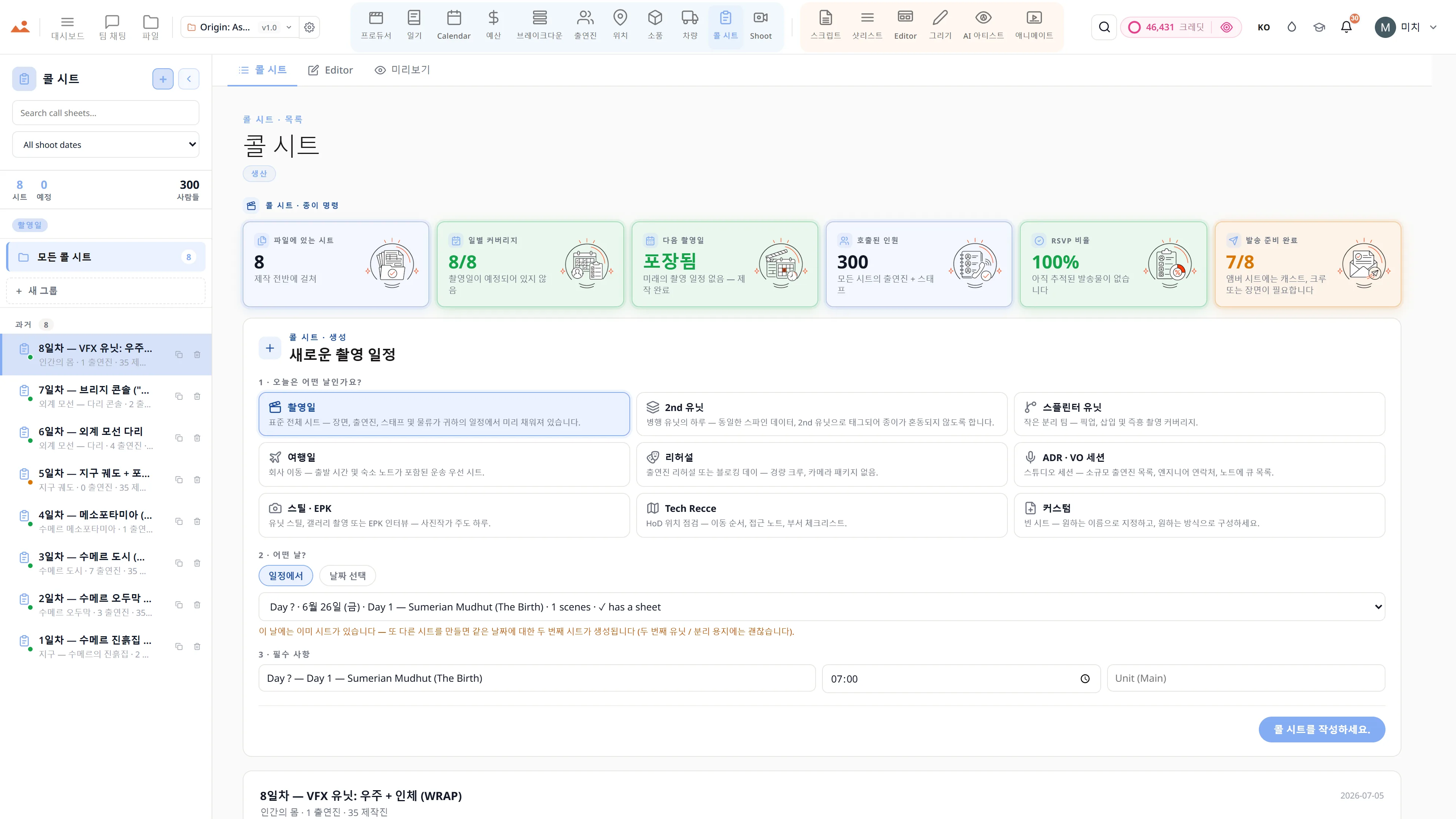
Auto Call Sheets

일정, 출연진, 위치 및 차량에서 정보를 가져옵니다. 픽업 시간, 날씨, 가장 가까운 병원, 원클릭 이메일 및 SMS 전송.

캐릭터 연속성 엔진

아이덴티티 임베딩은 모든 AI 생성 프레임에서 각 캐릭터의 얼굴, 의상 및 포즈를 일관되게 유지합니다.

영화적 샷 인텔리전스

초점 거리, 샷 크기, 렌즈 프리셋, 카메라 움직임 및 조명 논리 - 영화의 문법, 구조화되고 재사용 가능합니다.

실시간 협업

채널, 스레드 댓글, 프레임 고정 노트, @멘션, 프레임별 승인 및 존재 표시기.

GPU 가속 드로우 스위트

GPU 가속 렌더링, 오프 스레드 합성, 전체 스타일러스 압력 및 기울기, 우리의 브러시 엔진, 15개 이상의 혼합 모드.

아트 스타일 잠금

한 번 스타일을 선택하면 Dolly가 유지합니다. 내부 서명 스타일 프로필 + 사용자 정의 참조 성경 - 결코 LLM-슬롭이 아닙니다.

프로덕션 준비 완료 내보내기

300 DPI PDF 시트, 고해상도 PNG 프레임, CSV 촬영 목록, MP4/MOV 애니매틱, FDX / Fountain 각본, 그리고 Movie Magic / Gorilla 스트립보드 - 모든 내보내기가 업계 표준 형식입니다.

절대 잃어버리지 않는 저장

자동 저장 기록, 이름이 있는 버전, 편집 가능한 초안, 그리고 모든 파일에 대한 전체 복원 지점. 어떤 자산도 어떤 시점으로든 롤백할 수 있습니다.

모든 앱에서의 Dolly

선택 인식, 이미지 인식, 그리고 16개의 테이블 병렬 프로젝트 컨텍스트 가져오기를 갖춘 20개 앱 전역의 하나의 어시스턴트. 그녀는 당신이 클릭한 장면, 샷, 캐릭터 또는 소품을 알고 있으며, 파일 내의 모든 스토리보드 프레임, 캐릭터 사진, 그리고 로케이션 스카우트를 보았습니다.

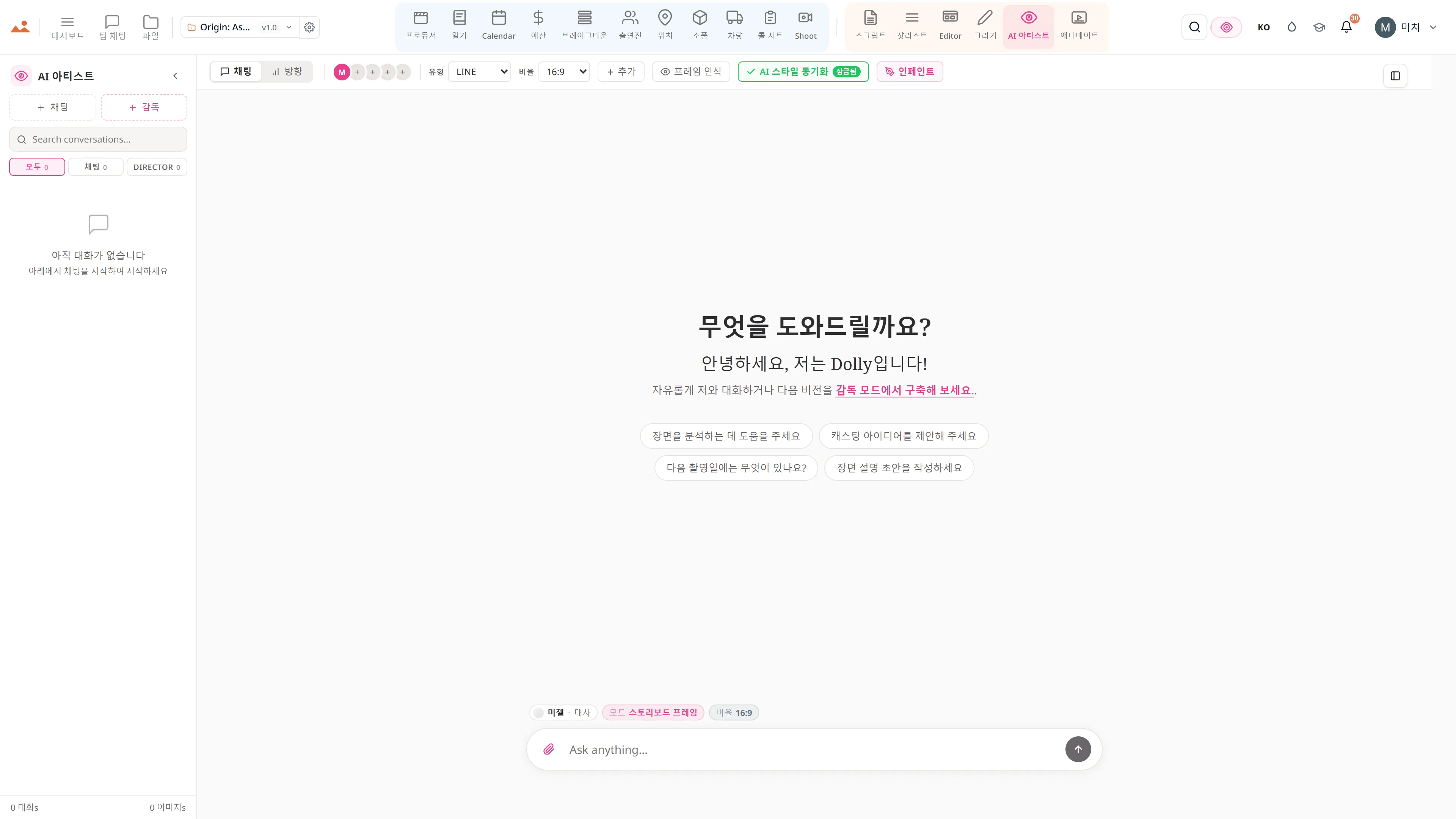
여덟 가지 AI 아티스트 모드

오늘부터 모든 여덟 가지 모드가 제공됩니다 - 스타일이 고정된 스토리보드 프레임, 극장용 원시트, 스트리밍 키 아트, 컨셉 페인팅, 무드 보드, EPK 스틸, 하단 3분의 1, 그리고 타이틀 카드. 모든 모드는 해당 산업의 결과물에 맞춰 프롬프트 엔지니어링 되었으며, 모든 출력물은 귀하의 프로젝트에 고정된 스타일 바이블에 따라 제한됩니다.

음성-스크립트 + 번역

AI 기반의 음성-스크립트 전사. 다국어 각본 번역. 100개 이상의 AI 작문 작업 - 커버리지, 연속성, 대화 다듬기, 비트 시트, 장면 재작성, 캐릭터 바이블.

캐릭터 TTS 읽기

분석에 따라 캐릭터의 나이와 성별에 맞춰 자동으로 캐스팅된 목소리. 적절한 목소리로 어떤 블록, 어떤 장면도 들어보세요 - 프리미엄 AI 목소리 또는 무료 브라우저 TTS.

편집 인수 브리지

애니매틱 → 프리미어 XMEML, 다빈치 EDL, OpenTimelineIO. 또한 캘린더 .ics 구독, ZIP 랩 패키지 아카이브, 캐스팅 연락처 시트 PDF, 모바일 콜 시트 공유 링크 - 설치 필요 없음.

Crew + Cast SMS 알림

@-멘션, 거래 메모 알림, DOOD 교대 경고 및 리뷰 댓글 알림이 포함된 SMS 운영자 기반 촬영일 알림. 모바일 콜 시트는 어떤 전화에서도 열 수 있으며, 앱이 필요 없습니다.

Cmd+K 명령 팔레트

어디에서나 프로젝트, 캐릭터, 장면, 샷, 위치, 소품 및 파일을 즉시 검색하세요. 단일 키 입력으로 전체 스위트를 가장 빠르게 탐색할 수 있습니다.
영화 제작 소프트웨어 기능 — 자주 묻는 질문

StoryboardCanvas is a complete script-to-screen film production suite: twenty integrated apps — script, breakdown, stripboard, call sheets, shot list, storyboards, Draw, AI Artist and animatic — that all share one project file. Everything a producer or director needs from first draft to final animatic, in one place.

Twenty apps are included, and they all read and write the same project file. A scene, character or location you enter once flows through the breakdown, schedule, call sheets, shot list and storyboard automatically, so there is no re-typing or exporting between tools.

Yes. The suite covers screenwriting, breakdown, stripboard scheduling, budgeting and call sheets that those tools handle separately — but inside a single synchronised project. That removes the copy-paste and version drift you get when your stack is several subscriptions that do not talk to each other.

Yes. The script becomes the data every other app runs on: the breakdown and shot list read it, and the AI Artist renders style-locked storyboard frames from your shots. Each shot becomes an annotated panel with shot-type and camera-movement notes, version history and one-click PDF export.

Draw is a browser-based drawing engine for boarding by hand, and the animatic app sequences your frames onto a timeline with camera moves, transitions, audio and timing. You can then export the cut to your editing suite or hand it straight to the team.

DollyAI is the AI assistant built into every app in the suite. It powers the script writing, breakdown, shot suggestions and style-locked image generation, and because it works from the same shared project file it always has the full context of your production.

Yes. StoryboardCanvas has a free plan, with paid tiers that scale up as your production grows — from solo creators through to studios and enterprise. You only pay more as you turn on more of the suite.

See it for yourself

Step inside a real production, completely free.

Open the actual software on Origin: Ascension, a finished short film, and explore every app exactly as the crew left it. Read the script, walk the boards, open the budget, print the call sheet. Fully read-only, with no sign-up. Nothing you touch is saved.

Try the free demo20 apps · one project file · 0 seconds of setup
No sign-upNo cardNo downloadFully read-onlyNothing you touch is saved
Live demo · Origin: Ascension
AI Artist 앱의 무료 데모에서 프로젝트의 잠긴 하우스 스타일로 스토리보드 프레임을 생성합니다.
The Draw studio in the free demo, painting over an Origin: Ascension storyboard frame on the GPU canvas.
Animate 앱의 무료 데모에서 타이밍이 맞춰진 애니메틱을 재생합니다.
Call Sheet 앱의 무료 데모에서 완성된 촬영일 콜 시트를 보여줍니다.

Script · breakdown · boards · animatic · call sheets · budget

The demo is a view-only copy shared for exploration. Some features need a paid subscription to run.

Storyboard Canvas · the complete production suite

The complete script-to-screen suite - start free

Twenty synchronised apps, one project file. Every app on every plan - pick a tier by team size, not features.

Get started