Animatic software that turns your storyboard into a timed previs.
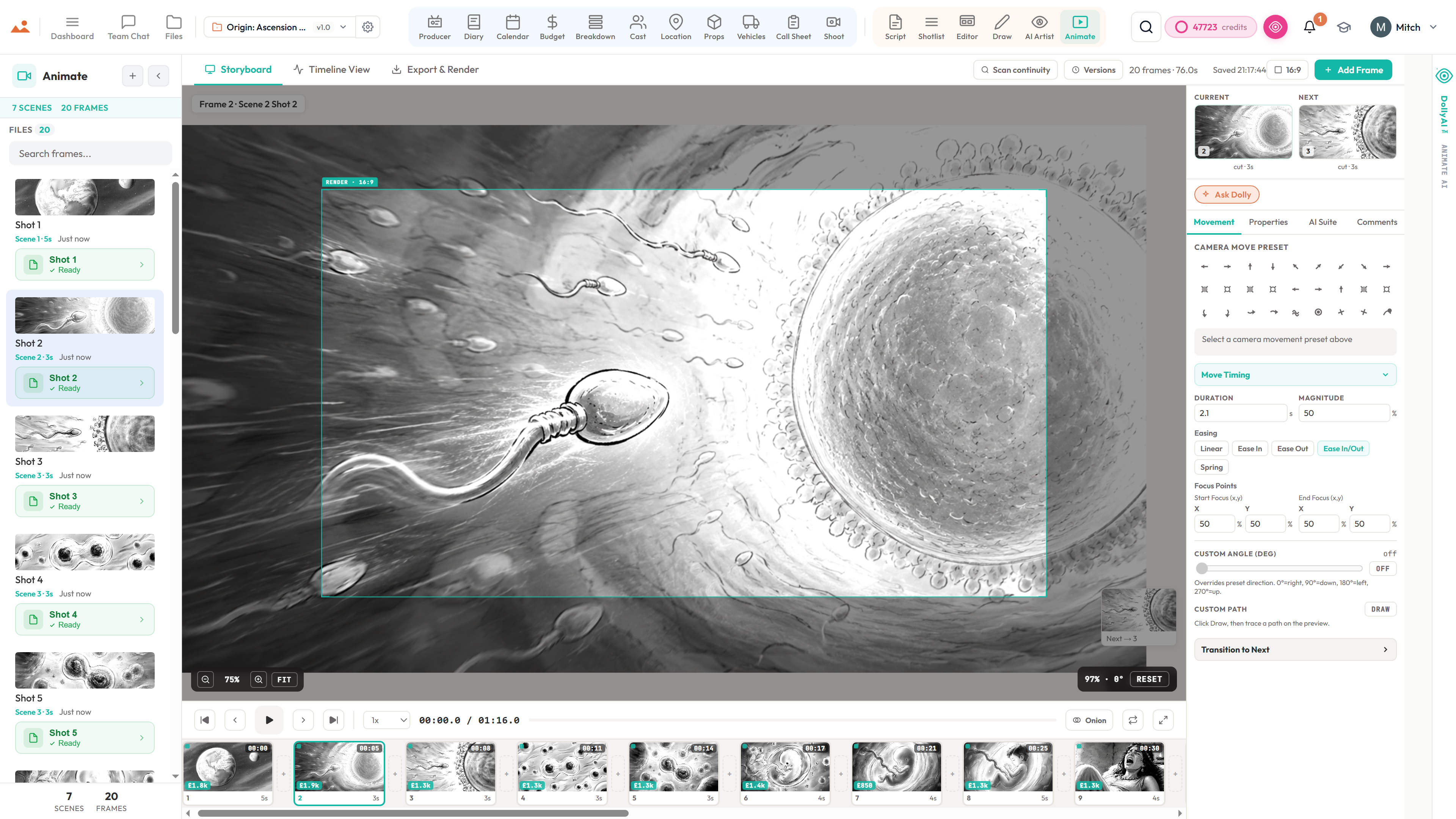
Your boards become a timed animatic in the same file - set the duration of each frame, add camera moves and transitions, lay a scratch track and dialogue underneath, then export the cut as MP4 or a Premiere/Final Cut timeline. The previs your edit starts from, before a single frame is shot.
See Animate →


What's inside Animate
Storyboard to animatic software.
- Boards from the same project, timed against the script - no import step, because there is nothing to import
- Camera moves, transitions, audio and a video export, plus handoff to Premiere, DaVinci and Final Cut
- One-click: frames + camera arrows + script timing -> animatic
- 27 camera presets + 9 transitions + proper timeline editor (trim, ripple, snap)
- Onion skinning + auto-tweening across keyframes
- Aspect-ratio templates (16:9, 21:9 anamorphic, 9:16 social, 1:1) with safe-zone overlays
- Multiple stacked audio tracks - dialogue, music, SFX, ambient bed - upload your own today
- Track scrubbing, snap-to-frame, ripple-trim - cuts feel like a rough edit, not a slide deck
- Time-coded comments per frame so editorial notes stay anchored to the shot
- FFmpeg in-browser MP4 / MOV export with timecode burn-in
- Editorial handoff - Premiere XMEML, DaVinci EDL, OpenTimelineIO, per-shot frame sequence
- Send to Animate from the Storyboard Editor in one click - same project file, no re-import
The pipeline
Where Animate sits in the production flow.
The final pre-production deliverable. Animate sits between the storyboard editor (where you compose frames) and the shoot day (where you execute the plan). Every frame, every camera move, every cut decision lands here as a timed animatic ready for PPM, financiers, and the crew read-through.
Feeds downstream into
Inside the app
Every shipped feature, fully wired.
Each block below maps a real shipped capability to the workflow it powers. No vapourware, no coming-soon.

DollyAI™ in this app
AI commands wired into Animate.
A few of the 200+ DollyAI commands across the suite, here in Animate. Every one shows its credit cost before you commit, and every response is anchored in your real project - not a generic prompt.
Draft annotations
4 crVision-grounded camera / mood / motivation / continuity drafts for the active frame, preserving any user-typed notes.
Continuity sentinel
3 crSweeps every adjacent frame pair, flags prop / costume / hair / lighting / sightline drift with severity ranking.
Pacing critique
3 crReads the active frame's hold duration against dialogue word count at 150 wpm and tells you if the cut lands too tight or too slack.
Transition motivation
3 crSuggests which of the 9 transitions reads true for the emotional beat you're trying to land.
Match-cut ideas
3 crPattern-matches adjacent frames for compositional / motion / colour echoes that read as deliberate cuts.
Camera motivation
3 crPicks from the 27-preset library and tells you why the push / pull / tilt earns its move on this beat.
Sound design
3 crPer-frame Foley + ambient suggestions read from the scene's diary entry + character continuity.
Runtime estimate
3 crPredicts the final cut's runtime from the timeline's current state + scene complexity from the breakdown.
Character read-through
1 crPer-frame TTS in any of 9 professional voices - dialogue read at performance pace, not synthesised dictation.
Talks to every app
Animate reads + writes to the same project file.
No re-entry, no copy-paste, no out-of-sync versions. Every connection below is a live data path in the running product.
Editor
One-click Send to Animate from the Storyboard Editor - frames + camera arrows + scene linkage all flow in.
AI Artist
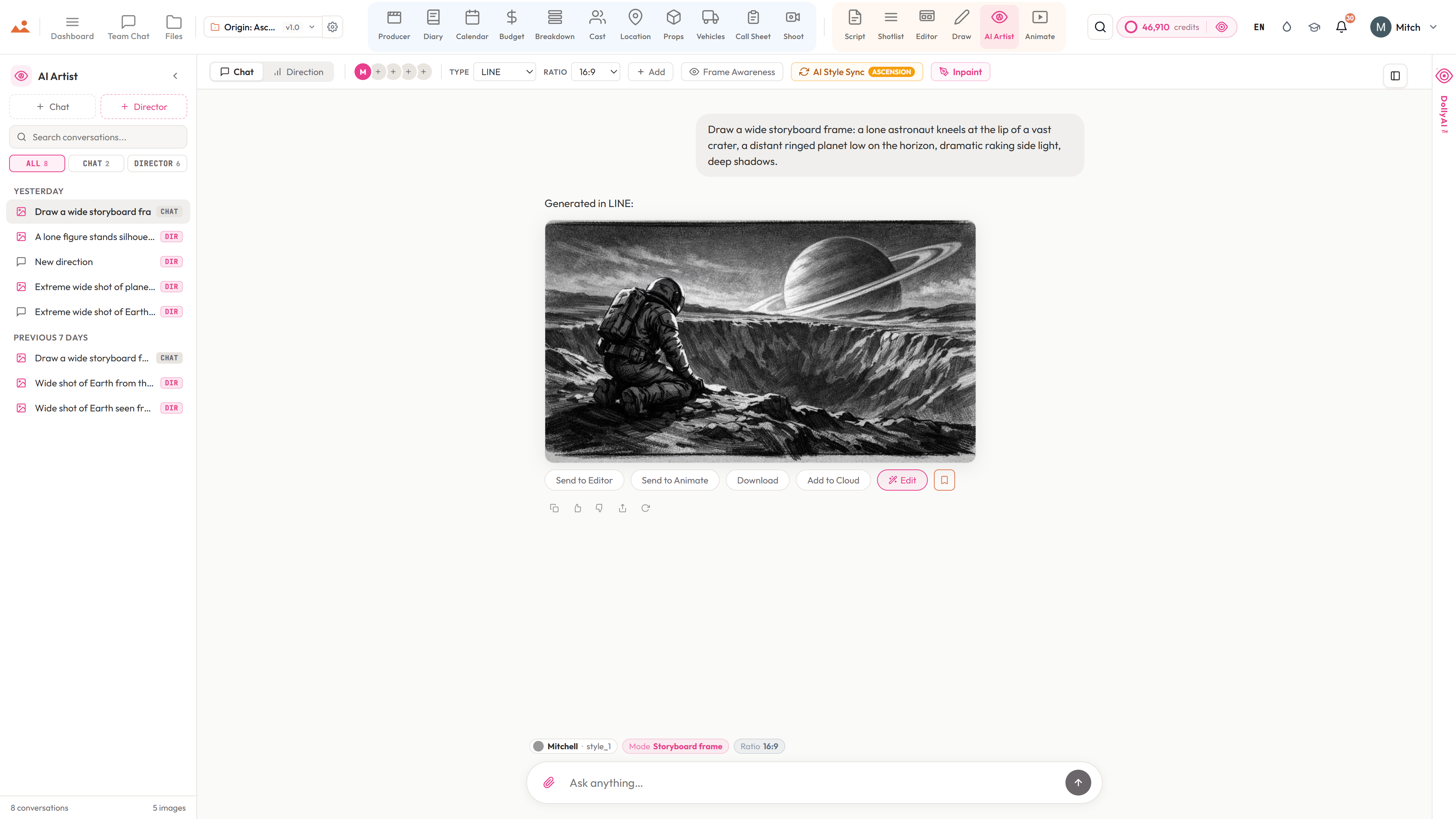
Every gallery generation carries a Send to Animate chip - the frame lands on the timeline with full scene context.
Draw
Export from Canvas Draw lands as an animatic frame; transforms / pan / zoom persist.
Files
Send to Animate chip on every image asset in the Files page.
Diary
Diary BTS photos surface as a third import source alongside Storyboard + AI Artist.
Breakdown
Per-scene element counts feed the budget-impact pill on every filmstrip card.
Script
Script timing infers default per-frame hold durations from dialogue word count at 150 wpm.
Producer
Every export / share / annotation logs to the unified producer audit log feed.
Frequently asked
Common questions about Animate.
Can I export the animatic to Premiere or DaVinci Resolve?
Yes. Animate ships XMEML (Premiere + DaVinci), FCPXML 1.10 (Final Cut Pro X), EDL (legacy), OTIO (cross-tool), and SRT (captions) - eight first-class editorial handoff formats. Every export carries audio, transitions, and camera-move metadata.
Does the MP4 export include audio?
Yes. Every MP4 and WebM that leaves the engine mixes down every audio track on the timeline - dialogue, music, SFX, ambient - with per-track fade in / fade out, volume, stereo pan, and delay envelopes. Clamped to the video length so a long music bed never runs past the final frame.
Can I share the animatic with reviewers who don't have an account?
Yes. Mint a read-only review URL in one click - token-protected, expirable, revocable. The recipient gets a phone-friendly viewer that plays the animatic with audio, supports frame comments, and never reveals the underlying project. Every share is logged.
Does it run in my browser?
Yes. Animate runs entirely client-side in Chrome, Firefox, Safari, and Edge. FFmpeg WASM does the audio mux and MP4 / WebM encode in-browser. No download, no plugins, no desktop install.
Can I roll back to an earlier version of the animatic?
Yes. Every autosave snapshots the full timeline - frames, audio tracks, settings, transitions, camera moves - into the cloud. Open the Versions panel, scroll through the labelled history, restore any prior version with one click. The restore itself takes a snapshot first, so even the restore is recoverable.
Does the AI cost extra per generation?
Every DollyAI™ action shows its credit cost before you commit - annotations drafts 4 credits, continuity sentinel 3 credits per frame pair, pacing critiques 3 credits, character TTS read-through 1 credit per dialogue block. Credits roll up to your monthly plan.
The Promise
Animate is on every tier.
No locked features, no Pro-only exports, no surprise paywalls. Every Animate tool on this page ships on every plan - Hobbyist to Enterprise.