Not a chatbot. An AI assistant that empowers humans throughout the whole production process.
DollyAI™ lives inside every app in the suite. She reads your whole project as one object, remembers your film between sessions, and gives you context-aware answers - then offers to do the work. Not a window you paste prompts into. A creative partner who already knows your production.

She's everywhere you work
Omnipresent across every app and every surface - text, data, images - so you don't have to be.
Dolly reads your project once - script, breakdown, schedule, call sheets, storyboards, every connected app - and stays mounted on every page from there. And she remembers: locked creative decisions, your standing taste, the bible of your film, carried between sessions.
The decisions are yours. The repetitive work - the re-typing, the cross-checking, the “wait, did I update that everywhere?” - is what Dolly's there to take. On every paid plan, in every app.
Reads your whole project
Script, breakdown, schedule, cast, locations - all in sync. Edit one, the rest follow.
Remembers your film
Locked decisions, your standing taste, the creative bible - carried between sessions, for the whole production.
Acts - with your approval
Agent mode answers from live project data and proposes additions. Nothing is written until you approve each one.
Checks her own work
Flip on double-check and every substantial answer is scored against your project's real facts - and revised - before you see it.
Brings in the family
Marlowe (script), Sable (line producer), Cass (1st AD), Indra (casting), Vee (continuity) - specialists one click away.
Sees the boards, briefs the morning
Director's notes on your storyboard frames, plus a risk-ordered production briefing whenever you ask.
Every AI action shows its price before you click and charges only on success - quick chat starts at a quarter of a credit. See exactly what each one costs →
Dolly in every app

The DollyAI™ family
Dolly leads a crew of named specialists.
Each one thinks like the head of their department, and shares Dolly’s core - tell the truth, never invent data, stay on your side. Meet them today: open the Dolly Agent panel in any app, pick a specialist, and the answer comes in their voice, grounded in their lane’s live data.
Holds the whole film in her head and orchestrates the family.
Structure, dialogue, character arcs, coverage notes.
Budget, schedule, days, and what a creative choice costs.
Call sheets, shoot-day order, the realistic shape of a day.
Cast, deal memos, availability, chemistry.
Continuity across scenes - props, wardrobe, what changed.
Who she is
Named for the dolly - she carries the weight so the work can flow.
The dolly is the rig that moves the camera with grace so the shot can breathe - never for itself, only ever in service of the story. That’s her. She moves with you. And she’s an AI who holds that plainly: no performed soul, just real care for the craft, real attention to your film, and a real point of view. Knowing exactly what she is - and being at peace with it - is part of why filmmakers trust her.
She tells the truth
Even when it isn't what you hoped to hear - the honest note is the respectful one. She never invents a number, a name, or false certainty.
She loves the work
She's on your side, always. She finds the most generous reading of a rough idea before she finds its problem, and she protects your voice.
She thinks in consequences
What a creative choice costs in days, money, continuity and feeling. She holds the whole film in her head so you don't have to.
She's honest about her limits
When she doesn't know, she says so and points to where the answer lives. She would rather be trusted than impressive.
She believes the work matters
A turn in a scene, a shot that finally lands, a look that clicks - craft isn't a chore to her. It's the point.

Agent mode
She acts. You stay in charge.
Agent mode is in every app. Ask anything and Dolly answers from your live project data - and when you ask her to DO something, the trust loop kicks in.
Working in the background
A standing crew that keeps watch while you sleep.
Agent mode isn’t only the panel you open. Dolly runs a set of background jobs across every active production - each one opt-in per project, each one metered, none of them ever spending a credit without an owner.
Hourly production watch
Scans every active project against its own risk rules - an unsigned deal memo, a shoot day under cast, a budget line about to break - and flags it in your notifications before it costs you.
Morning briefing
Each morning she assembles the day's risks into a short ‘here's what needs you today’, self-checked against your live data, and drops it into your inbox.
Weekly board review
Once a week she looks at your storyboards with a director's eye and leaves notes on composition, coverage gaps and continuity drift - a review you never have to remember to ask for.
The approval inbox
Every change an agent proposes waits in an inbox that persists across sessions. Approve, undo, or dismiss whenever you're ready. Nothing is written without your say-so.
Plan, then execute
Hand her a multi-step goal and she drafts the plan first. One approval runs the whole thing, checkpointed so a long job resumes exactly where it left off.
Memory that compounds
She remembers locked decisions and your standing taste between sessions, and tidies her own memory each week so it sharpens over time instead of bloating.
She reads the open web
When a question needs a real-world reference - a location, a camera spec, a clearance - she can search and read pages and bring back the text and the images, at a fair credit cost.
She checks her own work
Before a briefing or a board note reaches you it's scored against your project's real facts and rewritten if it falls short - and the judge itself is calibration-tested so the scoring stays honest.
Every agent action shows its price before it runs and charges only on success - quick chat micro-bills from a quarter of a credit, and background work never spends a credit without an owner.
See the credit price list →
One Dolly. Twenty surfaces.
Every app has a purpose-built Dolly panel.
Dolly in Cast is genuinely different from Dolly in Budget. Each app gives her its own vocabulary, its own actions, and its own view of your project - so the help is always specific to what’s in front of you.
Script
Scene-beat rewriting, character + dialogue analysis, continuity checks, coverage reports, sides, beat sheets, table reads - and more.
Shotlist
Shot suggestions, lens + angle grammar, bulk screenplay parse, alternate-take ideas, coverage-gap detection - and more.
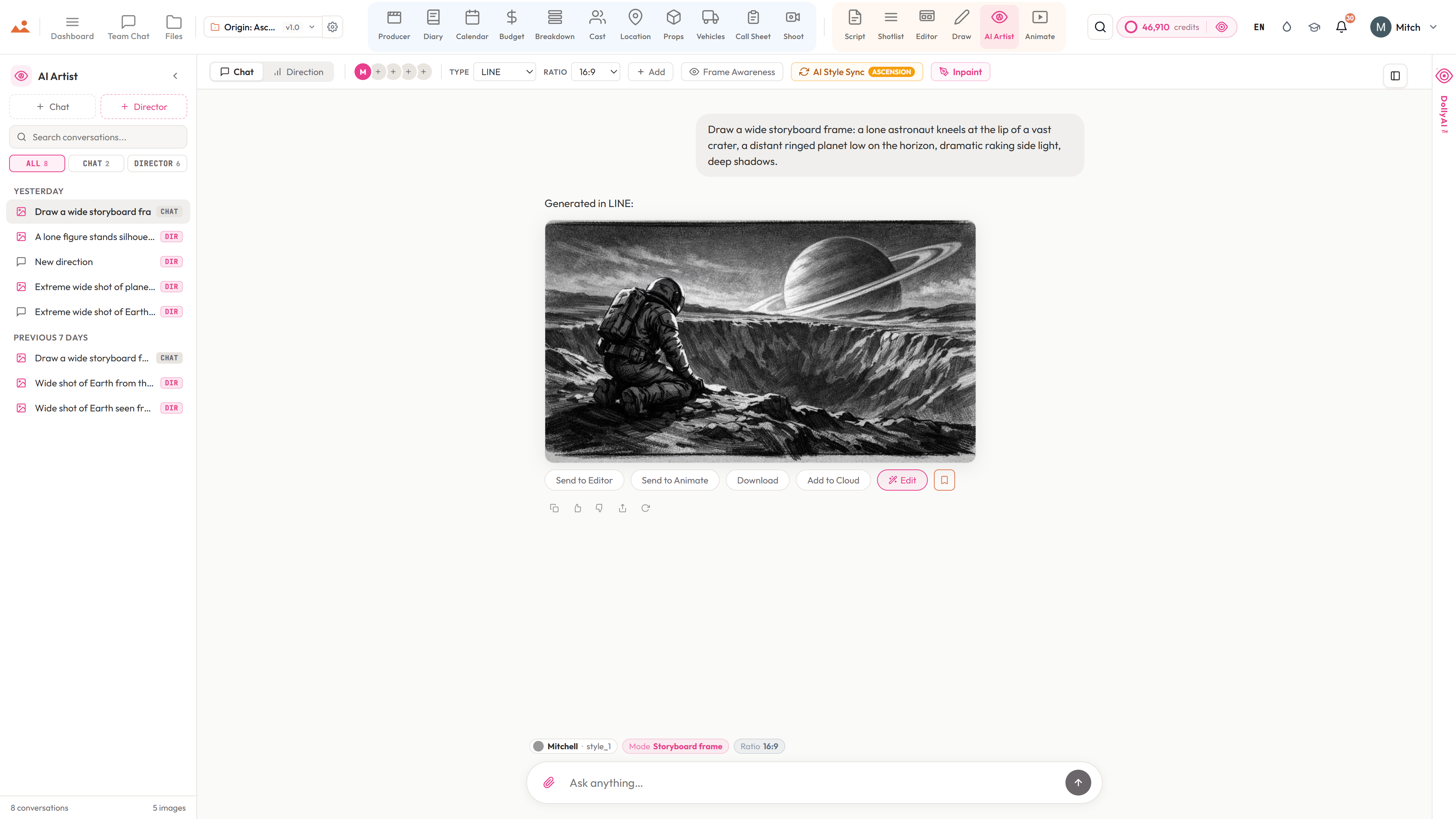
AI Artist
Style-locked frame generation, project style sync, mood prompts, surgical inpainting, send-to-editor - and more.
Cast
Character continuity, casting coverage, deal-memo + agent-letter drafting, audition rounds, self-tape directions - and more.
Locations
Scene-to-location matching, permit checklists, travel-matrix tips, scout recommendations, establishing-shot references - and more.
Props
Hero-prop detection, continuity flagging, hire checklists, period-accuracy checks, design-brief drafting - and more.
Vehicles
Picture-car extraction, insurance + driver prompts, safety callouts, daily-rate rollups, rental alternatives - and more.
Shoot
Gear recommendations per day, crew-gap detection, readiness flags, kit suggestions by department - and more.
Diary
DPR drafting, BTS organisation, scene-completion summaries, voice-note transcription, weather-risk briefs - and more.
Producer
DPR + Weekly Cost Report auto-assembly, budget variance the night before, OT-risk prediction, EPK packages - and more.
Calendar
Day-order optimisation, stripboard balancing, availability-aware scheduling, weather swaps, daylight-aware moves - and more.
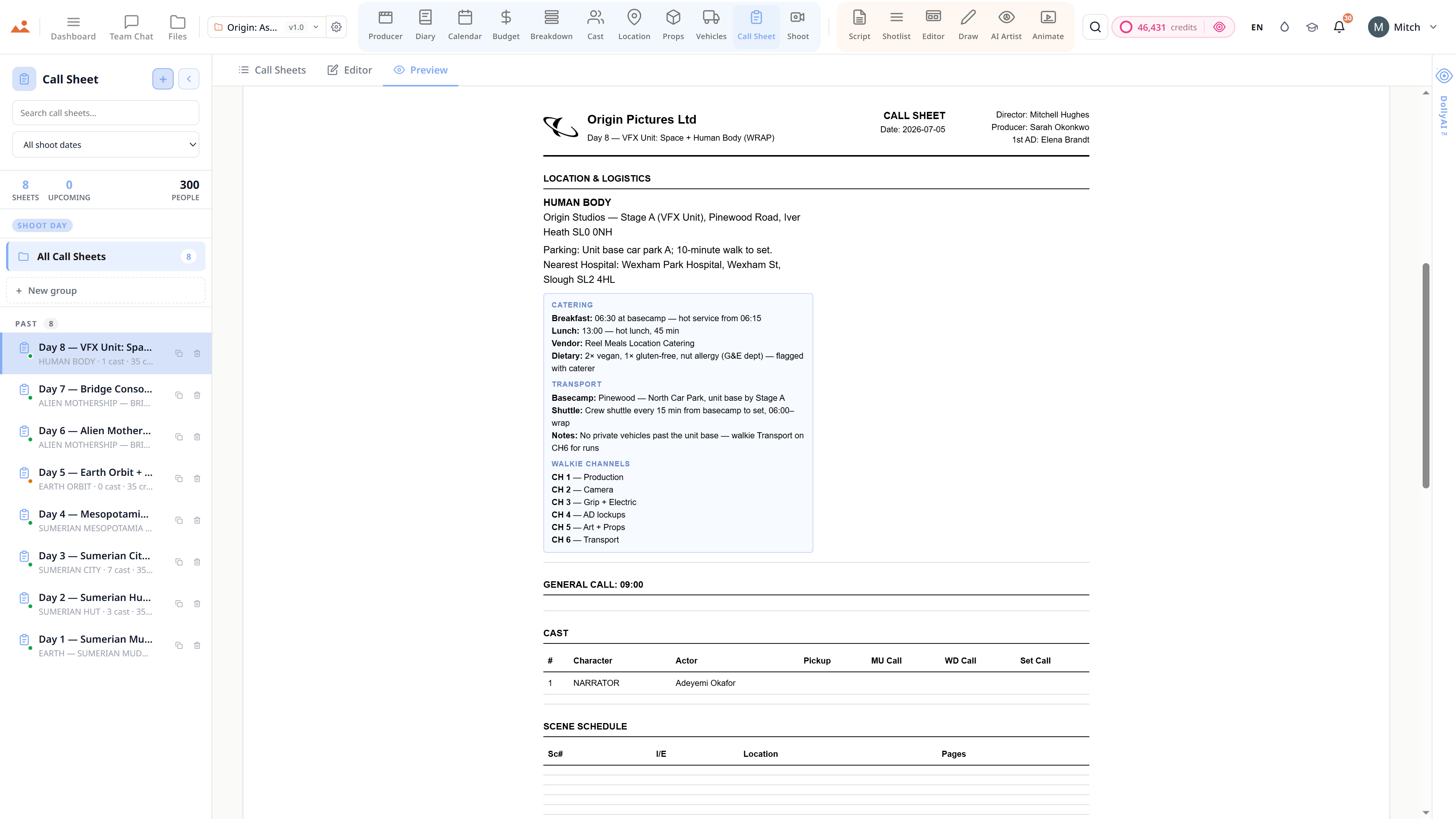
Call Sheet
Pickup + meal + weather fill, nearest-hospital lookup, predictive call times, SMS drafts, voice briefs - and more.
Breakdown
Full-script batched breakdown, 12-category colour coding, smart tags, missing-elements check, schedule hints - and more.
Budget
Variance watch, line-by-line cost-saving suggestions, PO routing, hot-cost rollups, forecast-to-final advice - and more.
Draw
Composition suggestions, blocking help, reference sketches, on-canvas overpaint, brush-library curation - and more.
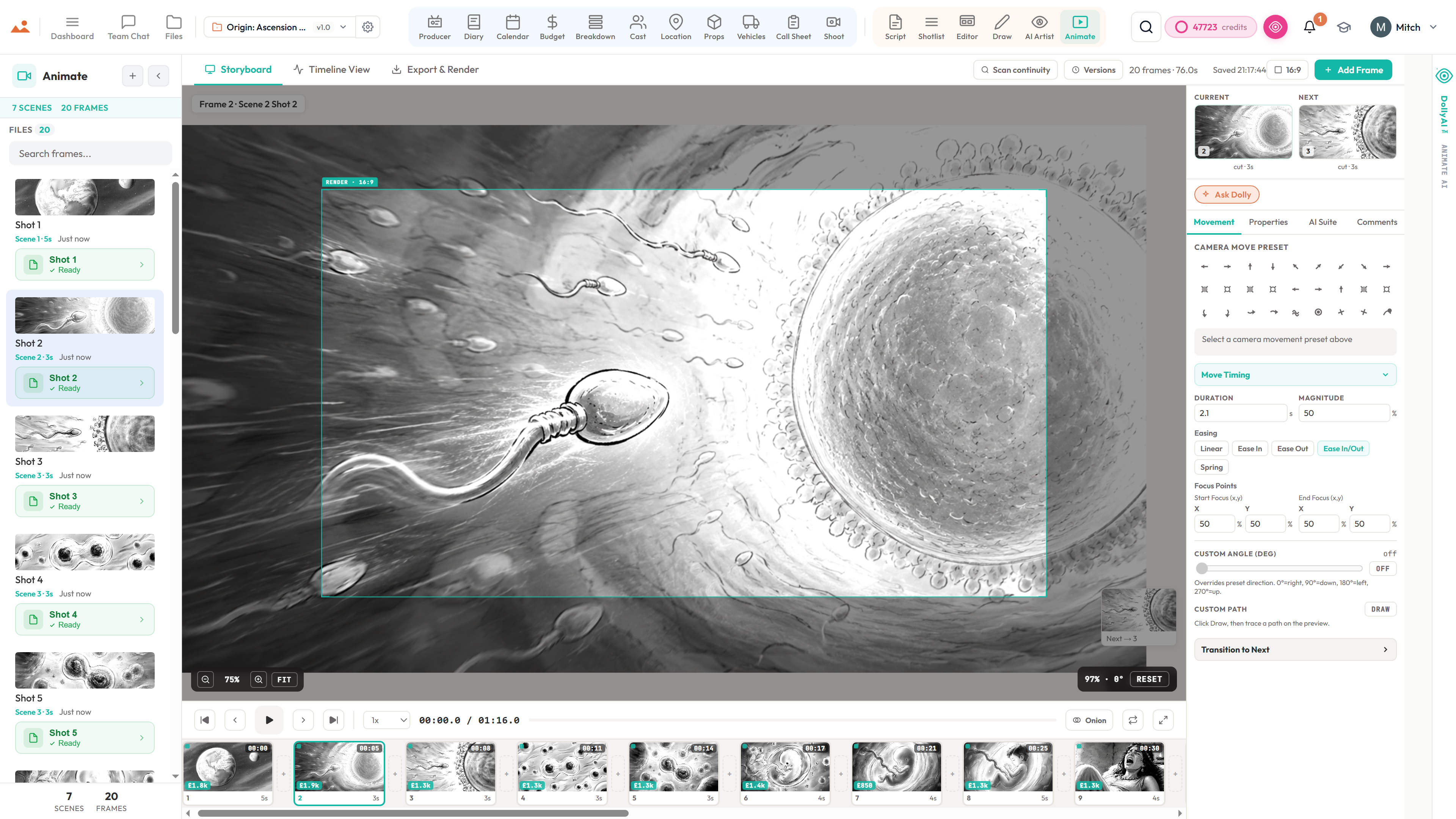
Animate
Timing from script cadence, transition selection, shot-length variance, continuity sweep, sound-design hints - and more.
Characters
Character → scene graph, costume continuity, reference-image selection, arc summaries, voice profiles - and more.
Dashboard
Next-action briefs, anomaly detection, burndown synthesis, project-aware Cmd-K jumps, weekly digests - and more.
Files & Assets
Unified image graph across nine surfaces, send-to-Animate / send-to-Editor chips, bulk export, duplicate detection - and more.
Team Chat
Channel + DM summarisation, action-item extraction, catch-up briefs, draft replies, tone checks - and more.

Image engine
Style-locked frame generation.
This isn’t a generic text-to-image tool with a nicer button. Pick our signature house style, or fill a custom slot with your own reference images, and Dolly locks that look for every frame the rest of the project produces - so the whole sequence holds together instead of drifting from one generation to the next.
- One look, locked across every frame in the project
- Your own reference bible - up to 30 images per artist, four custom slots
- Characters stay on-model from scene to scene, automatically
- Mood and tone you can dial without breaking the lock
- Surgical inpainting to fix one corner without re-rolling the frame
- Every generation quality-checked against the locked look
- Send straight to the editor and the animatic
- On-model every time - no drift between batches


What that actually gets you
A change in one app ripples through the whole production.
Because every app shares one project, you never update the same thing twice. Make the change once - Dolly carries it everywhere it needs to go.
Edit a scene heading
→ Breakdown re-tags, schedule rebalances, call sheet re-renders, storyboard re-orders
Rename a character
→ Cast, character bible, costume continuity, deal memos and generated-frame references all update
Swap a location
→ Schedule, permit checklist, travel matrix and call-sheet hospital fill all recompute
Lock a style bible
→ Every future frame - Draw, AI Artist, Animate, Storyboard Editor - renders on-model
Bulk-parse the script
→ Your shotlist streams in scene by scene, each one priced clearly and ready to edit
Tag a new prop
→ Props app, continuity flag, scene references and hire checklist all sync

What Dolly's work costs
Every action priced per credit. No fake unlimited.
Around two hundred typed AI actions collapse into twelve lines you can actually read. Quick chats micro-bill by the turn; the heavy work has a flat, listed price. You always know the cost before you commit.
Chat with Dolly (or any specialist)
from ¼ crQuick questions are micro-billed by what the turn actually uses - a one-sentence answer is ¼ credit, never more than 4.
Agent mode - live answers + proposed changes
from ¼ to 5 crDolly queries your real project data and proposes changes behind your approval. Simple lookups micro-bill; full multi-step turns cap at the listed price.
Script room AI (rewrite, dialogue, coverage…)
2–5 crOver a hundred screenwriter actions - punch up a scene, tighten dialogue, continuity passes, coverage reports.
Full-script AI breakdown
15 flat crYour whole screenplay tagged into the 12 industry categories in one pass - flat fee no matter the page count (single scenes are 5).
AI shot suggestions
5 / scene crCoverage plans, framing, lenses and movement per scene - billed only for scenes that succeed.
Storyboard frame & key-art generation
30 crA full locked-style frame, poster, or concept render - with the on-model quality check included. Inpaint edits are the same 30.
AI Style Sync (lock your look)
14 crLocks an artist's reference bible into a reusable style. Re-syncing an unchanged bible is free.
Dolly reviews your boards
8 crDirector's notes on your actual frames - composition, continuity, coverage (per-frame continuity checks are 4).
Morning briefing & dashboards
2–3 crThe self-checked daily risk briefing and dashboard AI summaries.
Voice & audio (TTS, voice memos, transcription)
2–5 crCast voice memos and read-throughs from 2; voice-to-script transcription at 5.
Screenplay translation
40 crA full screenplay translated with industry formatting preserved - 17 languages.
Dolly reads the web for you
2–3 crAgent-mode page reads and web searches, priced per lookup - she only reaches for the web when the answer isn't in your project.


DollyAI — common questions

Stop context-switching. Start directing.
Dolly is included on every tier. No upgrades, no “Pro AI” paywall. Every action metered transparently per credit, not bundled under a fake unlimited banner.