One tool instead of a £4,500-a-year stack.
Software prices are rising. Crews are shrinking. We built something different. Replace a £4,500+/year stack of single-purpose film production software and outsourced talent for as little as £15/month - built around the people on set, not the people replacing them, with an AI co-pilot beside you in every app while the human filmmakers still make every real decision.

The world problem
The friction that shapes every shooting day.
Every problem below is one we've sat in, on real productions. They're the reasons StoryboardCanvas exists.

One project file. Zero re-entry.
Every other production stack splits the truth across fifteen tools. StoryboardCanvas keeps it in one place. Change a scene heading once - the breakdown, schedule, call sheets, cast graph and storyboards all update themselves. That single shared file is the whole reason the rest of this page works.


Switch in an afternoon. Bring your whole stack with you.
Don't rebuild a single project by hand. Drop in the files you already have - a Movie Magic schedule, a Final Draft script, a StudioBinder breakdown - and our cross-over importer recognises the source, reads it, and rebuilds your production inside the suite. No re-typing. No copy-paste weekend.
Drop in what you already have
Routed, populated, ready
Movie Magic files come in structured - read directly, scene by scene, at zero AI credits. Scripts and PDFs run a credit-gated AI breakdown that splits every scene and tags the cast, locations, props, vehicles, crew and equipment for you. A dozen single-purpose tools used to split this work between them - we made it effortless to bring it all across to one place.

Script to Screen
The pipeline at a glance.
Eight stages, two tracks. Producer hands off to Director, Director hands back to Producer. Each card shows the surface that owns it and the apps it feeds downstream.

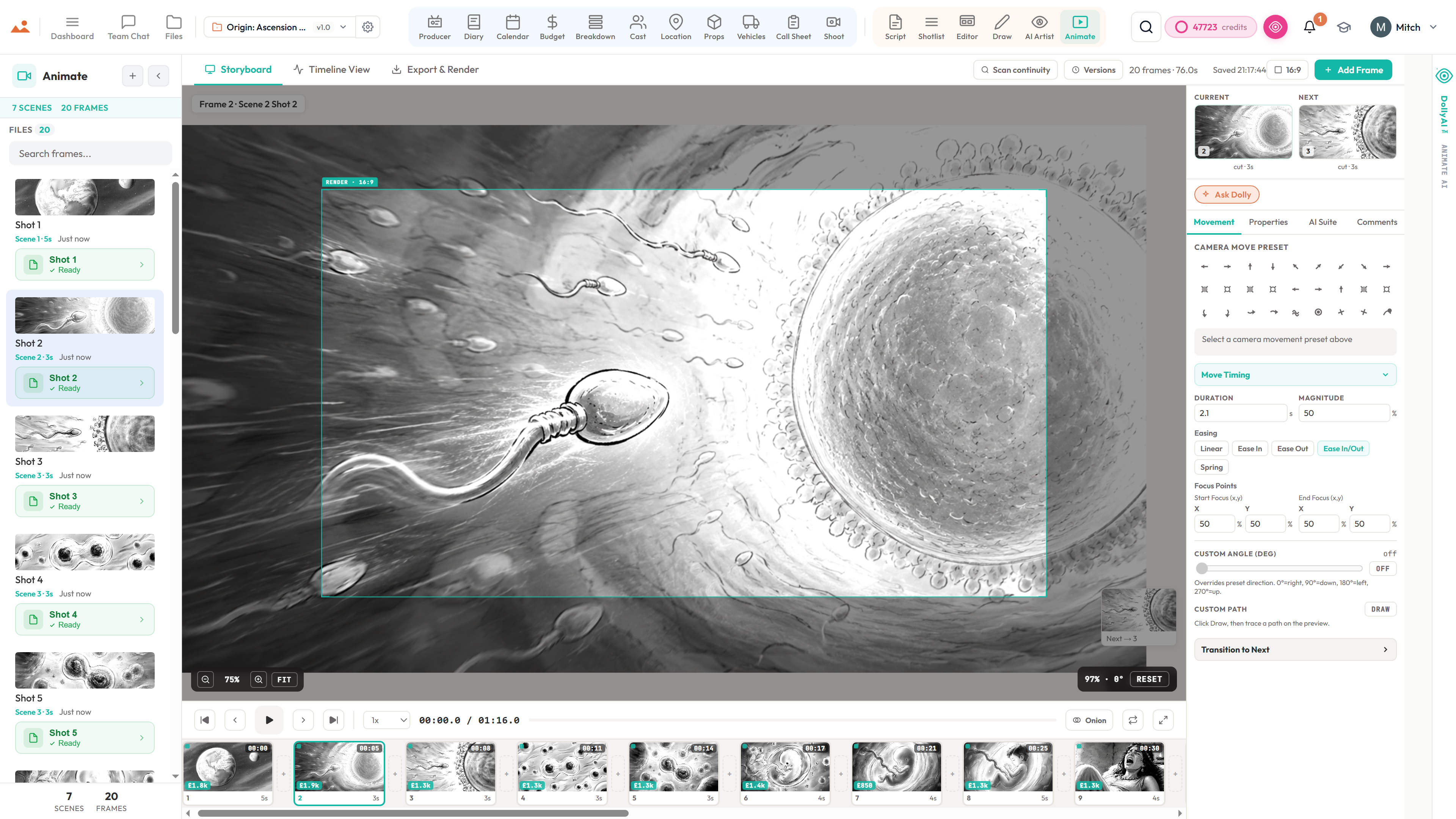
Script to shotlist to storyboard to animatic - ready for PPM or shoot.
No other tool carries your project continuously from first draft all the way to a timed animatic and a PPM-ready deliverable. Type a scene, get a shotlist, generate frames with the Draw suite or the AI Artist, drop them straight into the storyboard editor, time the animatic, and hand off a pre-production meeting pack - or walk straight onto set.
The Producer pipeline
From a locked deck to a wrapped shoot - same file, no re-entry.
The board hands straight off to the production side. Break it down, schedule it, dispatch the day, run the floor, watch the money - the whole shoot, one continuous spine.
…and the rest of the pipeline
The vast Producer Suite that turns a deck into a shoot.
An animatic is half the story. Every module below is a full production app - each one talks to the script, the breakdown, the schedule, and the cast graph automatically. Zero copy-paste between apps. Zero out-of-date versions in the Slack thread. One file, top to bottom.
Breakdown
12-category industry colour coding. Cast, props, wardrobe, VFX, vehicles, SFX - auto-tagged per scene.
Schedule
Stripboard, DOOD, day-order optimizer, shoot-day tracking with live cast availability.
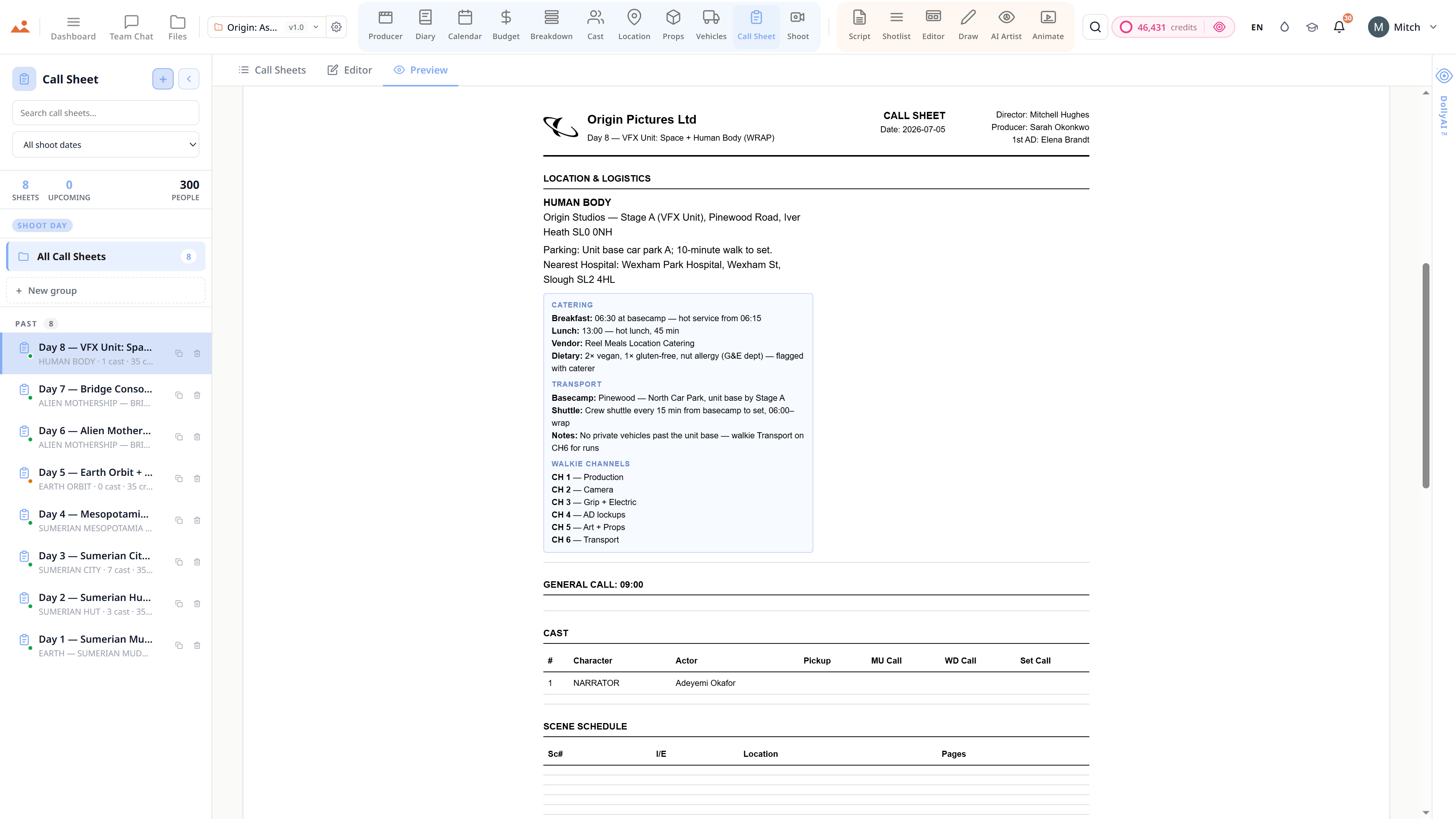
Call Sheet
Auto-fills from shoot day. Weather, pickups, hospital. PDF + email dispatch to the whole crew.
Cast
Profiles, availability, deal memos, character refs, casting coverage. The full character continuity graph.
Locations
Scout, permit, logistics, travel-matrix planning. Scene-to-location matching with Dolly assistance.
Props
Hero + background props, costume continuity, hire management, status tracking, scene refs.
Vehicles
Picture cars + unit vehicles, insurance, driver assignments, plate tracking, scene alerts.
Shoot
13-category gear inventory + 16-department crew roster. Shoot-day readiness at a glance.
Budget
Cost Report, Variance, Forecast, Top Sheet, POs, Petty Cash, tax incentives, fringes, cashflow and an AICP bid builder.
Diary
Daily Production Reports (DPRs), 11 view modes, BTS media capture, scene completion logging.
Crew
16-department roster with roles, rates, deals, call-sheet auto-inclusion, departmental view.
Files
Versioned project files, sections, comments, deliverable tracking. Every document, audit-trailed.
Plus Team Chat, Review + Share Tokens, Notifications, Team Roster, and the full Files / Cloud system - all synchronised across every app.


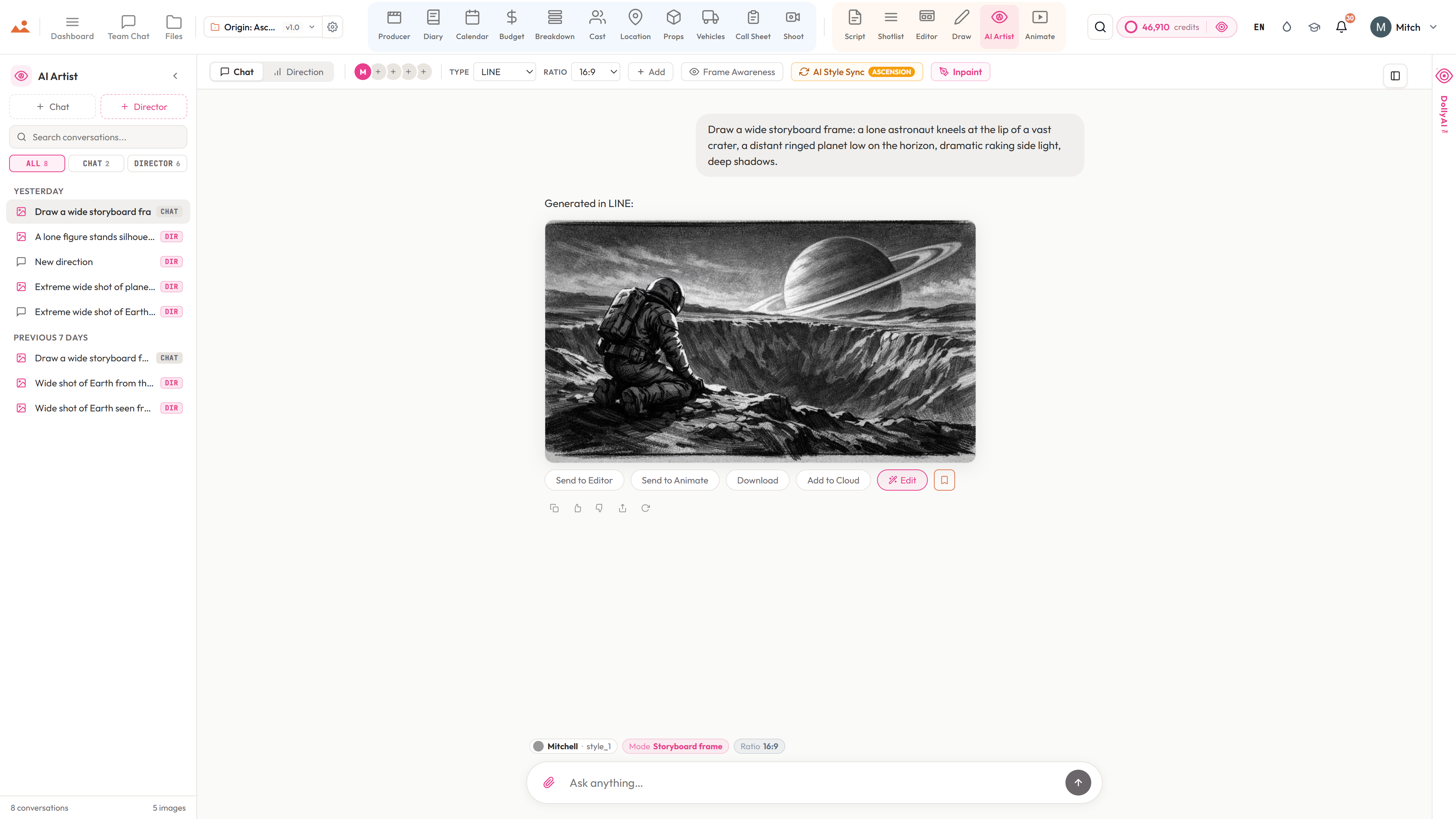
Style-locked AI storyboard frames. In 30–60 seconds. On-model.
The reason StoryboardCanvas exists. Built by storyboard artists and fed by your whole production - the Frame Builder already knows the cast, location and props in the scene, so frames come back on-model with no blank prompt box. Pick our award-winning default style - modelled on storyboard artist Mitchell Hughes - or upload a handful of your own references and let DollyAI™ hold that look for the whole project. No drift, no hallucinated characters, no throwaway character bibles, no month-long artist wait.
£25–£60 per frame · 2026 UK rates
~£0.30 per frame · 25 credits

What ships today
The numbers behind the suite.
Every figure below is live in the product today - counted from the running code, not the marketing deck.

AI Storyboard Generation · vs the field
Our frame generation vs. every other option
Most "AI storyboard" tools are one of two things: a generic image generator with a storyboard template, or a static deck tool with a generator tacked on. StoryboardCanvas is the only system where a single project file carries the generated frame directly into a shotlist, a storyboard editor, and an animatic - with character continuity, style lock, and scene linkage preserved through every step.
Based on publicly documented feature sets as of May 2026. Competitor capabilities change; we refresh this table when they do.

The Suite
The complete suite. One login. Every department.
Two stacks - Producer and Director - and the platform that ties them together. Every app shares the same file.
Producer Stack · 11 Apps
Breakdown
AI script breakdown software, in one pass.
Producer
Production office software, automated.
Budget
Film budget software, tax credits to bid.
Cast
Cast management with a self-tape portal.
Locations
Location management and scouting.
Props
Prop management and costume continuity.
Vehicles
Picture-car and unit-vehicle management.
Calendar
Film scheduling with a stripboard.
Call Sheet
Call sheet software, auto-generated.
Shoot
Equipment and crew, on shoot day.
Diary
Production diary, DPRs and continuity.
Director Stack · 6 Apps

Under the hood
Built for real productions
The systems behind the surface - the data model, the AI layer, and the production-grade exports that make this work on a real set.

Capabilities
The whole pre-production toolbox
Real Screenplay Editor
Typed blocks, scene numbering, dual dialogue, revision mode with locked numbers and colored pages. Reads and writes FDX, Fountain, Celtx, PDF, and RTF.
Production Breakdown
Dolly auto-tags props, wardrobe, VFX, stunts, SFX, animals, and vehicles. Category library, per-scene reports, and sync to the schedule.
Real Stripboard Scheduling
Color-coded strips, DOOD reports, company moves, meal-break awareness, and a Dolly day-order optimizer. Imports and exports Movie Magic, Gorilla, CSV, and FDX - your stripboard travels with you.
Auto Call Sheets
Pulls from Schedule, Cast, Locations, and Vehicles. Pickup times, weather, nearest hospital, one-click email and SMS delivery.
Character Continuity Engine
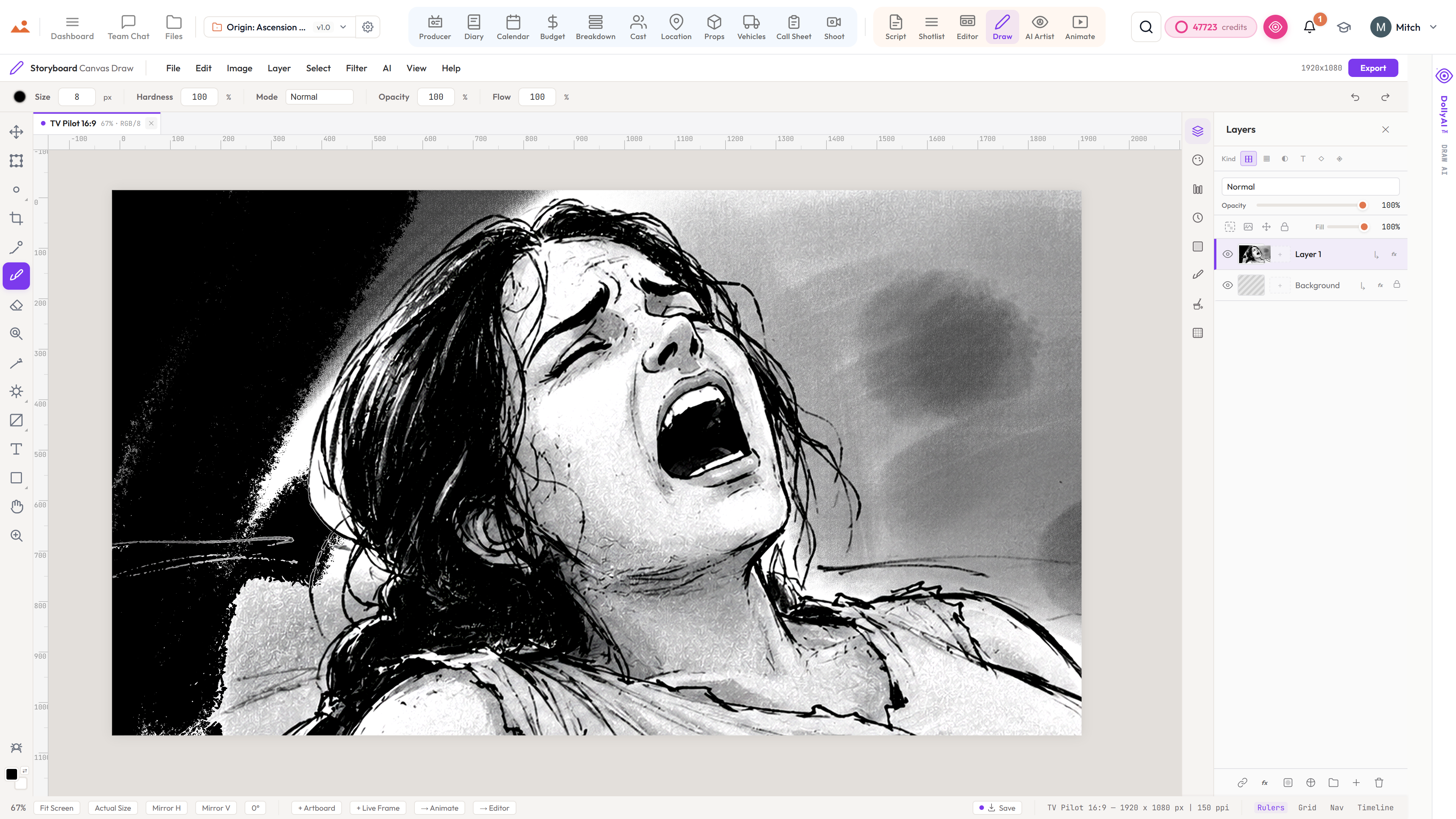
Identity embeddings keep every character's face, wardrobe, and pose consistent across every AI-generated frame.
Cinematic Shot Intelligence
Focal length, shot size, lens presets, camera movement, and lighting logic - the grammar of cinema, structured and reusable.
Real-Time Collaboration
Channels, threaded comments, frame-anchored notes, @mentions, per-frame approvals, and presence indicators.
GPU-Accelerated Draw Suite
GPU-accelerated rendering, off-thread compositing, full stylus pressure and tilt, our brush engine, 15+ blend modes.
Art Style Lock
Pick your style once and Dolly holds it. In-house signature style profiles + your custom reference bibles - never LLM-slop.
Production-Ready Exports
300 DPI PDF sheets, hi-res PNG frames, CSV shot lists, MP4/MOV animatics, FDX / Fountain screenplays, and Movie Magic / Gorilla stripboards - every export in an industry-standard format.
Never-Lose-Saves
Autosave history, named versions, editable drafts, and full restore points on every file. Roll back any asset to any point.
Dolly, in every app
One assistant across all 20 apps with selection awareness, image awareness, and a 16-table parallel project-context fetch. She knows which scene, shot, character or prop you've clicked - and she's seen every storyboard frame, character photo, and location scout in the file.
Eight AI Artist Modes
All eight modes live today - style-locked storyboard frames, theatrical one-sheets, streaming key art, concept paintings, mood boards, EPK stills, lower-thirds, and title cards. Every mode prompt-engineered to its industry deliverable, every output bound to your project's locked style bible.
Voice-to-Script + Translation
AI-powered voice-to-script transcription. Multi-language screenplay translation. 100+ AI writing actions - coverage, continuity, dialogue polish, beat sheets, scene rewrites, character bibles.
Character TTS Read-Through
Auto-cast voices by character age and gender from the breakdown. Listen to any block, any scene, in the right voice - premium AI voices or browser TTS for free.
Editorial Handoff Bridge
Animatic → Premiere XMEML, DaVinci EDL, OpenTimelineIO. Plus calendar .ics subscriptions, ZIP wrap-package archives, casting contact-sheet PDFs, and mobile call-sheet share links - no install needed.
Crew + Cast SMS Reminders
SMS-operator-powered shoot-day reminders with @-mentions, deal-memo notifications, DOOD shift alerts, and review-comment pings. Mobile call sheets open on any phone - no app.
Cmd+K Command Palette
Search projects, characters, scenes, shots, locations, props, and files instantly from anywhere. The fastest path through the whole suite in a single keystroke.
How film production software works — common questions
Stop juggling tools. Start making films.
Every app, every feature, every tier. No feature gates, no surprise paywalls.