Skip to content
How It Works

从剧本到屏幕, 端到端。

一个项目文件中包含二十个同步应用。输入一个场景,获取拍摄清单,生成帧,定时动画,并交付PPM包。

一个由DollyAI™驱动的制作套件

一个工具而不是一个 每年£4,500的堆栈。

软件价格在上涨。团队规模在缩小。我们构建了不同的东西。 用最低仅需的费用替代每年£4,500+/年的一堆单一用途的电影制作软件和外包人才 £15/月 - 以现场人员为中心,而不是取代他们的人,AI助手在每个应用中陪伴你,而人类电影制作人仍然做出每一个真实的决策。

How it works

No file gets lost between steps.

The handoff between tools is where productions leak time and detail. Here there isn't one - the same project file simply carries forward, so nothing has to be re-imported, re-typed or reconciled on the way to the screen.
The full StoryboardCanvas pipeline from script to screen, one continuous workflow end to end.
The big idea

The change you only make once.

Flip a scene from interior to exterior and the breakdown, schedule and call sheet follow on their own. The re-entry tax - typing the same edit into five tools at midnight - simply isn't part of the job here.
One project file feeding every app in the suite - the big idea behind StoryboardCanvas.
核心理念

一个项目文件。 零重复输入。

其他制作堆栈将真相分散在十五个工具中。StoryboardCanvas将其集中在一个地方。只需更改一次场景标题 - 分解、日程、通话表、演员图和故事板都会自动更新。这个共享文件正是本页其余部分运作的全部原因。

一个真实的信息来源

剧本、分解、日程、预算、演员、板块 - 所有内容都在读取和写入同一个文件。没有导出,没有版本漂移,没有“哪个副本是最新的?”

一次更改,处处更新

将场景从内部(INT.)切换到外部(EXT.),每个依赖的表面都会实时跟随。重新输入税 - 在午夜将相同的更改输入五个应用程序 - 已经消失。

两个堆栈,一个项目

制片人堆栈负责后勤,导演堆栈负责创意 - 两者共享同一个文件,因此在一个中重命名会在另一个中翻转每个依赖的表面。

Effortless to join us

No migration weekend. Just drop the files in.

Switching tools usually means a lost weekend rebuilding a project by hand. Hand over the exports you already have and the suite reads them and reassembles the production for you, so moving across costs you an afternoon, not a fortnight.
Importing a project from Final Draft, StudioBinder and other tools into StoryboardCanvas in one step.
轻松加入我们

下午切换。 带上你的整个工作流程。

无需手动重建任何项目。只需放入您已有的文件 - 一个 Movie Magic 日程,一个 Final Draft 脚本,一个 StudioBinder 分解 - 我们的跨平台导入工具会识别源文件,读取它,并在套件中重建您的制作。无需重新输入。无需复制粘贴的周末。

放入您已有的内容

Movie Magic (.sex / .mmsx)Final Draft (.fdx)StudioBinder 导出大猩猩排程YamduCeltxFountain · PDF · Word · 任何剧本

已路由,已填充,准备就绪

脚本分解演员地点道具车辆工作人员设备

电影魔法文件以结构化形式提供 - 逐场直接读取,位于 零 AI 额度. 脚本和 PDF 运行一个信用限制的 AI 分析,自动拆分每个场景并标记演员、地点、道具、车辆、工作人员和设备。我们使用了十几个单一功能的工具来分担这项工作 - 让您轻松将所有内容集中到一个地方。

At a glance

Every stage owned by the app that runs it.

Nobody works in a tool built for someone else's job. Each stage of the run lives in the surface designed for it - and the moment it's done, it hands the work to the next, already filled in.
The eight-stage production pipeline at a glance, with the producer and director tracks handing off to each other.

从剧本到屏幕

管道 一目了然。

八个阶段,两条轨道。制作人将任务交给导演,导演再将任务交回制作人。每张卡片显示拥有它的表面以及它向下游提供的应用程序。

步骤 01 · 两条轨道

编写剧本

Draft your screenplay in the Script app - typed-block editor, revision mode, readthrough, real-time co-writing. DollyAI™ already reads every line as you type.

剧本 · 分解
步骤 02 · 制作人

进行分解

DollyAI™ runs the 12-category breakdown across the full script and pipes every tagged element - cast, locations, props, vehicles - into the right producer app. Review, refine, approve.

分解 · 演员 · 场地 · 道具 · 车辆
步骤 03 · DIRECTOR

构建镜头清单

Plan coverage shot by shot - angle, lens, movement, lighting. DollyAI™ suggests coverage from the beats. Every shot stays linked to its scene.

镜头清单 · 剧本
步骤 04 · DIRECTOR

为画面制作分镜

Pick the default Mitchell signature artist style - our in-house style profile - or upload your own references and let DollyAI™ lock that look across the project. Refine in Canvas Draw, lay out in the Editor, preview motion in Animate.

编辑 · 绘图 · AI 艺术家 · 动画
步骤 05 · 制作人

预算与日程

Six-tab Budget tied to breakdown line items. Calendar with stripboard, DOOD, and the DollyAI™ day-order optimiser. Shoot app tracks gear and the 16-department crew roster.

预算 · 日历 · 拍摄
步骤 06 · 制作人

通话表已发送

Daily call sheets build themselves from Schedule, Cast, Locations, and Vehicles. Weather, sunrise, hospital, pickup times - all auto-filled. SMS and email dispatch with read receipts.

拍摄表 · 演员 · 地点
步骤 07 · 两条轨道

拍摄日

Run the day from the Shoot app on any device. Diary logs BTS media, scene completion, and daily progress. DollyAI™ summarises each day into a shareable crew recap.

拍摄 · 日志 · 拍摄表 · 团队聊天
步骤 08 · DIRECTOR

动画与包装

Render approved boards as a motion animatic with timed VO. Export DPRs, wrap notes, and the full production bible in one click for post and insurance.

动画 · 日志 · 文件
One continuous spine

One spine, start to wrap.

From the first scene heading to the last shoot day, it's one continuous spine. Nothing is exported and re-imported along the way, so the version you finish with is the same one you started.
StoryboardCanvas film production pipeline running from script to wrapped shoot in one continuous workflow
完整流程

从剧本到镜头清单,再到分镜头,再到动画预览 - 准备好进行PPM或拍摄。

没有其他工具能够将您的项目从初稿持续推进到定时动画预览和PPM准备好的交付物。输入一个场景,获取镜头清单,使用Draw套件或AI Artist生成画面,直接将它们放入分镜头编辑器,给动画预览定时,并交付一个预制作会议包 - 或者直接走上拍摄现场。

01

脚本

完整的文字处理套件

02

镜头清单

分解它

03

生成

绘制或AI艺术家

04

Storyboard

构建甲板

05

动画分镜

计时,播放

06

准备好

用于PPM或拍摄

脚本 → 镜头列表(一次点击)

在完整的剧本文字处理套件中编写 - 输入块、双重对话、场景导航、修订模式、评论、批准、FDX/Fountain/Celtx/PDF/RTF导入+导出。完整剧本批量解析通过DollyAI™流动,并为每个场景提供结构化的镜头清单 - 镜头类型、镜头、描述、顺序 - 以及每个场景的信用核算。

镜头列表 → 生成的帧

每个镜头自动连接到您选择的生成器:我们世界领先的 Draw 套件用于手绘帧,或风格锁定的 AI Artist 用于即时符合模型的覆盖。

帧 → 分镜编辑器

生成或手绘的帧直接流入分镜编辑器,场景链接得以保留。重新排序、配对、重复、就地重新生成,添加相机箭头,添加备注。

分镜 → 动画样片

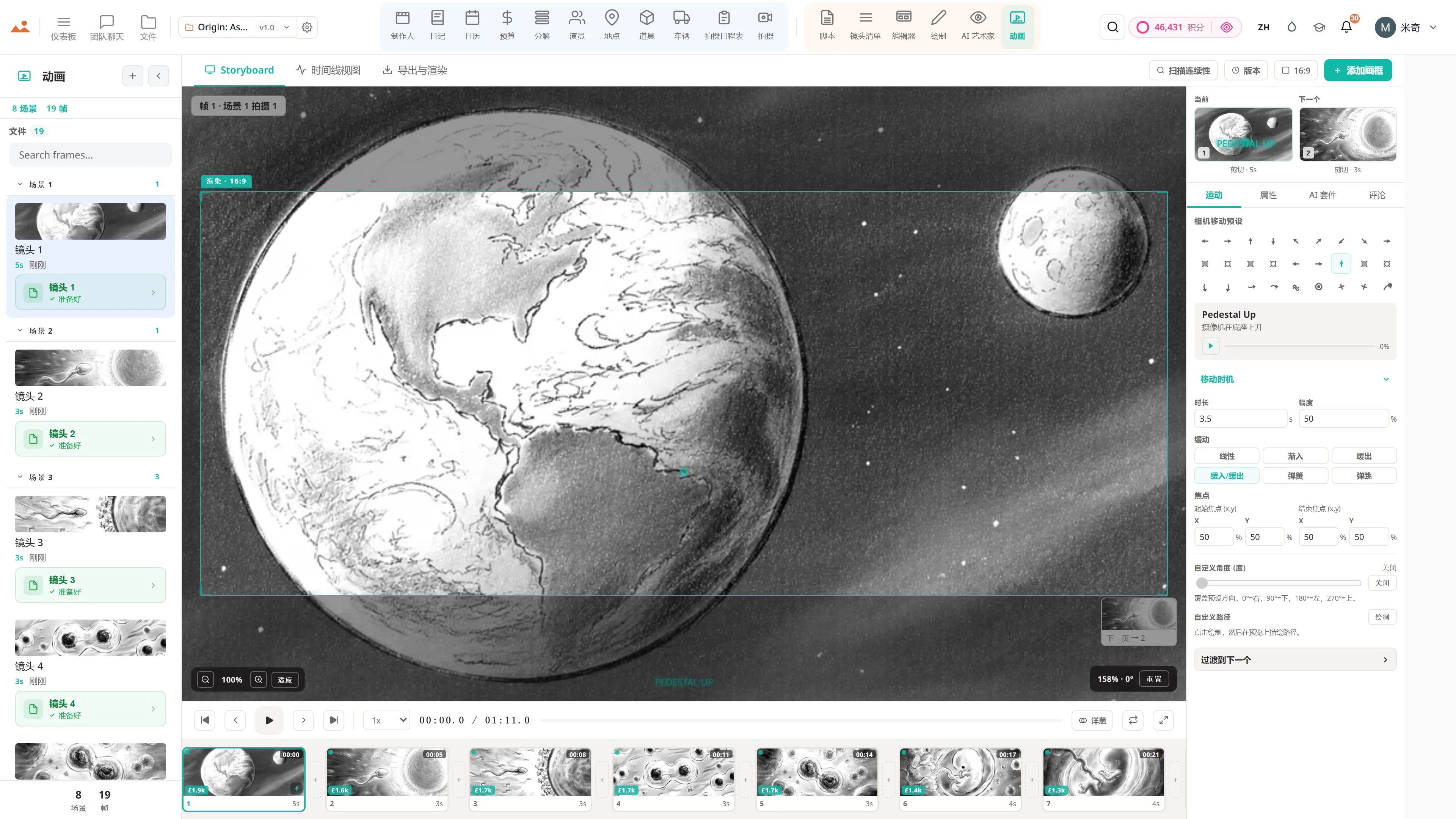
将整个演示文稿发送到Animate以进行定时动画 - 27个相机预设、9个过渡、音频和一键FFmpeg MP4导出。相同的项目文件。无需重新导入,无需重新输入。

制作人流程

从锁定的剧本到 完整拍摄 - 同一个文件,无需重新输入。

剧本直接交给制作方。分解、排期、调度、现场管理、监控资金 - 整个拍摄过程,形成一个连续的脊柱。

01

分解

标记每个场景

02

日程安排

Stripboard + DOOD

03

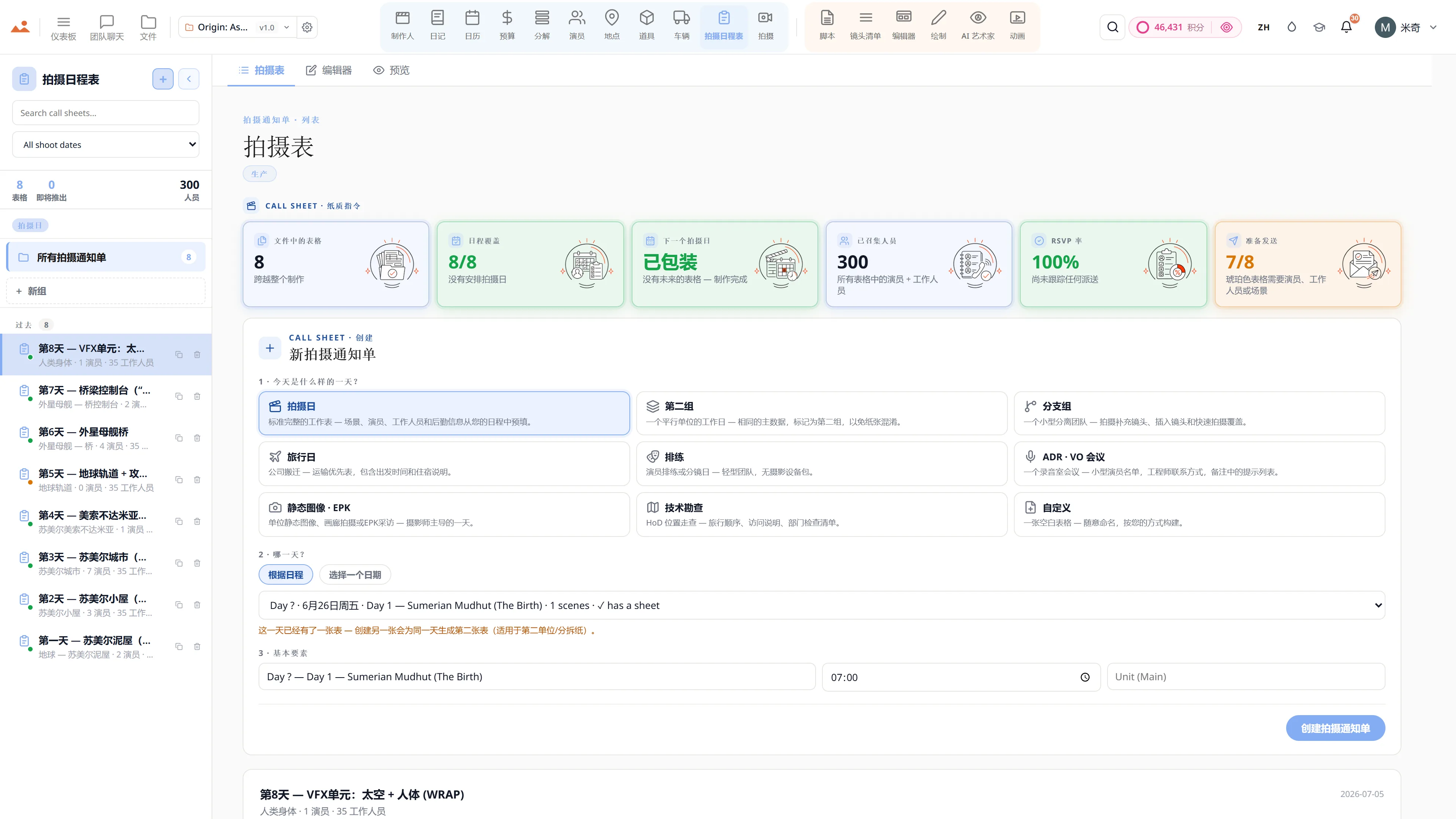
拍摄通知单

调度当天

04

拍摄

设备 + 团队准备就绪

05

预算

按需计费

06

收尾

DPR + 交付

…以及其余的流程

广阔的 制作人套件 将剧本转化为拍摄。

动画是故事的一半。下面的每个模块都是一个完整的制作应用程序 - 每个模块自动与剧本、分解、日程和演员图进行对话。应用之间零复制粘贴。Slack线程中没有过时版本。一个文件,从头到尾。

分解

12个类别的行业颜色编码。演员、道具、服装、视觉特效、车辆、音效 - 每个场景自动标记。

日程安排

条形板、DOOD、日程优化器、拍摄日跟踪与实时演员可用性。

拍摄通知单

自动填充拍摄日信息。天气、接送、医院。PDF + 电子邮件发送给全体工作人员。

演员

角色资料、可用性、交易备忘录、角色参考、选角覆盖。完整的角色连续性图。

地点

侦查、许可、物流、旅行矩阵规划。与Dolly的场景与地点匹配协助。

道具

主角+背景道具、服装连续性、雇佣管理、状态跟踪、场景参考。

车辆

拍摄车辆+单位车辆、保险、司机分配、车牌跟踪、场景警报。

拍摄

13类设备库存+16个部门工作人员名册。拍摄日准备情况一目了然。

预算

成本报告、差异、预测、顶层表、采购订单、零用现金、税收激励、附加费用、现金流和AICP投标生成器。

日记

每日制作报告(DPRs)、11种视图模式、幕后媒体捕捉、场景完成日志。

工作人员

16个部门名册,包含角色、费率、交易、拍摄通知单自动包含、部门视图。

文件

版本化项目文件、章节、评论、交付物跟踪。每个文档都有审计追踪。

还有团队聊天、审查 + 分享代币、通知、团队名单,以及完整的文件 / 云系统 - 在每个应用程序中同步。

The producer suite

The animatic is only half the story.

A timed board is where most tools stop. Here it's the halfway mark: the same file keeps going into breakdown, schedule, call sheets, cast and budget - a dozen production apps that fill themselves in.
The vast StoryboardCanvas producer suite that turns a locked deck into a fully run shoot.
Style-locked AI images

Not a blank prompt box. It knows the scene.

This is the opposite of a generic image tool. The Frame Builder already holds the cast, the location and the props in the shot, so a frame comes back on-model and in your locked style without you describing a single thing.
Style-locked AI storyboard frames generated in one consistent line, tone and colour.
风格锁定的 AI 图像

风格锁定 AI 分镜头框架在 30–60 秒内。符合模型。

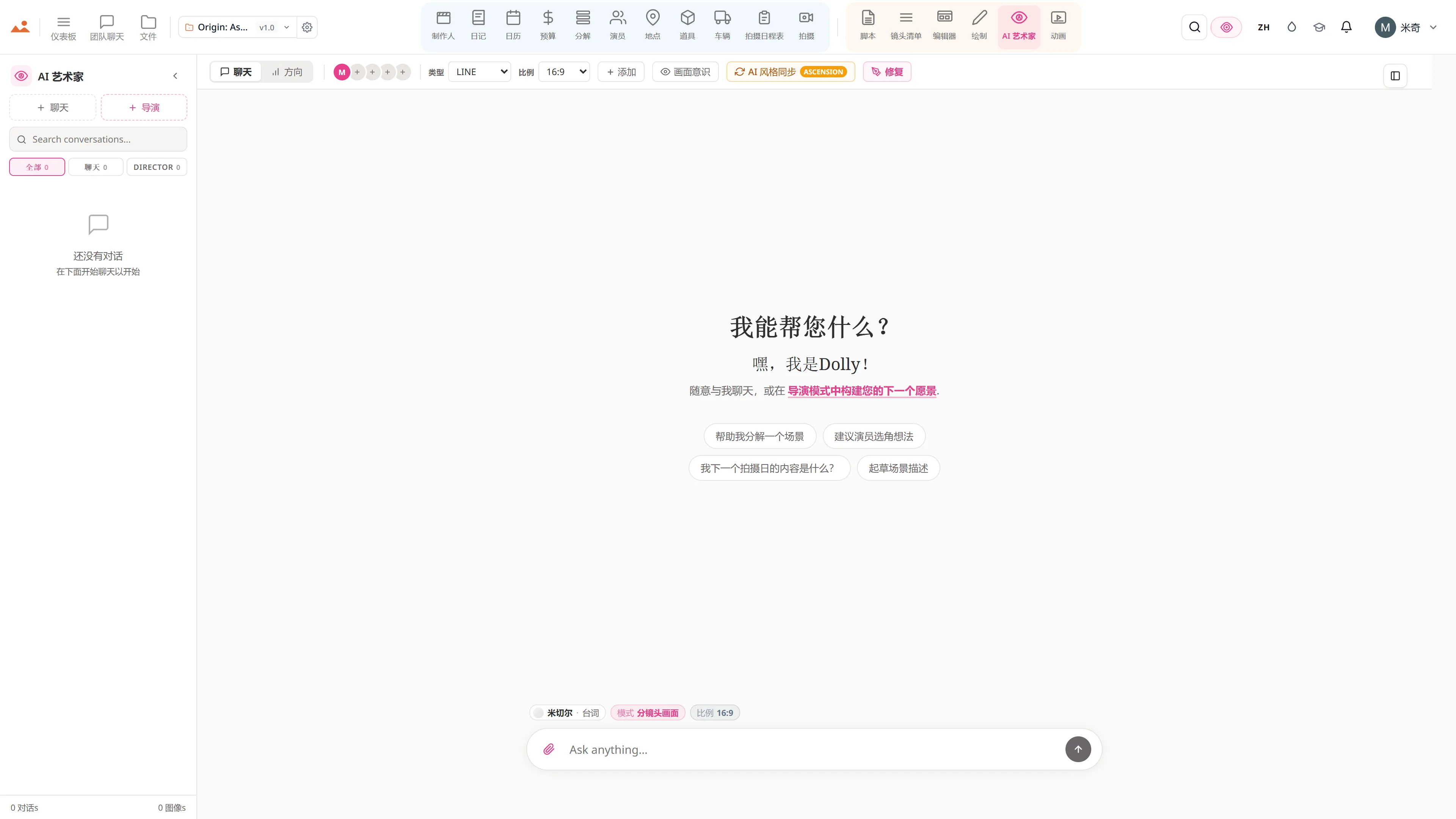
StoryboardCanvas 存在的原因。由分镜头艺术家构建,并由你的整个制作团队提供支持 - 帧构建器已经知道场景中的演员、地点和道具,因此帧会在没有空白提示框的情况下返回符合模型的结果。选择我们获奖的默认风格 - 以分镜头艺术家 Mitchell Hughes 为模型 - 或者上传一些您自己的参考资料,让 DollyAI™ 在整个项目中保持这种风格。没有漂移,没有虚构角色,没有废弃的角色设定,没有一个月的艺术家等待。

传统艺术家

£25–£60 每帧 · 2026年英国费率

周转时间每批5–14天
修订额外费用,每次修订再加一天
可用性预订需提前 2–6 周
风格漂移取决于他们当天的情况
交付最后提供 PDF,无实时更新
200 帧甲板≈ £5,000–£12,000 · 2 周
StoryboardCanvas · AI Artist

~£0.30 每帧 · 25 信誉

周转时间每帧 30–60 秒
修订无限制,瞬时,包含在内
可用性现在就可以。整个周末。凌晨2点。
风格漂移锁定风格手册,每次都符合模型
交付实时,可分享,可导出 - 立即
200 帧甲板包含在 Studio · ~2–3 小时
The numbers

A count you can actually check.

Every figure on this page is read straight from the running code, not a marketing deck - what ships today, what is on the roadmap, and an honest line drawn between the two.
The numbers behind the StoryboardCanvas suite - apps, integrations and what ships today.

今天发布的内容

套件背后的数字。

以下每个数字在产品中都是实时的 - 从运行代码中计算,而不是市场宣传材料。

20apps

Synchronized main apps.

Every surface a production needs, every one tied to the same source of truth - script through wrap.

22mini apps

Sub-tools and ladder pages.

Callbacks, deal memos, share links, version history, audit logs, audition rounds, admin surfaces - the production utilities that live inside the main apps.

300+commands

DollyAI™ actions across the suite.

300+ distinct AI actions across script coverage, breakdown tagging, shot suggestions, schedule optimisation, style-locked image gen, continuity sentinel, voice memos and the six-engine agent stack - every one priced before you commit, served by 520+ API routes.

730KLoC

Engineered in-house.

730,000+ lines of TypeScript + React across app/, lib/, components/ - no licensed engines, no third-party SaaS wrappers. The whole stack is ours, the whole roadmap is ours.

1login

Covers every app.

One account, one project file, one bill. Final Draft, StudioBinder, Movie Magic, Boords, Frame.io, the AI image tools - all collapsed in.

任何设备 - Mac、PC、iPad、Chromebook无需下载,无需安装自动更新,始终最新内置实时协作
Vs the field

The frame that walks into the next app.

Most tools generate a picture and stop. The difference here isn't the image - it's that the same frame carries its scene link, its character continuity and its locked style straight into the shotlist, the editor and the animatic.
StoryboardCanvas AI storyboard generation compared head-to-head against other tools in the field.

AI Storyboard 生成 · 与其他产品的对比

我们的框架生成与 其他所有选项

大多数“AI storyboard”工具有两种类型:一种是带有故事板模板的通用图像生成器,另一种是带有生成器的静态演示工具。StoryboardCanvas 是唯一一个将生成的帧直接带入镜头列表、故事板编辑器和动画分镜的系统,且在每一步中都保留角色连续性、风格锁定和场景链接。

能力
StoryboardCanvas
Midjourney
通用 AI
Boords AI
Boards SaaS
LTX Studio
AI 视频
Storyboarder
桌面应用
所有帧的风格锁定
锁定风格手册 + 模型质量评估重新评分
风格参考 (--sref),漂移保持
每个板块的艺术风格
元素保持外观,镜头范围
无 AI 生成
角色连续性
角色图表 + 参考锁,项目范围内
全方位参考,一张图片
角色指南(内置)
元素,自动提取
无 AI 生成
自动生成的剧本
全剧本批量解析 → 帧
每帧手动提示
粘贴剧本 → 场景帧
剧本 → 场景 + 镜头
仅限手动
八种生成模式 - 板、海报、关键艺术、概念、EPK
一个引擎,八种模式
仅限自由形式图像
仅限画板
仅限视频镜头
仅限画板
在帧上进行修补/区域编辑
应用内修补 + 参考注入
变化区域(修补)
重拍(重新塑造镜头)
手动重绘
在生成的帧上手绘
在同一文件中绘制套件
仅基本形状
是的(桌面)
真实艺术画笔
450+ 种画笔 + 纸张纹理,自定义构建器
不适用
不适用
不适用
仅限铅笔/钢笔
框架 → 场景关联的镜头列表 → 日程安排
一个项目文件,自动同步
导出 + 复制粘贴
仅限画板
仅限视频时间线
无日程安排
故事板 → 同一应用中的定时动画
动画模块,27个相机预设
内置动画剧本
视频原生
制作人工具(预算、拍摄表、演员)
完整的制作人套件包含在内
基础计划中包含积分
是的 - 每个层级都包括积分
订阅,快速小时
每个计划生成上限
计算信用 / 秒
免费,无需 AI
实时团队协作
存在、评论、审核代币
评论 + 分享链接
团队工作区
单用户

基于截至2026年5月的公开文档功能集。竞争对手的能力会发生变化;我们会在他们变化时更新此表格。

The complete suite

Use the three you live in. Pay for all twenty once.

Nobody opens all twenty every day - but they are all there, all on every plan, all reading the same file. Live in the handful your role needs and the rest are waiting the moment you do.
The complete StoryboardCanvas suite of twenty connected production apps.
Under the surface

A real production data model, not a folder of files.

Because it is a real schema and not a pile of documents, the apps can reason about your film - which is why a rename in one place is understood everywhere, and an export holds up on a real set instead of falling apart at the edges.
Under the hood of StoryboardCanvas - the shared data model, AI layer and production exports beneath the suite

在幕后

真实制作

表面背后的系统 - 数据模型、AI 层和使其在真实拍摄现场工作的生产级导出。

制作人堆栈

脚本 → 拆分 → 日程

六个共享一个数据库的制作应用程序。剧本更改、分解更新、日程重新平衡、通告单重新渲染 - 自动完成。

  • 具有修订模式和行业色彩页面的写作应用
  • 带有AI标记的道具、服装、视觉特效、特技的细分
  • 真实的分镜板与DOOD和日程优化器
  • 自动生成的拍摄通知单,支持短信/电子邮件发送
导演工具包

导演的画布

六个创意应用程序,从剧本到镜头列表,再到故事板和动画分镜。手动绘制、使用 AI Artist 生成,或两者结合 - 所有操作都在同一个画布上。

  • 完整的剧本编辑器,带有输入块
  • 带有角度、镜头和运动元数据的拍摄清单
  • 编辑画布,支持拖拽对齐、图层和演示者模式
  • 绘图应用:60fps 的 GPU 加速绘画
您的副驾驶

DollyAI™,在每个应用中

一个电影制作助手,能够阅读您的剧本,尊重您的风格,并在正确的时刻建议正确的动作。一个 Dolly,适用于每个应用,零漂移。

  • 读取您项目中的每个文档
  • 建议覆盖、日程安排和连续性修复
  • 在每个 AI 帧中保持您的艺术风格
  • 解释每个建议的审计跟踪
整个屋顶

一个同步的套件

所有内容共享一个项目文件。更改场景标题后,分解、日程、通话表和故事板都会自动更新。再也不需要在五个工具中重复输入相同的信息。

  • 一个项目 = 剧本 + 板块 + 日程 + 通话表
  • 在每个应用程序中进行更改传播
  • 带有永不丢失保存的版本文件应用
  • 针对制作人和导演的角色感知仪表板
生产级别

拍摄日准备就绪

自动生成的拍摄通知单。优化的日程安排。符合行业标准格式的导出。为真实制作而设计,而非业余项目。

  • 通过电子邮件和短信自动分发的拍摄通知单
  • 条形图 + DOOD + 公司移动意识
  • 导入和导出 Movie Magic、Gorilla、Final Draft 和 CSV
  • 300 DPI 故事板 PDF 和 MP4 动画
团队准备就绪

每个座位的权限

组织所有者可以精确选择每个受邀席位可以看到的二十个应用程序中的哪些。十一种角色预设,三十六个应用程序门控。邀请一位故事板艺术家,他们可以看到编辑 + 绘图 + AI 艺术家 + 拍摄清单 - 永远看不到预算。

  • 11种角色预设:所有者、制片人、导演、编剧、故事板艺术家、动画师、制作设计师、制作协调员、编辑、观众、管理员
  • 每个座位的36个应用程序覆盖矩阵
  • 实时交叉表同步在 250 毫秒内 - 在一个设备上拖动一个条带,其他所有标签都会更新
  • 审计日志记录每个分享链接的创建、撤销和访问更改
The toolbox

One place for the whole pre-production checklist.

The list a production runs on - the schedule, the budget, the boards, the shot list, the call sheets, the wrap binder - usually lives across half a dozen subscriptions. Here it is a single tab away, all talking to each other.
The full StoryboardCanvas pre-production toolbox of capabilities, from script to call sheet.

功能

整个 前期制作工具箱

真实剧本编辑器

输入块、场景编号、双重对话、带锁定编号和彩色页面的修订模式。支持读取和写入FDX、Fountain、Celtx、PDF和RTF格式。

制作分解

Dolly自动标记道具、服装、特效、特技、音效、动物和车辆。类别库、逐场报告,并与日程同步。

真实条形日程安排

颜色编码的条带,DOOD 报告,公司动态,餐休意识,以及 Dolly 的日程优化器。支持导入和导出 Movie Magic、Gorilla、CSV 和 FDX - 你的条板随时随地陪伴你。

自动通告单

从日程、演员、地点和车辆中提取信息。接送时间、天气、最近医院,一键发送电子邮件和短信。

角色连续性引擎

身份嵌入确保每个角色的面孔、服装和姿势在每个AI生成的画面中保持一致。

电影镜头智能

焦距、镜头大小、镜头预设、相机运动和照明逻辑 - 电影的语法,结构化且可重用。

实时协作

频道、线程评论、帧锚定笔记、@提及、逐帧审批和在线状态指示器。

GPU加速绘图套件

GPU加速渲染,线程外合成,全面的笔压和倾斜支持,我们的画笔引擎,15种以上混合模式。

艺术风格锁定

选择你的风格一次,Dolly 会保持它。内部签名风格档案 + 你的自定义参考圣经 - 永远不会是 LLM 的糟粕。

生产就绪导出

300 DPI PDF 表格,高分辨率 PNG 帧,CSV 拍摄清单,MP4/MOV 动画,FDX / Fountain 剧本,以及 Movie Magic / Gorilla 条板 - 每个导出都采用行业标准格式。

永不丢失的保存

自动保存历史,命名版本,可编辑草稿,以及每个文件的完整恢复点。可以将任何资产回滚到任何时刻。

Dolly,适用于每个应用

一个助手跨越所有 20 个应用程序,具有选择意识、图像意识和 16 表并行项目上下文提取。她知道你点击了哪个场景、镜头、角色或道具 - 她已经看过文件中的每个故事板帧、角色照片和场地勘查。

八种AI艺术家模式

今天所有八种模式都已上线 - 风格锁定的故事板帧、戏剧性海报、流媒体关键艺术、概念画、情绪板、EPK 静态图、下三分之一和标题卡。每种模式都经过提示工程,以满足其行业交付标准,每个输出都与项目的锁定风格圣经相绑定。

语音转脚本 + 翻译

AI驱动的语音转剧本转录。多语言剧本翻译。100+ AI写作动作 - 覆盖、连贯性、对话润色、节拍表、场景重写、角色圣经。

角色TTS朗读

根据角色年龄和性别自动分配声音。从分解中收听任何块、任何场景,使用合适的声音 - 高级AI声音或浏览器TTS免费使用。

编辑交接桥

Animatic → Premiere XMEML, DaVinci EDL, OpenTimelineIO。此外,提供日历 .ics 订阅、ZIP打包归档、选角联系表PDF和移动拍摄单分享链接 - 无需安装。

剧组 + 演员 SMS 提醒

由SMS运营商提供的拍摄日提醒,包含@提及、交易备忘通知、DOOD班次警报和评论反馈提醒。移动拍摄单可在任何手机上打开 - 无需应用程序。

Cmd+K 命令面板

从任何地方即时搜索项目、角色、场景、镜头、地点、道具和文件。通过单个按键快速访问整个套件。
See it for yourself

Step inside a real production, completely free.

Open the actual software on Origin: Ascension, a finished short film, and explore every app exactly as the crew left it. Read the script, walk the boards, open the budget, print the call sheet. Fully read-only, with no sign-up. Nothing you touch is saved.

Try the free demo20 apps · one project file · 0 seconds of setup
No sign-upNo cardNo downloadFully read-onlyNothing you touch is saved
Live demo · Origin: Ascension
在免费演示中的 AI Artist 应用,生成项目锁定房屋风格的故事板帧。
The Draw studio in the free demo, painting over an Origin: Ascension storyboard frame on the GPU canvas.
在免费演示中的 Animate 应用,播放定时的动画分镜。
在免费演示中的 Call Sheet 应用,显示完成的拍摄日通告单。

Script · breakdown · boards · animatic · call sheets · budget

The demo is a view-only copy shared for exploration. Some features need a paid subscription to run.

停止 juggling 工具。 开始制作电影。

每个应用、每个功能、每个层级。没有功能限制,没有意外付费墙。

Storyboard Canvas · the complete production suite

The complete script-to-screen suite - start free

Twenty synchronised apps, one project file. Every app on every plan - pick a tier by team size, not features.

Get started