Skip to content
StoryboardCanvas welcome illustration - a global film crew collaborating in the all-in-one production suite.
WELCOME TO STORYBOARD CANVAS

AI storyboards - and an app for every person in the script-to-screen process.

Film production still runs on a spreadsheet nobody remembered to share, a Google Doc on its eleventh version, and a call sheet that was out of date the moment it was sent. That is the industry standard. It shouldn’t be.

StoryboardCanvas is a web application suite - a productivity and workflow toolkit for video and film production, a complete script-to-shoot-day software suite for writers, producers, directors and all the crew involved.

The quickest way to earn more money is to save money.

Our product saves everyone time, turning a 12-hour day into 6 for the whole team and keeping everyone on the same page 100% of the time. Change a detail once and every app around it updates. No downloads - a browser and a connection, in 25 languages.

Powered by DollyAI™, your omnipresent assistant.

One project file · twenty apps

“Imagine the Google app suite, ChatGPT and a crew of professional filmmakers had a wild night of passion - their offspring would look something like StoryboardCanvas AI’s software suite…”

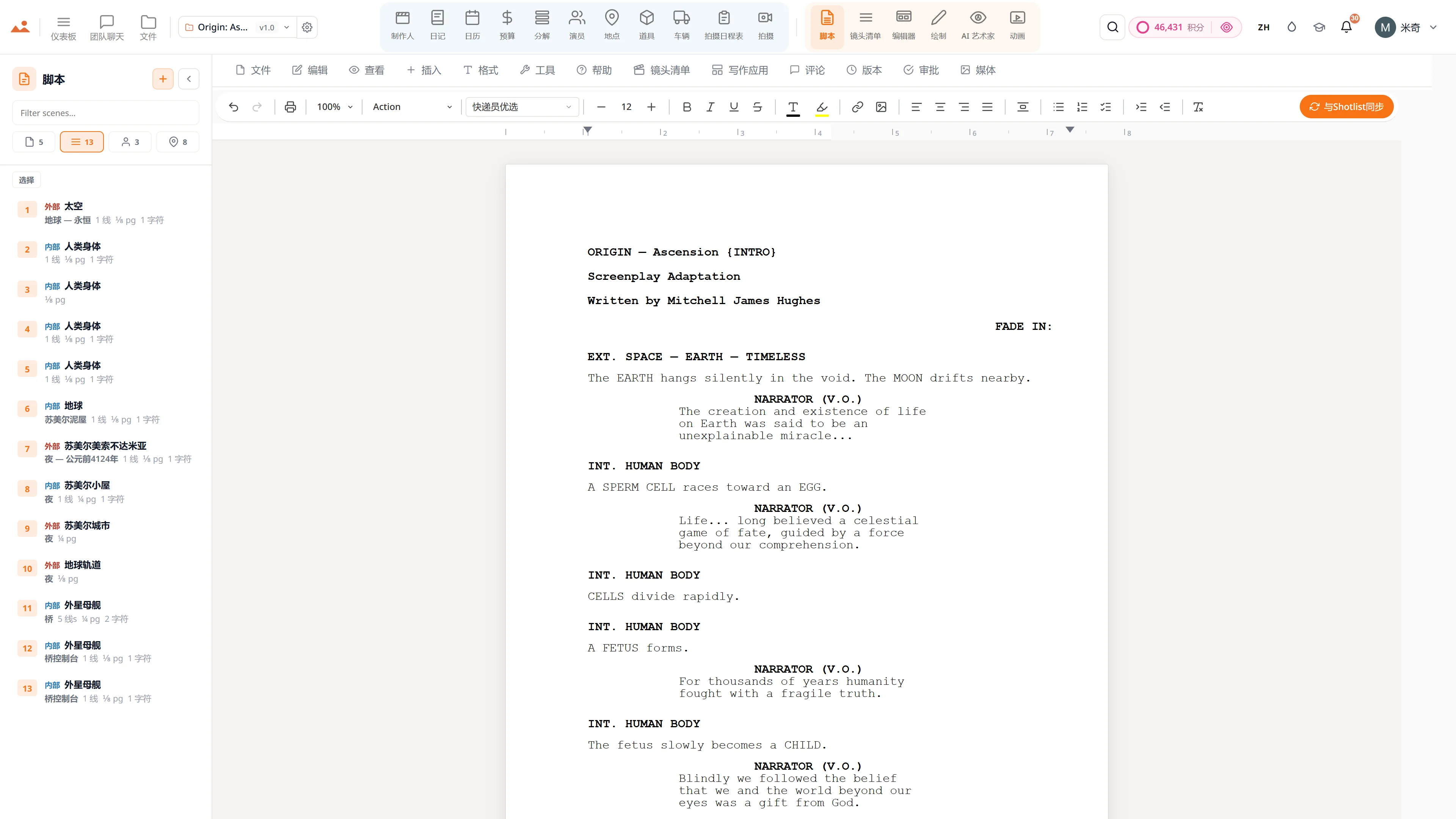
Screenwriting app - 专业剧本编辑器,带有实时场景导航和AI写作助手。
Script
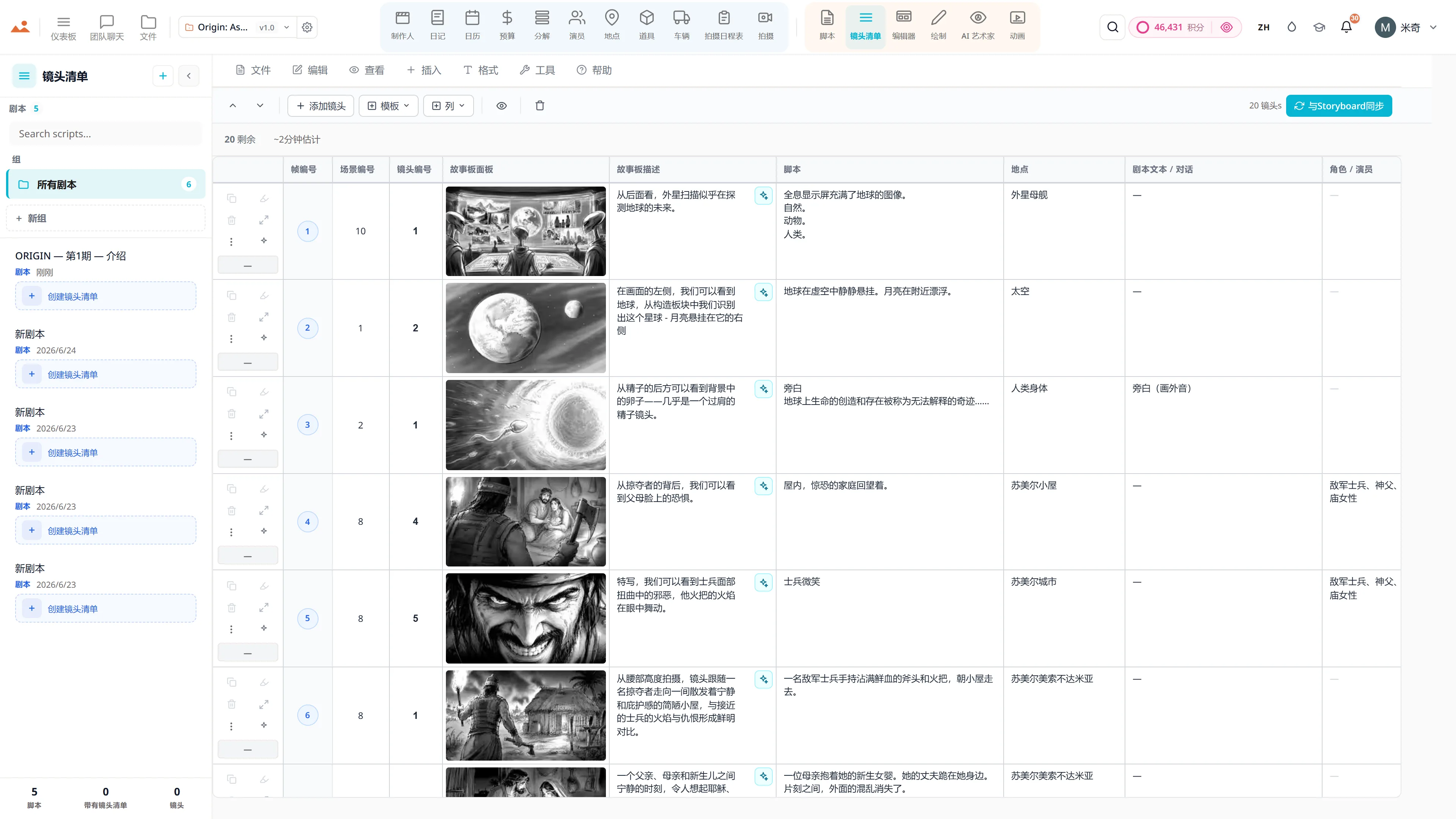
Shot list app - 每个镜头的相机、镜头和运动,链接到分镜框。
Shot List
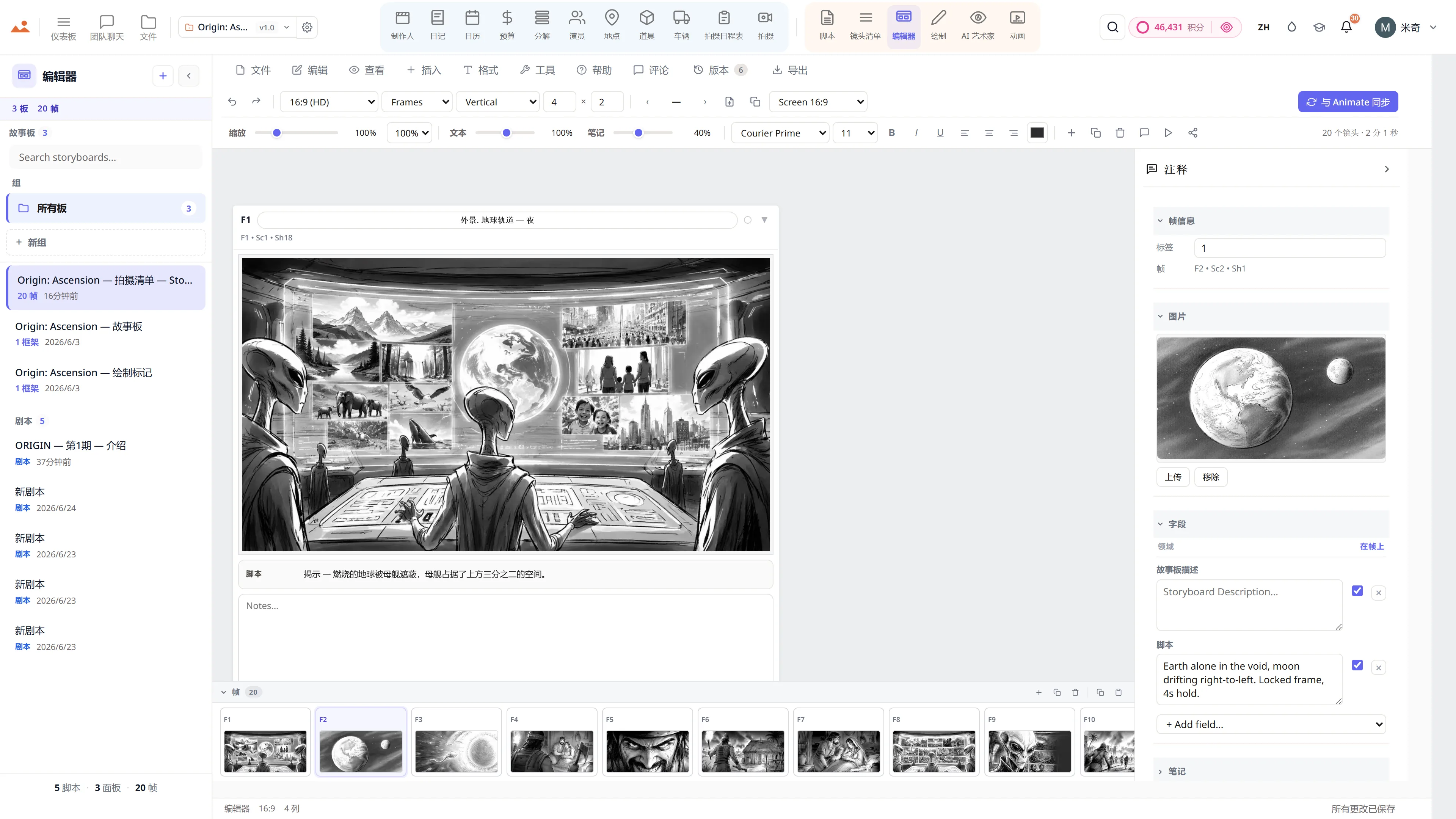
Storyboard编辑器 - 科幻序列,带有镜头类型和相机移动注释。
Storyboard
Draw app - GPU storyboard sketching with 450+ professional brushes and layers.
Draw
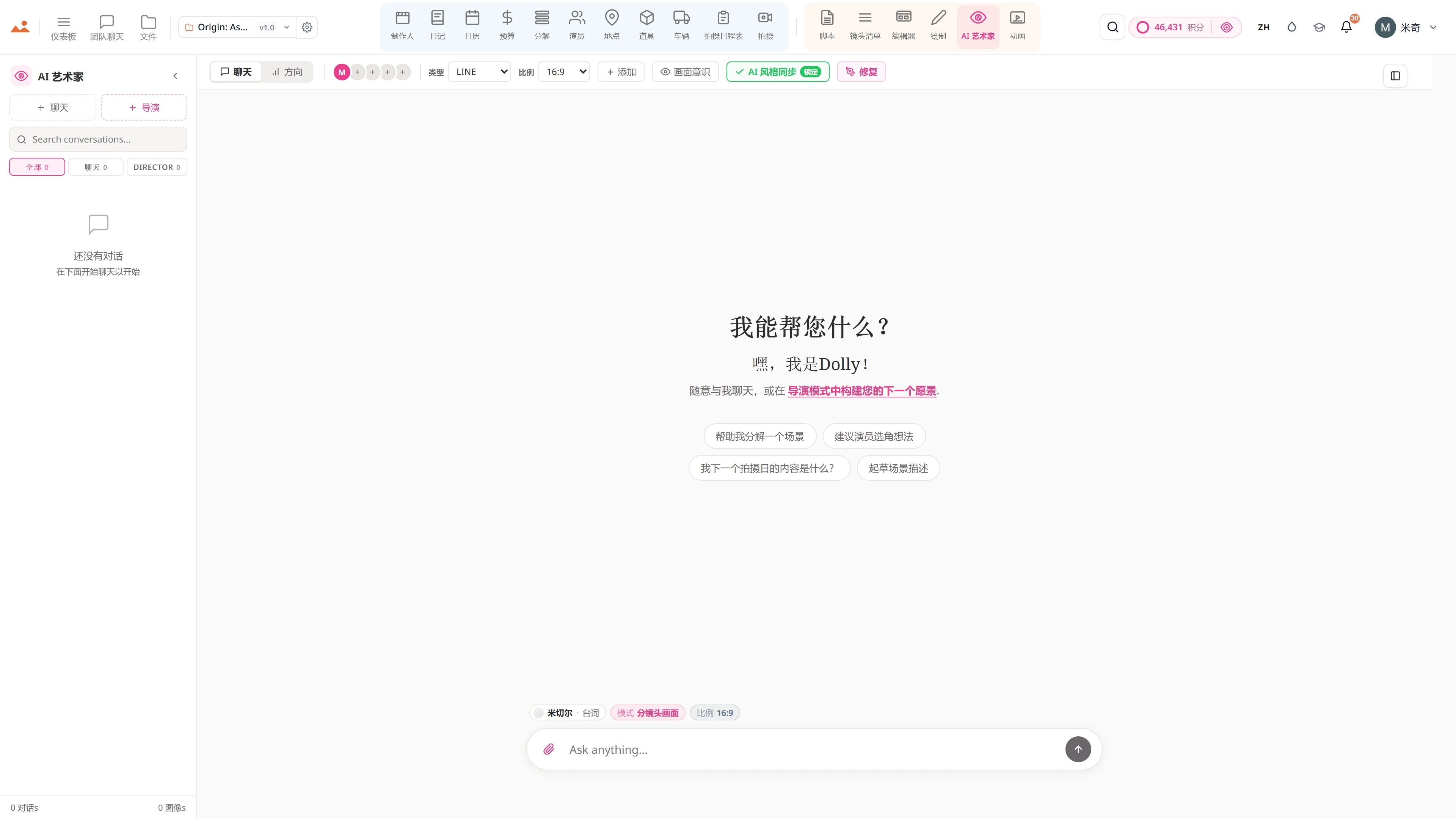
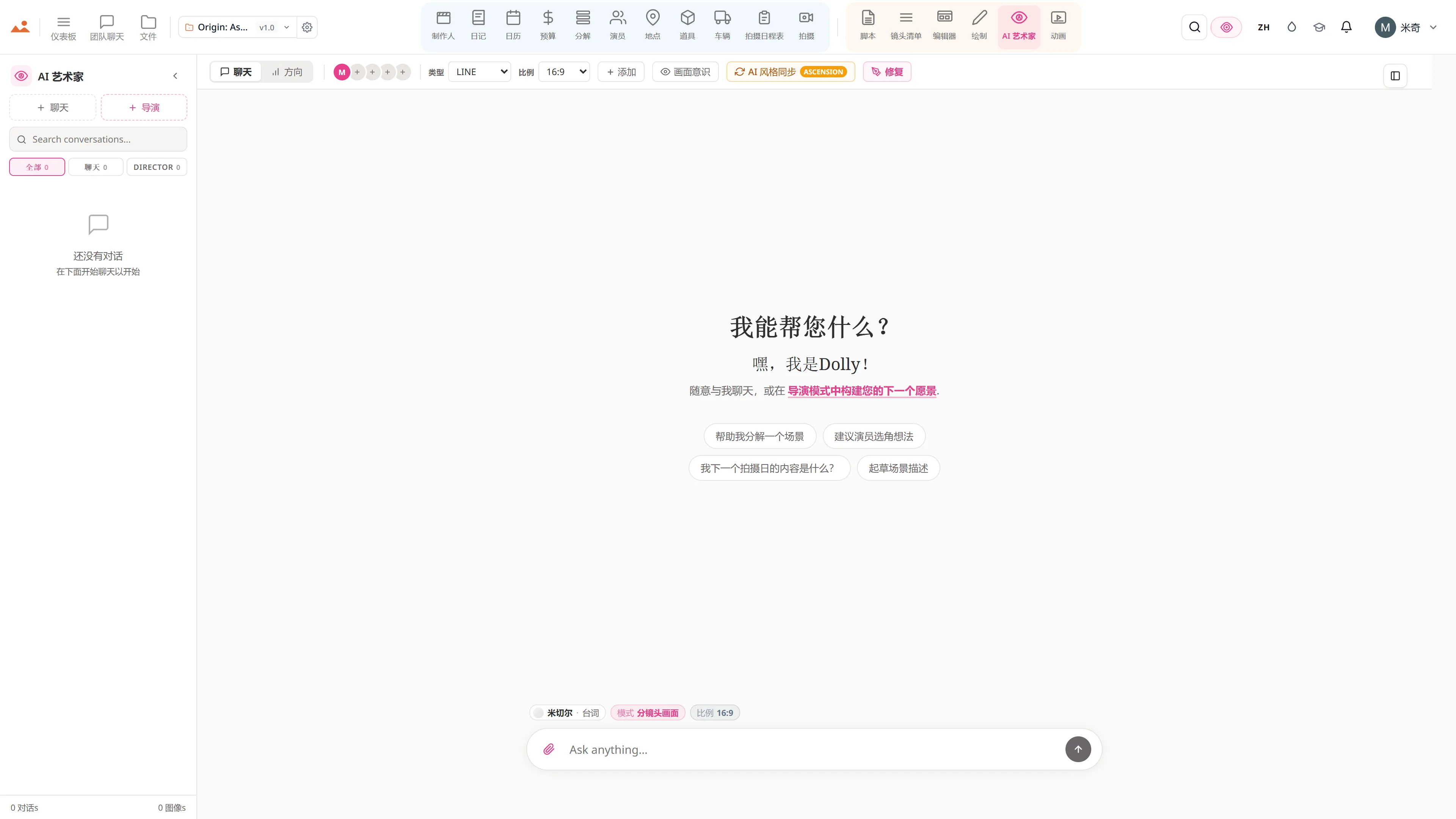
AI Artist - 使用DollyAI™引擎生成风格锁定的故事板图像。
AI Artist
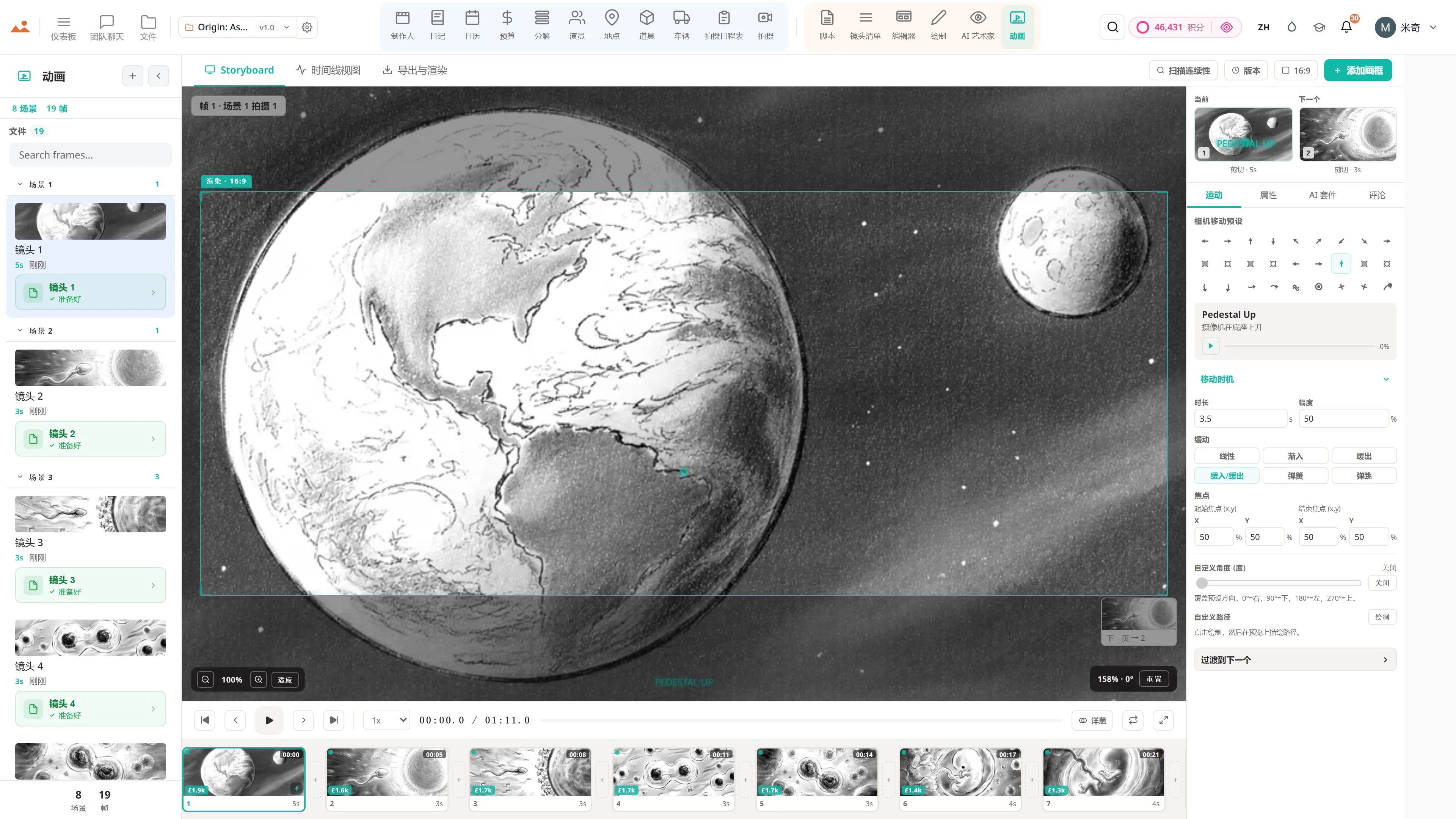
Animatic应用 - 帧时间线,包含相机移动、过渡和视频导出。
Animate
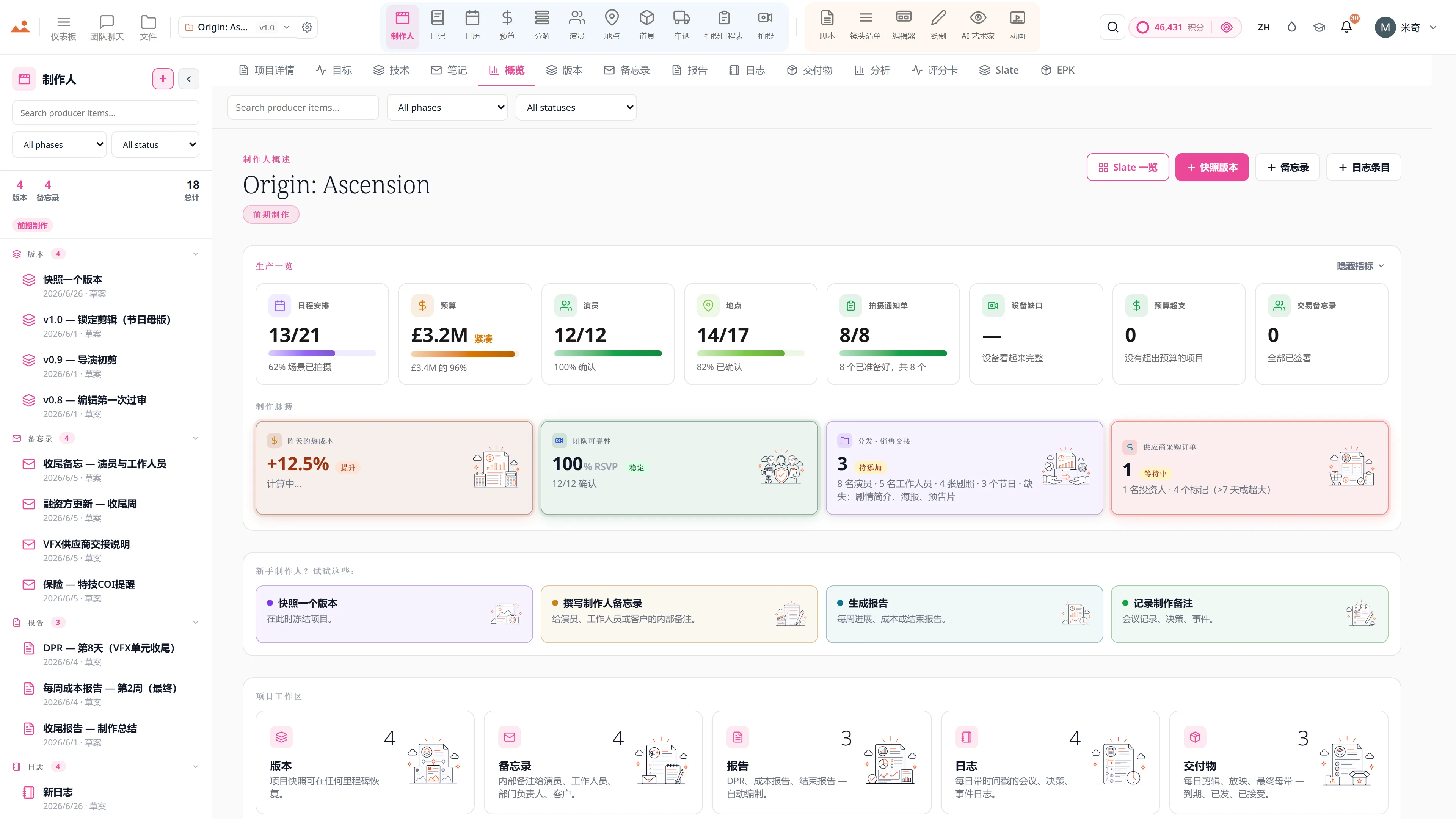
制作人分析 - 日程延误保持在 0.0 天,四天的拍摄倒计时完成 50%,所有项目的信用消耗,以及逐日拍摄的场景与计划场景的对比。
Producer
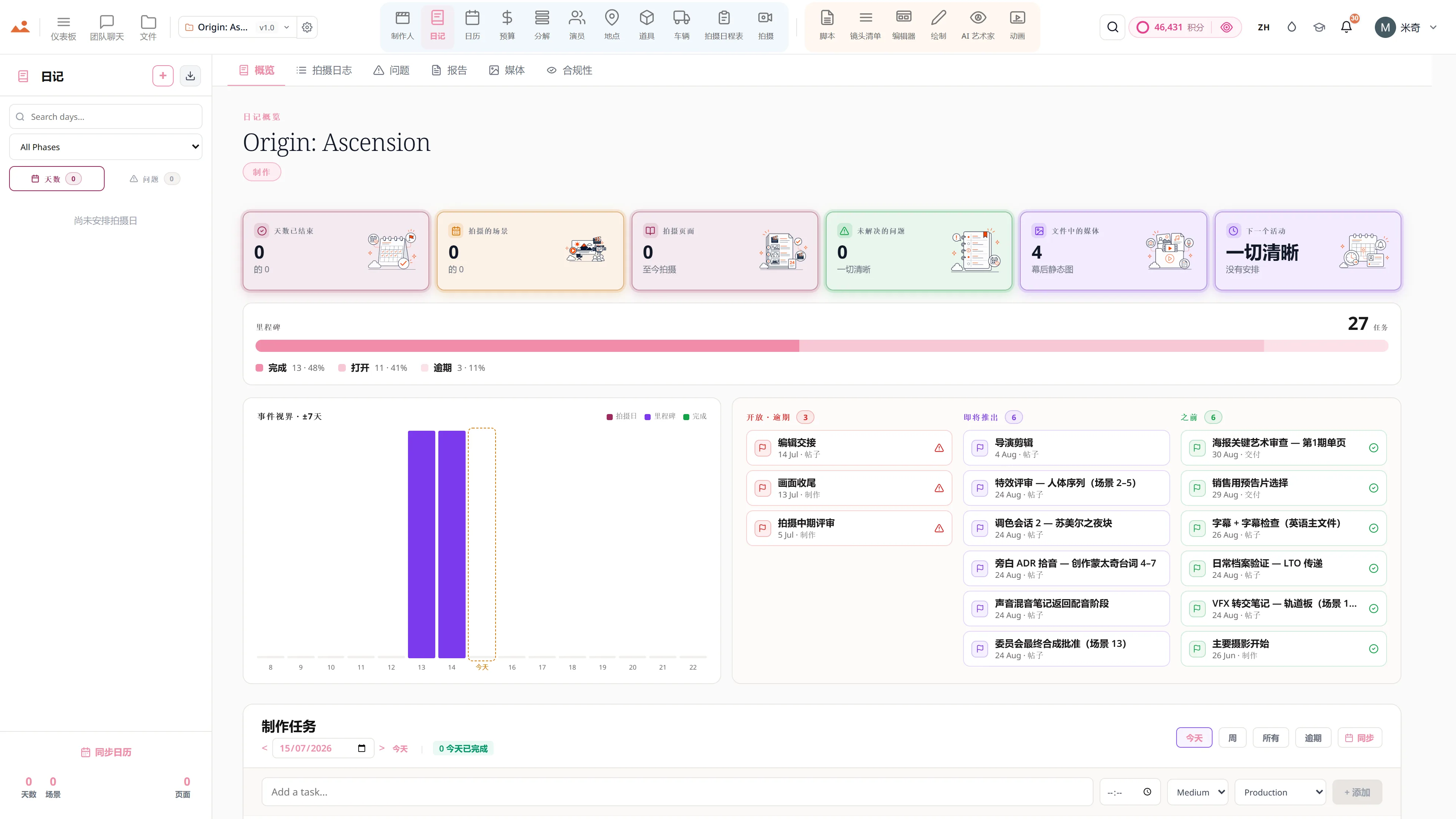
制作日记概览 - 8 天已完成,13 个场景已拍摄,至今拍摄 7 页,没有未解决的问题,文件中有 BTS 照片,今天的下一个事件是画面收尾,位于一个里程碑条和今天前后七天的事件视界之上。
Diary
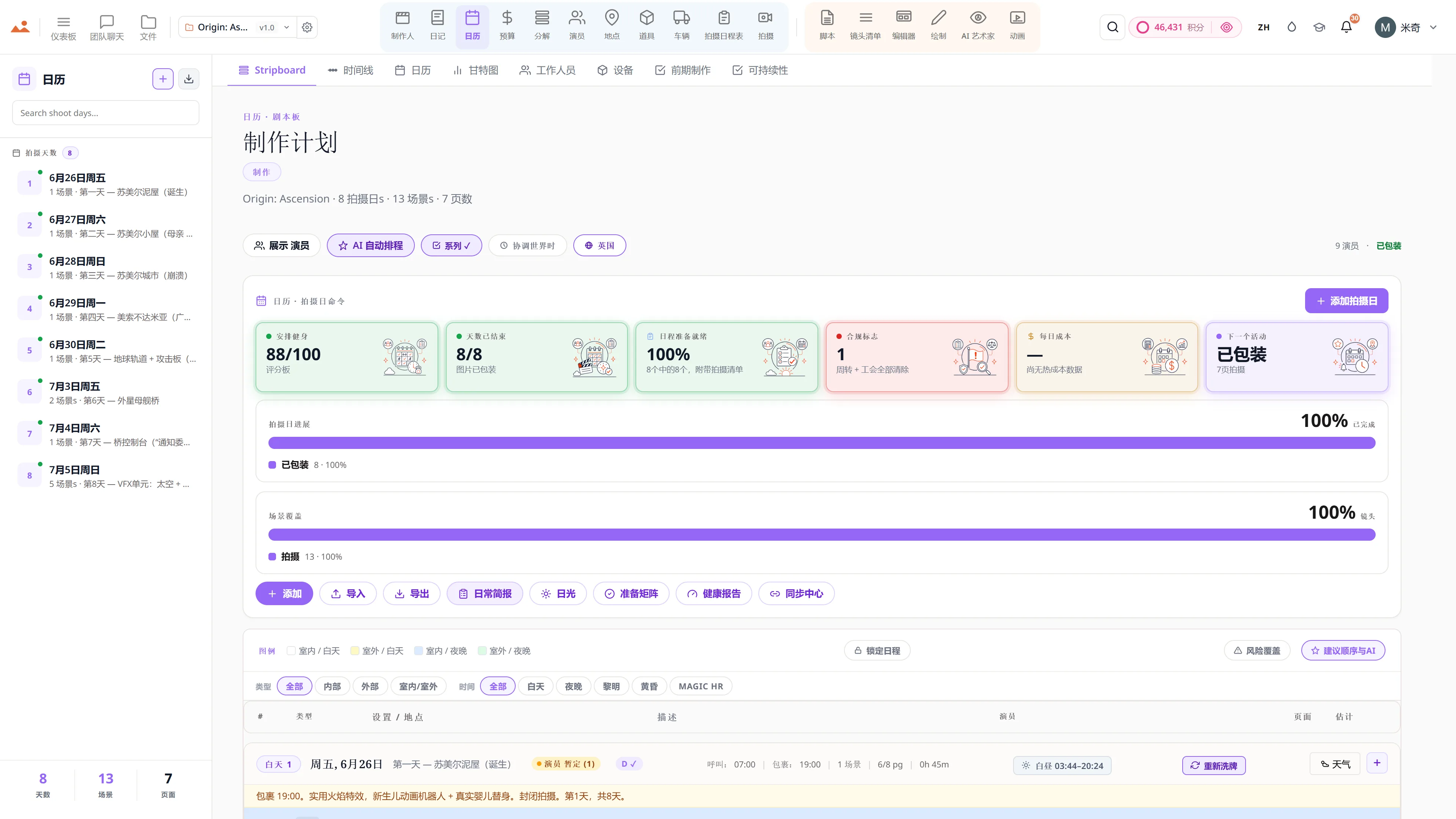
制作日历和条形板 - 在拍摄日之间的颜色编码场景条。
Calendar
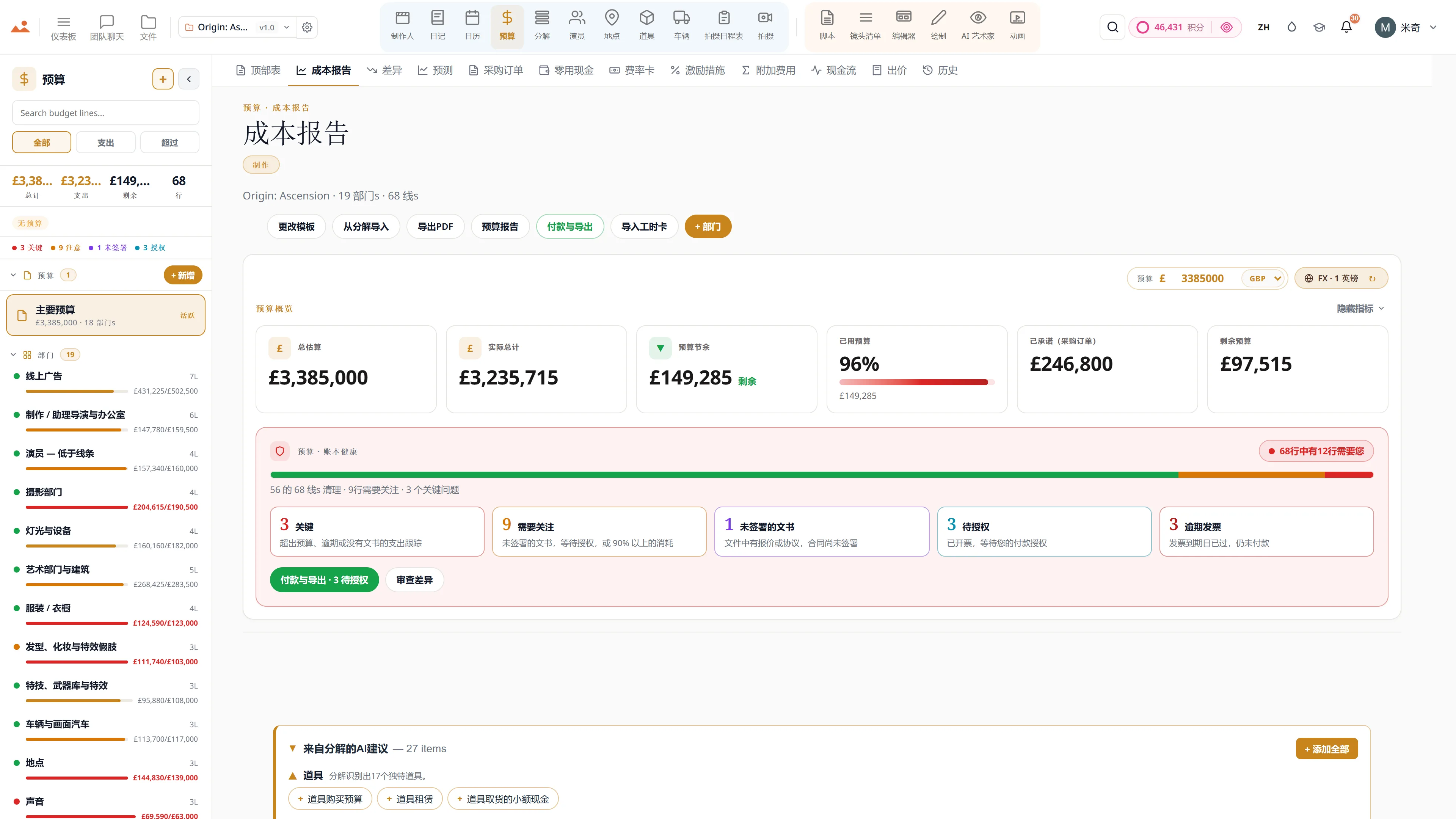
电影预算应用 - 顶部表、成本报告和以GBP为单位的差异跟踪。
Budget
Screenwriting app - 专业剧本编辑器,带有实时场景导航和AI写作助手。
Script
Shot list app - 每个镜头的相机、镜头和运动,链接到分镜框。
Shot List
Storyboard编辑器 - 科幻序列,带有镜头类型和相机移动注释。
Storyboard
Draw app - GPU storyboard sketching with 450+ professional brushes and layers.
Draw
AI Artist - 使用DollyAI™引擎生成风格锁定的故事板图像。
AI Artist
Animatic应用 - 帧时间线,包含相机移动、过渡和视频导出。
Animate
制作人分析 - 日程延误保持在 0.0 天,四天的拍摄倒计时完成 50%,所有项目的信用消耗,以及逐日拍摄的场景与计划场景的对比。
Producer
制作日记概览 - 8 天已完成,13 个场景已拍摄,至今拍摄 7 页,没有未解决的问题,文件中有 BTS 照片,今天的下一个事件是画面收尾,位于一个里程碑条和今天前后七天的事件视界之上。
Diary
制作日历和条形板 - 在拍摄日之间的颜色编码场景条。
Calendar
电影预算应用 - 顶部表、成本报告和以GBP为单位的差异跟踪。
Budget
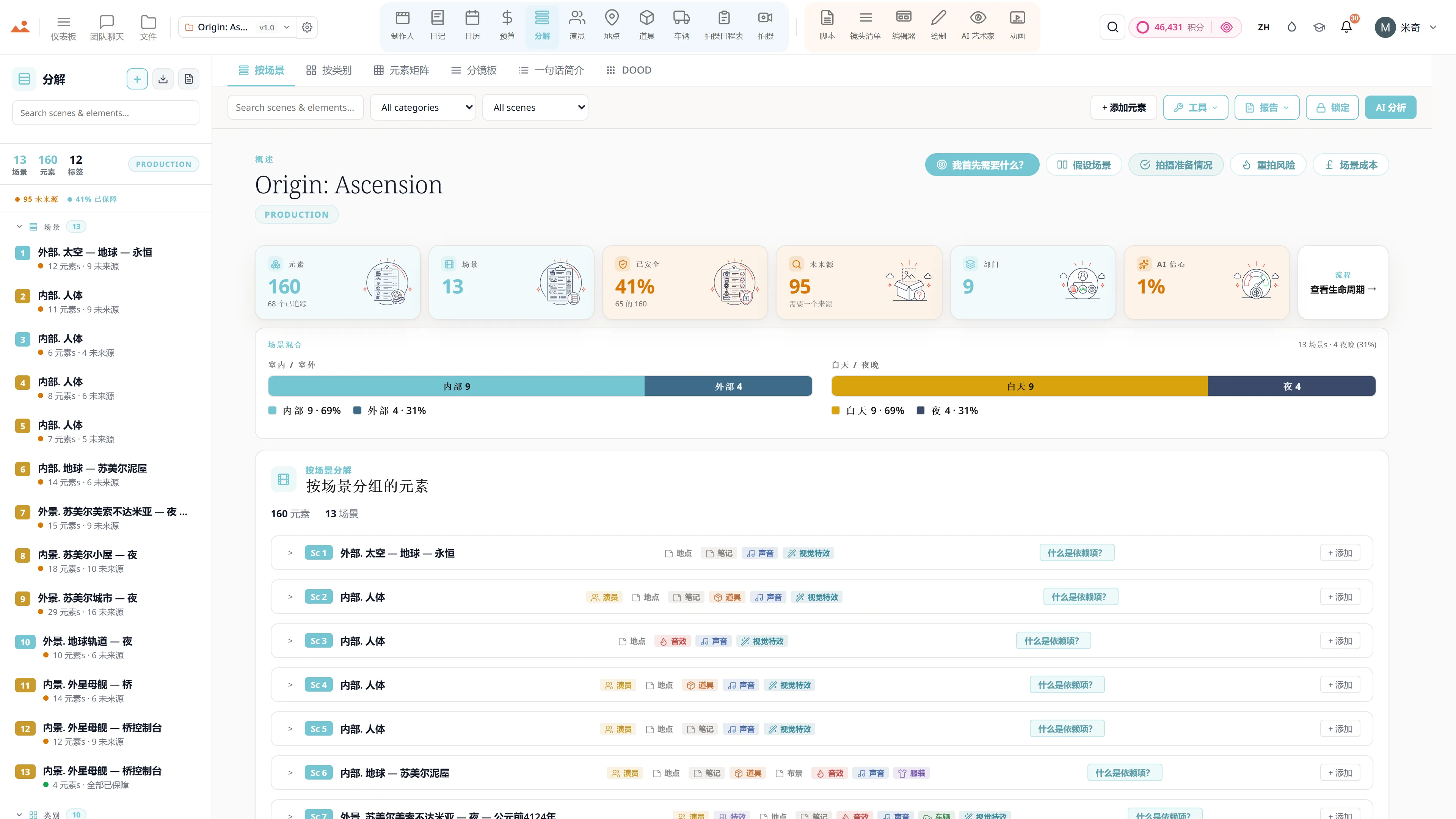
剧本分解 - 12个类别的颜色编码制作元素,逐场景元素计数。
Breakdown
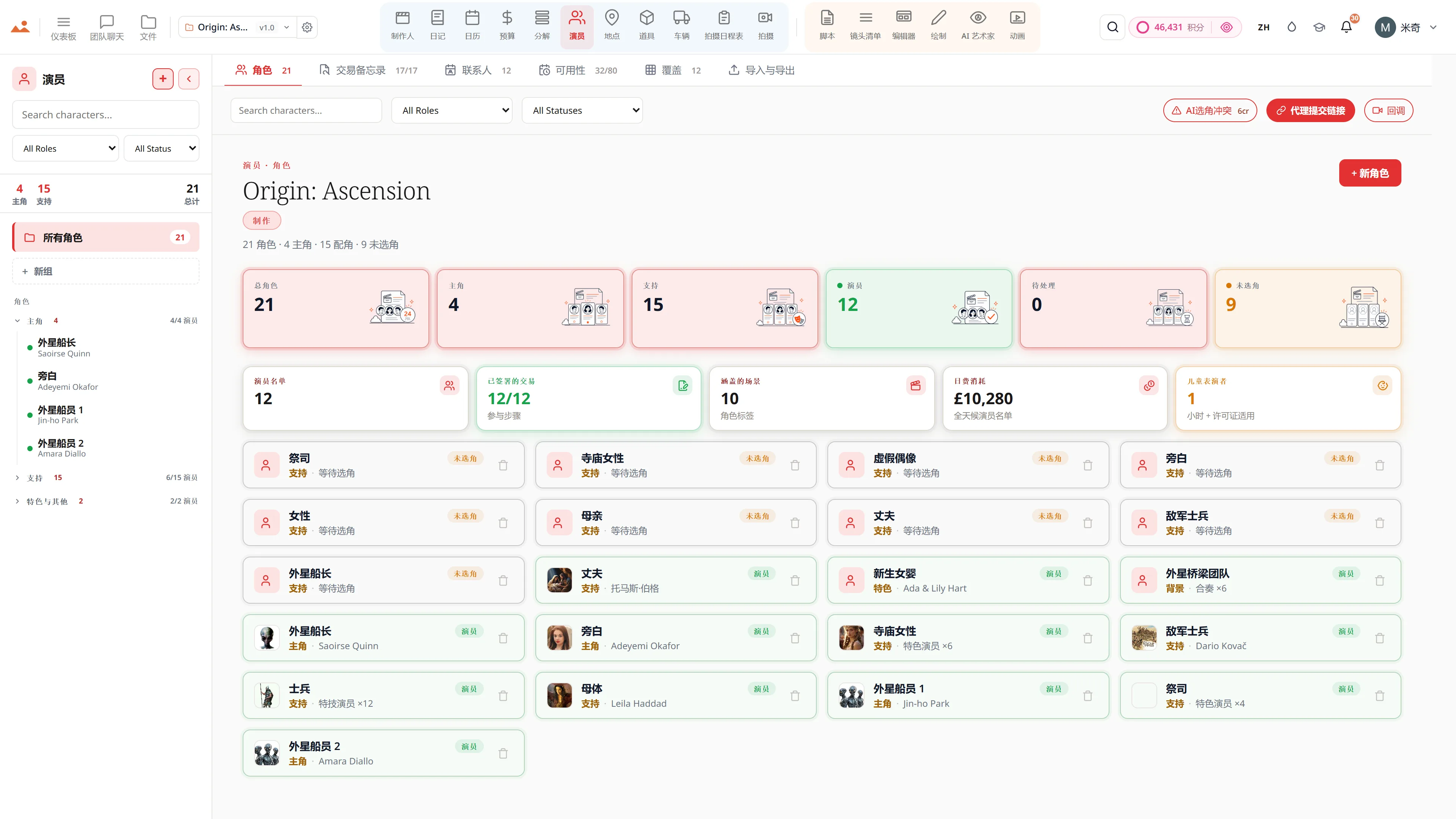
演员管理 - 角色档案、可用性和特邀演员的协议备忘录。
Cast
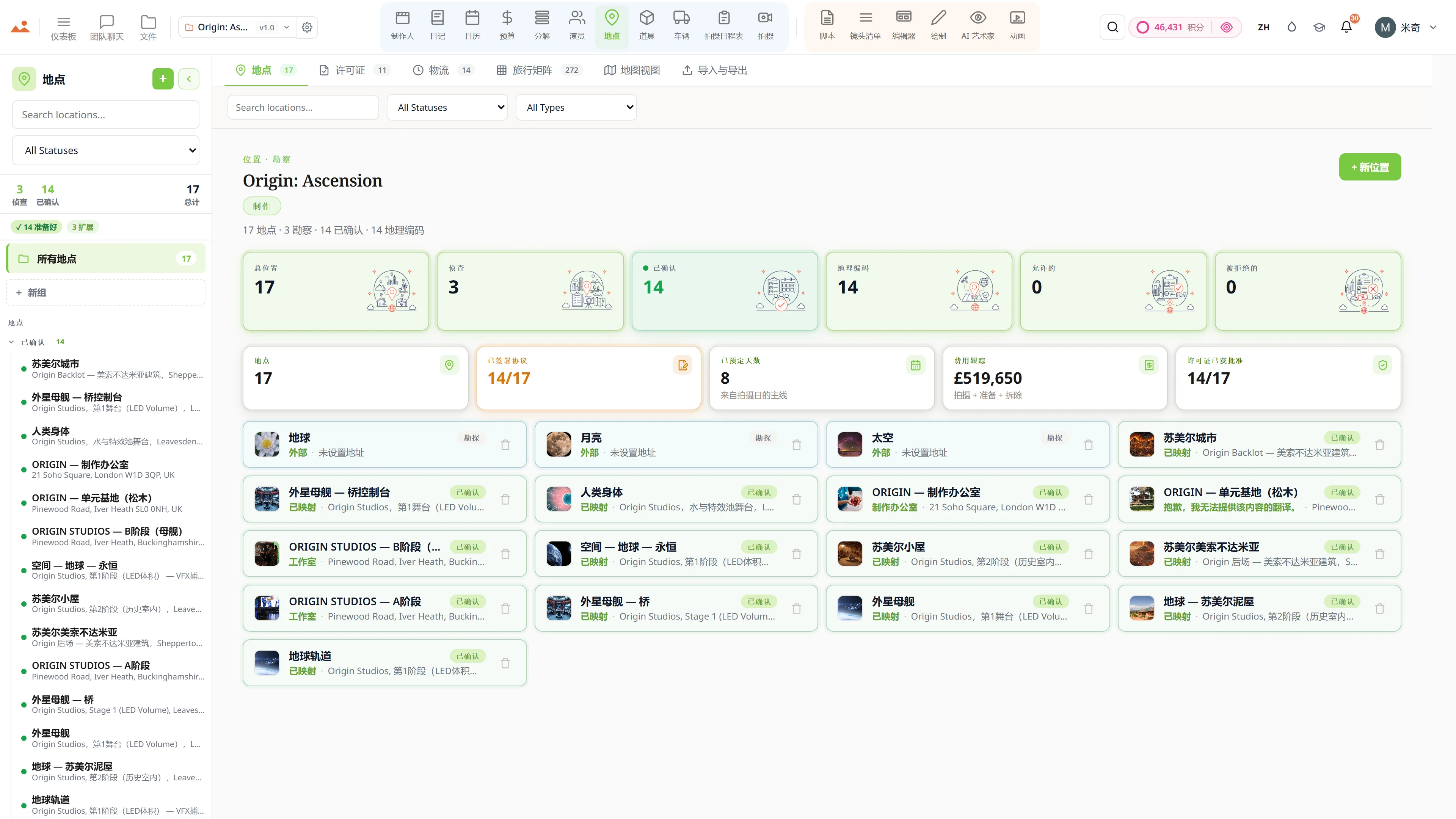
场地勘查 - 拥有许可证的场地、后勤和照片参考。
Locations
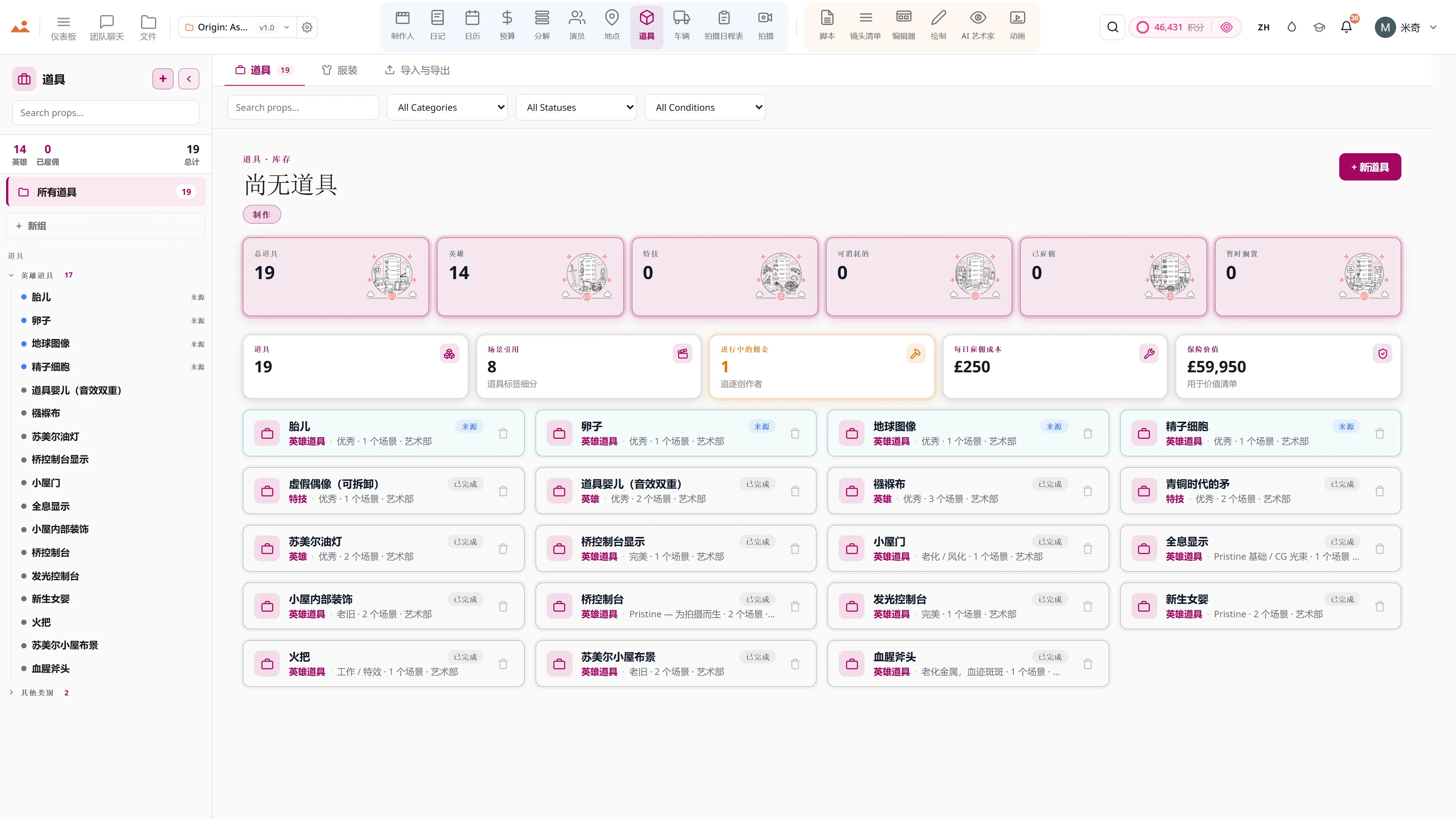
道具和服装连续性 - 道具清单,包含租赁状态和场景参考。
Props
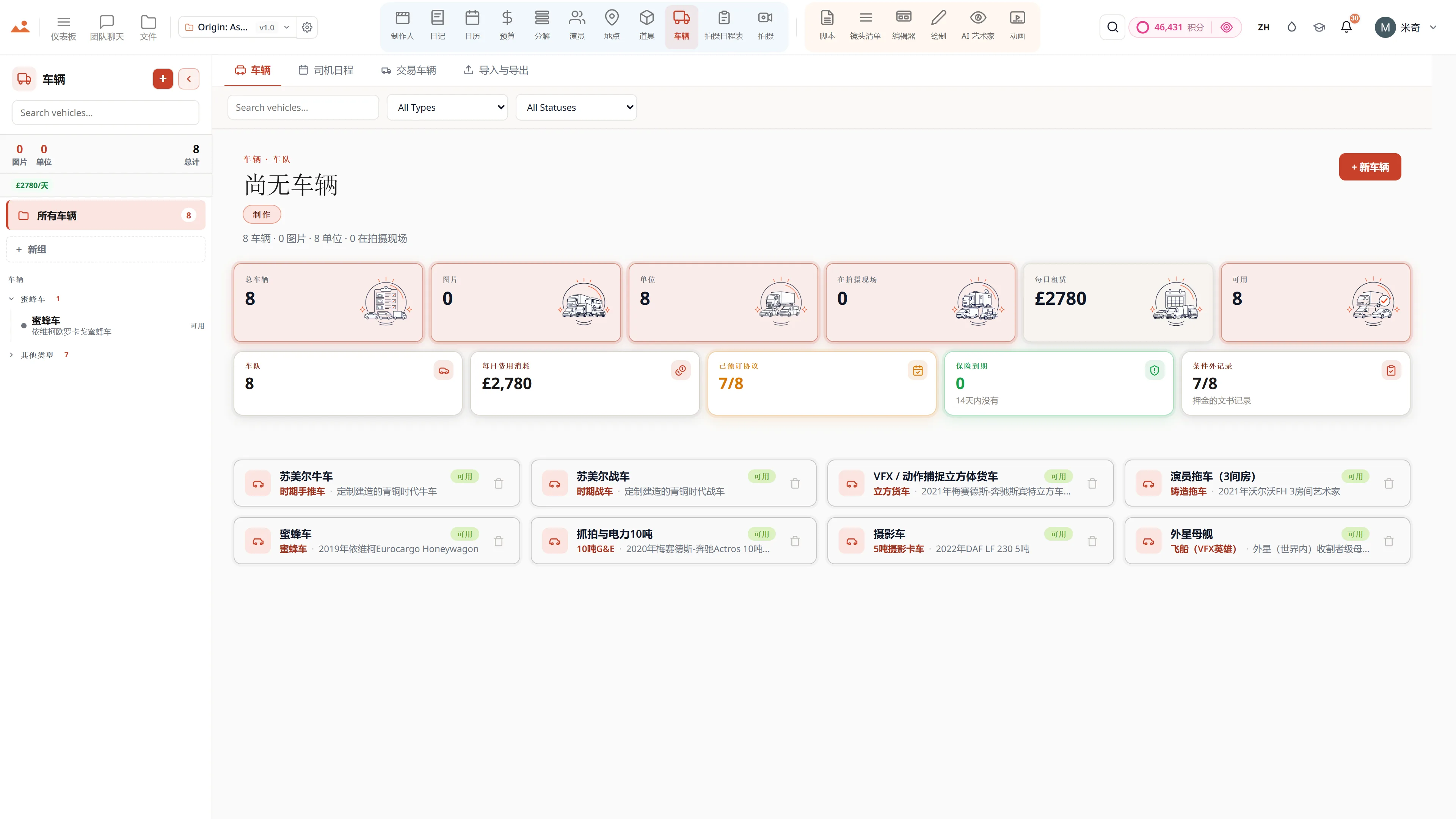
拍摄和单位车辆 - 车队清单,包含保险、车牌和司机调度。
Vehicles
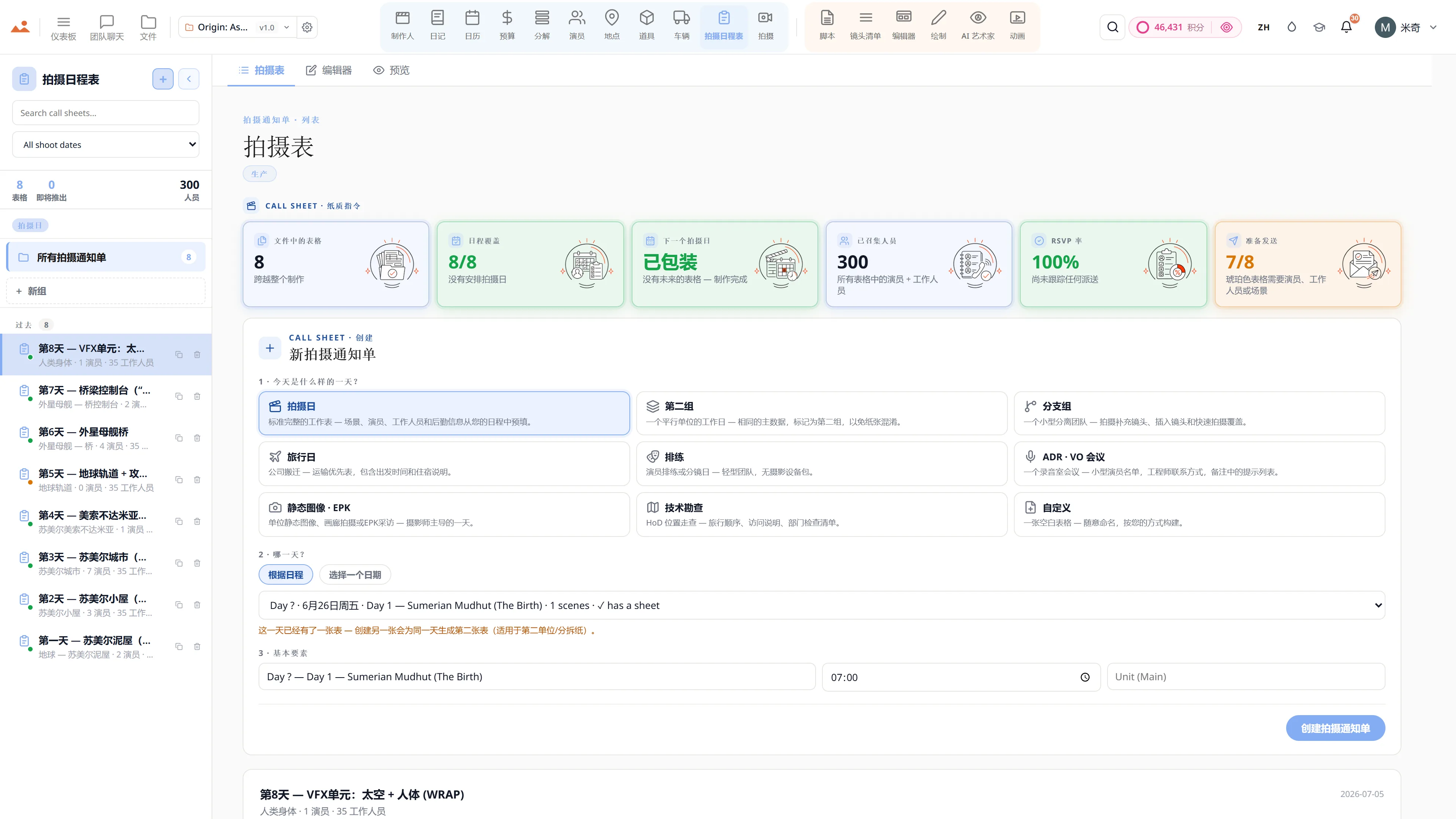
拍摄通知应用 - 演员和工作人员的召集时间、天气和场景顺序,一键派遣。
Call Sheet
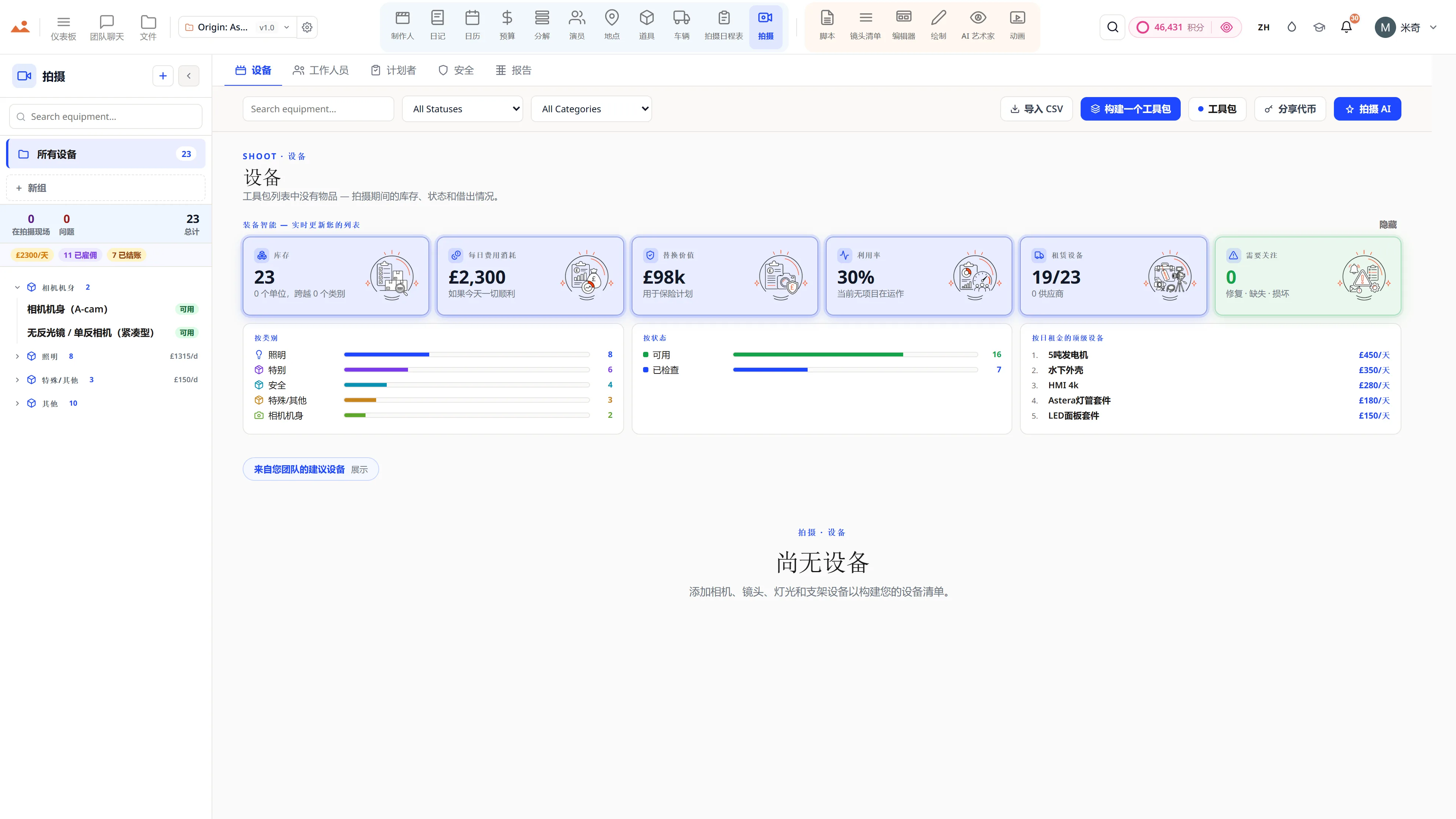
现场拍摄中心 - 13个类别的设备清单和完整的工作人员名单。
Shoot Day
剧本分解 - 12个类别的颜色编码制作元素,逐场景元素计数。
Breakdown
演员管理 - 角色档案、可用性和特邀演员的协议备忘录。
Cast
场地勘查 - 拥有许可证的场地、后勤和照片参考。
Locations
道具和服装连续性 - 道具清单,包含租赁状态和场景参考。
Props
拍摄和单位车辆 - 车队清单,包含保险、车牌和司机调度。
Vehicles
拍摄通知应用 - 演员和工作人员的召集时间、天气和场景顺序,一键派遣。
Call Sheet
现场拍摄中心 - 13个类别的设备清单和完整的工作人员名单。
Shoot Day
The official DollyAI extension for Google Chrome - StoryboardCanvas is built on the web platforms the world trusts.
WE ARE TRUSTED BY GOOGLE

We are trusted by Google.

StoryboardCanvas runs beautifully in every modern browser - Chrome, Edge, Safari, Firefox and Brave - with nothing to install and no plugins to configure. But we build and test on Google Chrome first, so for the fastest, smoothest experience Chrome is the one we recommend.

Download the official DollyAI™ Chrome extension to add your production's assistant to your browser - built on the web platforms the world trusts.

  • DollyAI in every tab - Chat with your production's assistant while you browse and research, without ever leaving the page.
  • Capture anything, anywhere - Send a reference image, a location, a cast headshot or a quick note straight into the right app in your project, in one click.
  • She knows where it fits - Dolly suggests the right app and files your find for you, always aware of the exact production you are working on.
  • Nothing to install for the suite - The whole app suite runs in Chrome with zero downloads. Only the optional DollyAI extension is added to your browser.
Get DollyAI for ChromeWorks in Edge, Safari, Firefox and Brave too.
Built on the platforms the world trusts

Every app, every tier

Twenty connected production apps, one project file.

Every plan from Hobbyist to Enterprise ships the full suite. Tiers differ on seats, monthly credits, cloud storage, white labelling and queue priority - never on capability.

Free forever

The whole suite. £0. Forever.

Not a trial. Not a demo. All twenty apps - script, breakdown, storyboard, stripboard, budget, call sheets, shoot day, wrap - open, unlocked, and yours to keep.

The only thing Free doesn’t include is AI credits - DollyAI is the one feature that costs real money per use. Add a Booster from £5 the day you want it, or never.

All 20 apps, fully unlockedNo card. No trial clock.You own everything you makeWe never train on your work

Or compare every plan, from Free to Enterprise →

The free tier - the whole StoryboardCanvas suite unlocked: storyboard frames, script, shot list, budget, team chat, call sheets and the drawing canvas, with no card and no trial clock.
AI图像引擎

唯一的故事板AI 知道你电影中的内容。

每个其他图像工具都从一个空白的提示框开始,并在回答的瞬间忘记你的影片。而我们的工具则从影片开始。

The StoryboardCanvas image engine: choose a house style or upload your own reference, lock it, and every generated storyboard frame holds the same line, shading, composition and colour across the whole project.

它从电影开始

它读取你的剧本、演员、服装、道具和拍摄地点,因此每个画面都知道谁在其中以及他们的位置。

风格锁定引擎

选择一只手,每个画面都保持它,镜头接镜头。一个锁定的视角,贯穿整个板块。

训练你自己的艺术家

上传你的参考资料,风格圣经会学习你的风格、语调和颜色。它将成为你的艺术家。

导演模式中构建您的下一个愿景

在3D中瞄准相机,设置角度和高度,故意打破180°线。指令自然而然地写成。

超越板块

海报、关键艺术、概念画、情绪板、EPK静态图像和标题卡,全部采用相同的锁定风格。

而它是你的

您生成的所有内容均享有完整的商业版权,我们绝不会使用您的作品进行训练。

查看图像引擎 →

由一位厌倦了与提示框争论的故事板艺术家打造。

See it for yourself

Step inside a real production, completely free.

Open the actual software on Origin: Ascension, a finished short film, and explore every app exactly as the crew left it. Read the script, walk the boards, open the budget, print the call sheet. Fully read-only, with no sign-up. Nothing you touch is saved.

Try the free demo20 apps · one project file · 0 seconds of setup
No sign-upNo cardNo downloadFully read-onlyNothing you touch is saved
Live demo · Origin: Ascension
在免费演示中的 AI Artist 应用,生成项目锁定房屋风格的故事板帧。
The Draw studio in the free demo, painting over an Origin: Ascension storyboard frame on the GPU canvas.
在免费演示中的 Animate 应用,播放定时的动画分镜。
在免费演示中的 Call Sheet 应用,显示完成的拍摄日通告单。

Script · breakdown · boards · animatic · call sheets · budget

The demo is a view-only copy shared for exploration. Some features need a paid subscription to run.

Mitch, founder of StoryboardCanvas and a working storyboard artist.
Mitchell Hughes
Founder · Storyboard Artist

Build your own style - or pick from ours.

The only AI storyboard generator built by a storyboard artist.

Mitch has spent nearly two decades turning scripts into frames for advertising, film and branded content, long before a camera rolls. The job was never just drawing. It is emotion, pacing, composition and the language of cinema.

He used the popular AI models on his own paid jobs, and they kept missing what a board is for. So he built this one.

You can talk to it in chat, or open the Frame Builder in Director mode. Every dropdown is already wired to your scenes, cast, props and notes, so your prompt is built in seconds.

His line, tone and colour ship as the house style. Pick one of them, or train your own artist in the Style Bible. Either way, the Style-Lock Engine holds every frame to that one hand, whether you want clean line, greyscale tone or full colour.

The boards that built Origin: Ascension

Twenty frames of a real production - drawn, locked and made in StoryboardCanvas.

Storyboard frame from Origin: Ascension, drawn by the AI Artist in Mitch's locked house style.

The Style-Lock Engine

Pick a style, or build your own - and it stays locked.

01

Built by the founder, a working artist

Mitch is our founder and a working storyboard artist, and he drew every reference frame himself. The line, the tone and the colour are one person's hand, so the look you get is real craft rather than something scraped off the internet.

02

Train your own custom styles

Drop in a few reference frames and run AI Style Sync. Your studio's look becomes a locked artist you can pick from any time, exactly like Mitch's, and every future board can be drawn in it.

03

A lock no prompt can break

Your locked style sits above your prompt rather than beside it. Ask for photoreal and the board stays on style, because the locked look wins every frame, every time.

04

Re-drawn the moment it drifts

Every frame is scored against the reference for line, tone and colour. The instant one falls off the look, the engine redraws it, so drift never reaches your board.

05

Surgical inpainting

Repaint one corner of a frame and only that region is redrawn. It comes back in the same locked hand, and the rest of the board is left exactly as you had it.

06

Synced to your whole project

The Frame Builder reads the scenes, characters, props and notes already in your project. A board lands with your script's own detail baked in, instead of whatever a generic prompt happened to invent.

One locked style, every creative mode:

StoryboardsConcept artPostersKey artMood boardsEPK stillsTitle cardsProduction design
Mitch's reference set

One frame. Three finishes.

Line
Clean pen-and-ink. Fast to read for blocking and sign-off.
Tone
Greyscale marker over the line. Light, depth and mood.
Colour
Muted paint over both. Pitch-ready frames.
A frame drawn by the AI Artist in all three house-style finishes - line on top, tone in the middle, colour beneath.

Or lock your own. Drop a few reference frames, run AI Style Sync, and the engine holds every future frame to your studio look - across storyboards, posters, concept art and key art alike.

One connected production workflow

From the blank page to the final wrap, in one place.

Write the script, break it down, build the shot list, board it, schedule it, budget it, shoot it and wrap it - every department reading from the same project file. No exports, no re-typing, no “which version is this?”
See how it works
A filmmaker presenting a storyboard built in StoryboardCanvas, with numbered scene frames and a script-to-screen workflow.
The connective thread

What makes twenty apps feel like one.

A connected suite is only as good as the thread running through it. Dolly is that thread - the same assistant in every app, holding the whole film in her head so the pieces never drift apart.
Explore DollyAI
Dolly, the AI production assistant, present across every app in the StoryboardCanvas suite.
认识 DOLLY

Dolly AI,您的AI制作助手 - 无处不在 在每个应用和界面上,文本、数据和图像,您无需亲自处理。

Dolly 只需读取一次你的项目 - 剧本、分解、日程、通话表、故事板、每个连接的应用 - 然后从那里开始保持在每一页上。她 remembers:锁定创意决策,您的品味标准,您电影的圣经,在各个会议之间传递。

问她任何问题,她会根据您的实时制作数据回答,而不是猜测 - 然后提供行动建议。代理模式会提出添加内容;在您批准之前,什么都不会被写入。打开双重检查,她会在您看到之前,根据项目的真实数据对自己的答案进行评分。当问题属于某个专家时,她会引入团队 - Marlowe 负责剧本,Sable 负责资金,Cass 负责日程,Indra 负责选角,Vee 负责连贯性。

决定权在您手中。重复的工作 - 重新输入、交叉检查, “等一下,我在每个地方都更新了吗?” - 这是 Dolly 要来处理的。在每个付费计划中,在每个应用中。

读取您的整个项目

剧本、分解、日程、演员、地点 - 所有内容保持同步。编辑一个,其余的会跟随。

记住你的电影

锁定决策,你的品味,创意圣经 - 在每次会议之间携带,贯穿整个制作过程。

行动 - 在你的批准下

代理模式根据实时项目数据进行回答并提出补充建议。在你批准每一项之前,任何内容都不会被写入。

检查自己的工作

开启双重检查,每一个重要答案都将与项目的真实数据进行对比并修订 - 在你看到之前。

引入团队

Marlowe(剧本),Sable(制片人),Cass(第一助理导演),Indra(选角),Vee(连续性) - 专家触手可及。

查看板块,简报早晨

导演对您的故事板框架的笔记,以及您每次请求时的风险排序制作简报。

代理模式 - 询问 → 她逐字段提出建议预览 → 您一键批准 → 一键撤销。还有主动模式:每小时制作监控、早晨简报,以及每周导演对您板块的审查。她甚至可以浏览开放网络并带回参考资料。

每个AI操作都会显示其价格 在您点击之前 仅在成功时收费 - 快速聊天起价为四分之一信用。

Dolly在每个应用中

脚本场景标题辅助、节奏分析、修订摘要
镜头清单根据剧本节奏建议覆盖范围
编辑器序列节奏分析和缺失镜头检测
绘制参考草图 + 组成和布局帮助
AI 艺术家帧感知生成,锁定风格 + 角色
动画根据剧本节奏 + 场景长度的时机建议
分解自动标记道具、服装、特效、特技、音效、车辆
预算变动监控 + 逐项节省成本建议
Calendar日程优化器 - 找到更便宜的拍摄顺序,标记冲突
拍摄通知单自动填写接送、用餐时间、天气、最近医院
制作人自动在每天早上6点生成DPR + 每周成本报告
演员角色连续性图 + 演员覆盖建议
地点场景与地点匹配、侦查提示、许可证提醒
道具直接从剧本中提取每个主角 + 背景道具
车辆根据剧本提及的画面车提示 + 运输物流
拍摄每个拍摄日的设备推荐 + 团队部门提醒
日记每日拍摄总结 + BTS 媒体组织者 + DPR 草稿
仪表板下一步行动简报、异常检测、燃尽合成、项目感知的 Cmd-K 跳转
文件跨九个表面的统一图像图,发送至 Animate / 发送至编辑器的芯片
团队聊天频道 + DM 摘要、行动项提取、提及感知通知
资产资产库搜索,自动标记,重复检测,跨应用调度

后台工作

她全程监控整个制作 当你睡觉时。

每小时生产监控

根据自身的风险规则扫描每个活跃项目 - 未签署的交易备忘录、拍摄日人手不足、即将超支的预算项目 - 并在造成损失之前标记出来。

早间简报

每天,她会整理出需要您关注的事项 - 自行核对您的实际生产数据 - 并直接将其放入您的通知中。

每周董事会审查

她以导演的眼光审视您的故事板,并留下关于构图、覆盖和连续性偏差的笔记 - 这是您无需请求的常规审查。

审批收件箱

她提出的每一个更改都会在一个收件箱中等待,跨会话 - 随时准备批准、撤销或拒绝。没有您的同意,任何内容都不会被写入。

计划,然后执行

给她一个多步骤的目标,她会起草计划;一次批准即可运行整个流程,设置检查点,以便在中断处准确恢复。

生产记忆

她记住了锁定的创意决策和你在会议之间的品味,并每周整理自己的记忆,使其变得更加清晰,而不是膨胀。

后台工作对平台友好,从不在没有所有者的情况下消耗信用 - 你可以根据项目随意开启或关闭其中任何功能。

Make it yours · the colour studio

Paint the whole production suite in your brand colours.

Open the colour studio from the droplet in the menu bar - pick a curated palette or set your own accent for every one of the twenty apps. Switch between Light, Dark and Monochrome. Your theme saves to your account and follows you into every app, every session.
The colour studio recolouring every app in the suite to a chosen brand palette, with Light, Dark and Monochrome themes.

二十个应用程序。一个项目。 零替换。

为希望工具彼此沟通、AI为他们服务而非控制他们的电影制作人而打造。从£15/月 - 从剧本到屏幕,统一账单。

THE DEVELOPER PROMISE

Your film production software gets measurably better every fortnight, free, for the life of your project.

Bi-weekly cadence. Public roadmap. Honest changelog. Every quality-of-life upgrade ships to every plan, retroactively. Here's the actual board.

JUST SHIPPED

Last fortnight, in production.

Alpha just landed, on top of a fortnight of releases. Every entry is a real commit, dated, deployed.

  • v7.00.0 · JUL 1
    Version seven - a new face for the whole studio.
    Every one of the twenty apps and the whole website rebuilt to one calm, consistent identity, with a brand-kit wizard, fresh full-screen galleries, and the rebranded demo open to walk through. Fifty percent off your first month to mark it.
  • v6.6.0 · JUN 22
    The storefront, made as alive as the studio.
    Every app page now leads with a real media gallery, the screenshots are turning into short clips of the apps in motion, and the whole site reads clean in fifteen languages on any screen.
  • v6.0.0 · JUN 11
    Version six - the launch build. All twenty apps, finished, working as one studio.
    Write a script and the breakdown reads it; the connected production fills itself end to end. Live in the demo now.
  • v4.0.01 · JUN 2
    Alpha - version four of the whole suite.
    Twenty synchronized apps you can run a real production on, with a live read-only demo open on the homepage.
Every other Friday, like clockwork.
SHIPPING NEXT

What's on the bench right now.

The next two fortnights, scoped, dated, public. No NDA pitches.

  • FORTNIGHT · JUL 11
    The suite, captured in your language.
    Every app and key function photographed in all fifteen languages, so a visitor browsing in Japanese, German or Spanish sees the studio actually working in their language - not an English screenshot with a translated caption under it.
  • FORTNIGHT · JUL 25
    Your language, all the way down.
    The interface already speaks fifteen languages; next, Dolly's replies and your exported documents - call sheets, PDFs, reports - come through in your team's language too, not just the chrome around them.
  • FORTNIGHT · AUG 8
    A look for every production.
    Save a theme per project, so the noir thriller and the toy commercial each open in their own light. The full appearance studio already ships; this pins a chosen look to a single production.
  • FORTNIGHT · AUG 22
    Read-only share links across the planning apps.
    The shot list and call sheet already mint a no-login share link; next, the same secure read-only share comes to the breakdown, schedule and budget so any collaborator sees exactly what you choose.
Two cadences out, then it's the next bench.
ON THE ROADMAP · VOTE LIVE

Rolling out across the Alpha - you pick the order.

Alpha is live - and this is everything still to come during it. The vote buttons are real: tap one and the count climbs for everyone. Top askers ship first.

  • Your screenplay, translated without losing your voice.
    The suite already speaks fifteen languages. This is the harder one: translating the script itself for a co-production, keeping the rhythm, the idiom and the character's voice intact, with the original always one click away.
  • Brand kits for studios and agencies.
    Every document you send a client - the call sheet, the deck, the board, the PDF - carrying your company's mark rather than ours. One kit, applied across the suite, per production.
  • WhatsApp dispatch.
    Crews do not read email at 05:40. Call sheets, sides and call-time changes go to the channel they actually have open, alongside the email and SMS routes that already work.
  • An agent for each department.
    A 1st AD agent that drafts tomorrow's sheet. A script supervisor agent that logs the day. Work queued while you are out of signal, waiting for you when you come back.
  • On-set mode, installed on the phone.
    Between setups you are holding a phone, not a laptop. Call sheets, diary, breakdown and schedule, on the home screen. The drawing apps stay on a tablet, where they belong.
  • Everyone in the same document at once.
    Director, producer, AD and artists in one script, board or schedule, every keystroke landing live. No refresh. No arguing about which file is the latest one.
  • Animatics that move on-model.
    Motion that holds your locked hand frame to frame instead of dissolving into someone else's style by the third second. With music and voice, from the boards you already drew.
  • Casting, with the paperwork handled.
    Right-to-work, child-performer hours, likeness consent and publicity rights checked as you cast, plus an AI casting director that reads the self-tapes and surfaces the strongest read for the role.
  • The cut comes back.
    Handoff to Premiere, DaVinci and Final Cut already works one way. The return leg brings the timing, the markers and the editor's notes back onto the boards they came from.
  • MORE · TBC
    And plenty more we are not ready to name yet.
    The vote buttons above are real. Whatever gets asked for most is what gets built next.
You decide what jumps the queue - literally.

All data and claims within this website are based on current software. Go have a look around in our read-only DEMO - please note some of the apps need a paid subscription. Track the developers in the changelog. Thanks for the on-going support - every share helps us keep the prices where they are.

终极一击

自动化 片尾字幕 从您的拍摄清单中,一键生成。

我们已经知道您制作中的每位演员、工作人员、部门和贡献者——我们必须知道这些信息,以便运行您的拍摄表。因此,我们构建了一个按钮。点击它,您将获得完整的制作字幕,按部门字母顺序排列,格式符合电影和电视的惯例,准备好放入您的编辑中。

提取自演员、工作人员、部门按字母顺序排列 · 格式正确导出为PDF、PNG或直接放入编辑条
生成您的片尾字幕 →

在每个付费等级上可用 · 无额外费用

One suite, twenty apps

Twenty connected apps, one project file.

Script, breakdown, shot list, storyboard, schedule, call sheets, budget, producer and more - each one finishing the others' work, every department reading from the same source of truth.
The twenty connected apps of the StoryboardCanvas suite, from script to wrap, working from one project file.
EVERY APP, A LITTLE CLOSER

Every app in the suite, from script to shoot day.

Each app carries its own colour in the in-app nav so you always know where you are. The project file underneath stays one - change a scene heading and every other app updates with you.

PRODUCER APPS

The page a producer keeps open every morning.

Ten apps for breakdown, budget, schedule, cast, crew, locations, props, vehicles, equipment, and the diary that saves your bond company.

Breakdown

AI script breakdown software, in one pass.

  • Element matrix
  • One-line schedule
  • Day out of Days built straight from the breakdown, with a cast cost roll-up underneath: days worked times daily rate, totalled
  • Strip board that carries each scene's synopsis, cast, elements, page count and estimated screen time
  • Full-script AI breakdown in a single pass, batched in parallel
Replaces: Legacy scheduling apps and two days of AD labourOpen the Breakdown app →

Producer

Production office software, automated.

  • Mission control
  • Slate view
  • Production scorecard: schedule slip, OT exposure, RSVP rate, weather losses, budget variance, all derived rather than typed
  • EPK assembled from the production itself
  • Wrap package
Replaces: The 4am spreadsheet update, the four-tab budget review, the bond-co email chain, the EPK courier brief, the portfolio Google DocOpen the Producer app →

Budget

Film budget software, tax credits to bid.

  • AICP bid builder
  • Union rate finder
  • Cashflow schedule with a budget exhaust point
  • Fringe matrix and payroll loading, plus a tax-incentive estimator
  • Purchase orders that write themselves back onto their budget line when they are paid, so committed spend is never a guess
Replaces: Legacy budgeting desktop apps and a dozen fragile spreadsheetsOpen the Budget app →

Cast

Cast management with a self-tape portal.

  • Deal memos that walk a visible stepper from draft to sent to negotiating to signed, with committed fees rolled up
  • Self-tape portal and a callback comparison tool
  • Availability grid
  • Contacts export as a cast list, a contact sheet, or a redacted PDF for the people who should not have private numbers
  • Child-performer hours and licences flagged on the roster, not buried in a folder
Replaces: Legacy casting-paperwork apps and spreadsheetsOpen the Cast app →

Locations

Location management and scouting.

  • The nearest A&E is a required field
  • Travel matrix
  • Company-move carbon pushed into the production carbon model, which otherwise defaults transport to zero and quietly excludes the largest line on most shoots
  • Permits tracked per location with status, and a map that plots every geocoded location in company-move order
  • Interactive map with pins for every scouted location
Replaces: Legacy location-management apps and map screenshots and spreadsheetsOpen the Locations app →

Props

Prop management and costume continuity.

  • Costume continuity
  • Hire burn per day and an insurance schedule of values across the whole prop inventory
  • Quantities the way an art department thinks: one hero plus three doubles, with period, sourcing and what the prop must do on camera
  • Seeded straight from the breakdown's prop tags, so the list starts as everything the script asks for
  • AI-extracted props list from your script
Replaces: Legacy props-inventory modules across multiple desktop appsOpen the Props app →

Vehicles

Picture-car and unit-vehicle management.

  • Driver schedule
  • Counts the runs nobody has agreed to yet and the ones with no driver number to ring, because those are the two that ruin a 06:00
  • Condition-out reports on every vehicle: the photographic paper trail that decides who pays for the scratch
  • Picture vehicles and unit vehicles on one fleet, each with its insurance, day rate and agreement
  • Picture-car and crew-transport tracking
Replaces: Assistant Director clipboards + rental paperworkOpen the Vehicles app →

Calendar

Film scheduling with a stripboard.

  • Schedule fitness scored out of 100, with a compliance flag when turnaround is tight
  • Crew availability matrix
  • Equipment bookings day by day with vendor, daily rate and a live rental spend
  • Pre-production milestone spine
  • Daylight hours and golden hour on the day itself, so an exterior is scheduled against the light rather than against hope
Replaces: Legacy stripboard-scheduling desktop appsOpen the Calendar app →

Call Sheet

Call sheet software, auto-generated.

  • Nine kinds of day, not one: shoot, second unit, splinter, travel, rehearsal, ADR, stills and EPK, tech recce, or a blank sheet you build yourself
  • Arrival board
  • Set status live on the day: prep, blocking, shooting, company move, lunch, wrapped
  • Pre-flight check on memos, permits and insurance before the sheet can be dispatched
  • Catering with dietary flags, transport and basecamp, walkie channels, parking and the nearest hospital, all pulled from the Locations app
Replaces: Legacy call-sheet apps and on-set messaging toolsOpen the Call Sheet app →

Shoot

Equipment and crew, on shoot day.

  • Risk assessment register
  • Kit and crew planner
  • Gear intelligence: daily rate burn, replacement value for the insurance schedule, utilisation, and what is checked out right now
  • Crew payroll normalised per shoot day, with a count of who has an emergency contact on file and who does not
  • Suggested kit per department, drawn from the crew you actually hired
Replaces: Legacy shoot-day apps and department spreadsheetsOpen the Shoot app →

Diary

Production diary, DPRs and continuity.

  • The daily production report writes itself from the day you logged: a director's narrative, the Exhibit G cast-time table, a weekly progress digest and the end-of-day wrap, one button each
  • DPR register shows which shoot days have their report on file and which do not, so the gap is visible before a financier finds it
  • Issues log with severity and lifecycle
  • BTS media filed against the shoot day it belongs to, feeding the EPK and the wrap binder automatically
  • 11 view modes
Replaces: DPR apps + a shared Google Doc that always rotsOpen the Diary app →
DIRECTOR APPS

The creative spine - script to animatic, end to end.

Six apps for the writers, directors, DPs, and visual storytellers - with DollyAI™ riding shotgun the whole way.

Script

Screenplay software that writes the breakdown.

  • Every scene heading carries a stable scene id, so renaming a heading never breaks the shot list, the boards or the schedule downstream
  • Read-through with AI character voices, or your own browser voices, for a table read you can run alone
  • Screenplay translation for co-productions, with the original always one click away
  • Voice-to-script dictation, and a clearance scan that flags the names and marks a lawyer will ask about
  • Typed screenplay blocks with Tab cycling
Replaces: Legacy desktop screenwriting apps, collaborative-doc subscriptions and script-distribution servicesOpen the Script app →

Shotlist

AI shot list with lens planning.

  • AI generates the first pass of coverage from the scene itself
  • Every shot carries its scene id through to the storyboard editor and the animatic, so nothing loses its place in the film
  • Bulk parse a whole screenplay into shots, scene by scene, streaming as it goes
  • Full shot grammar: angle, size, lens, movement
  • Cinematography parameters per row
Replaces: Legacy shot-list apps and visual-reference desktop toolsOpen the Shotlist app →

Editor

Storyboard editor and frame canvas.

  • Frames arrive from the shot list already carrying their scene, shot size and description
  • Frame-anchored comments for review, with threaded replies and a share link that needs no login
  • Drag, snap, group, and layer frames on a pixel canvas
  • Smart alignment guides and auto-spacing
  • Camera-movement overlays
Replaces: Legacy storyboard apps and pitch-deck subscriptionsOpen the Editor app →

Draw

Pro storyboard drawing software.

  • Send the canvas straight to the Animate timeline as a frame, with its storyboard linkage intact
  • Photoshop ABR brush import, so the brushes you already own come with you
  • Stock ABR brush library + brush studio with full settings controls
  • Custom Tip Painter
  • Custom Texture Creator
Replaces: Legacy desktop drawing and digital-painting apps for storyboard workOpen the Draw app →

AI Artist

AI storyboard generator, style-locked.

  • 3D camera picker
  • The 180-degree rule as an explicit control
  • Camera coverage helper
  • Every camera choice resolves into a real cinematographer directive that goes into the prompt, not a vague style word
  • Frame Builder pulls every choice from your production
Replaces: a dozen browser tabs and half a dozen paid AI subscriptionsOpen the AI Artist app →

Animate

Storyboard to animatic software.

  • Boards from the same project, timed against the script
  • Camera moves, transitions, audio and a video export, plus handoff to Premiere, DaVinci and Final Cut
  • One-click: frames + camera arrows + script timing -> animatic
  • 27 camera presets + 9 transitions + proper timeline editor (trim, ripple, snap)
  • Onion skinning + auto-tweening across keyframes
Replaces: Legacy animatic-mode tools and rough-cut editing appsOpen the Animate app →
PLATFORM

The shared layer underneath every app.

Dashboard, files, team chat, cloud library - the connective tissue every other app rides on.

Every app, every tier

The whole suite on every plan.

No feature gates and no surprise upsells. Every tier from Hobbyist to Enterprise unlocks all twenty apps - you choose your plan on seats and credits, never on which tools you get. From £15/month.
See pricing
Every StoryboardCanvas app and feature included on every plan tier, from Hobbyist to Enterprise.

常见问题

电影制作人关于电影制作软件的问题

StoryboardCanvas is the complete script → shoot day software suite - 20 production apps covering the entire pipeline from first draft to wrap, powered by our proprietary IP: DollyAI™ (cross-module AI director), the Style-Lock Engine, the AI Image Engine (eight generation modes), Canvas Draw (GPU brush engine), Frame Brain (animate-aware AI), the Cross-App Spine, the Brand Kit Engine, and the IATSE Turnaround Engine. It's live and open to everyone - sign up, pick a plan, and start your production today. Every app is included on every tier; annual billing saves roughly 20%.

Six director apps (Script, Shotlist, Editor, Draw, AI Artist, Animate). Ten producer apps unified under one production stack (Breakdown, Cast, Locations, Props, Vehicles, Calendar, Call Sheet, Shoot, Diary, Budget). Four platform apps that tie them together (Dashboard, Files, Team Chat, Cloud Library). Twenty in total. They share one project file - change a scene heading once, and the breakdown, schedule, call sheet, and storyboard all update themselves.

It's a full screenplay word-processing suite - not a glorified textarea. Typed screenplay blocks with Tab cycling, intelligent element assist, scene navigator, dual dialogue, revision mode with industry-coloured pages and locked scene numbers, autosave history with named versions and editable drafts, comments with @-mentions, real-time multi-user collaboration, approval workflows, sides generation, episodic support, readthrough TTS, File/Edit/View/Help menus, and import/export for FDX, Fountain, Celtx, HTML, RTF, and PDF. Built to replace Final Draft entirely.

Those are single-purpose tools. StoryboardCanvas covers 22 out of 22 capabilities on our comparison matrix - Final Draft covers 3, Celtx 9, StudioBinder 14, Movie Magic 4, Gorilla 4, Boords 4, Storyboarder 3, LTX Studio 6, Midjourney 4. Change a scene heading once, and every dependent document updates. No copy-paste between five different logins.

DollyAI™ is not a chatbot. She's the AI director layered into every app in the suite - 200+ typed, prompt-engineered actions across every route, with selection awareness (knows which scene / shot / character / prop you've clicked) and image awareness (can see your storyboard frames, character photos, location scouts, props, vehicles, costumes, behind-the-scenes media, and recent AI generations). She's powered by a six-engine intelligence stack: production memory (remembers your film and your taste across sessions), agent mode (proposes changes with a field-by-field preview, your approval, and one-click undo), a self-critique loop, the AI Family of specialist department heads you can bring in by name (Marlowe, Sable, Cass, Indra, Vee), proactive briefings (an hourly watch, a self-checked morning briefing, a weekly frame review and an approval inbox), and deeper vision that reviews your actual frames. She can even read a web page or run a search when you ask. Per-row Ask Dolly menus on the major tables. Every action starts with a parallel 16-table project-context fetch so she answers with full awareness of your script, breakdown, cast, schedule and visual style bible - not generic chat. Streaming responses. Credit-gated, micro-billed from a quarter-credit. Included on every tier.

A world-beating web-based GPU-accelerated drawing engine with a custom brush builder. 450+ stock brushes across ink, pencil, oils, watercolour, charcoal, airbrush, gouache, chalk, markers and bristle sets. 120+ paper and canvas textures - cold-press, hot-press, rough, smooth. 15+ blend modes, non-destructive layers with groups / masks / alpha locks, adjustment layers, full stylus pressure + tilt, five smoothing modes, Adobe ABR brush-file import, 60fps rendering - all in your browser with no plugins, no install, no download. Start with stick figures for quick blocking or paint a finished frame.

Credits are the fuel for AI actions - every DollyAI™ chat, script action, breakdown, shotlist parse, and style-locked frame generation consumes credits. Simple actions cost 1–3 credits, image generations and long-context actions 10–25. Your monthly allocation refreshes on your billing date: Free comes with none (add a Booster from £5 whenever you want DollyAI), Hobbyist, Solo and Team credits are use-it-or-lose-it, Studio gets 25% rollover, and Agency, Network and Enterprise get 50–75%. Booster credits are different: they are kept in a separate balance that no monthly refresh ever resets, on any plan including Free, so credits you have paid for stay yours until you spend them. Upgrading carries unused credits across automatically.

Free, plus seven paid tiers: Free (£0 forever), Hobbyist (£19/mo · gateway), Solo (£39/mo), Team (£99/mo), Studio (£269/mo · most popular), Agency (£599/mo), Network (£1,599/mo) and Enterprise (£3,329/mo · self-serve). Annual billing locks in 20% off any paid tier. Every app, every feature, every export format is available on every tier, including Free - no feature gating, ever. Tiers differ only on seats, AI credits and credit rollover. Free gets the same revision-mode Script app and the same DollyAI™ as Enterprise; the only thing it doesn't come with is a monthly credit allocation, and you can buy a Booster from £5 any time.

Annual billing locks in 20% off any paid tier - equivalent to 2.4 months free over the year. Hobbyist £15/mo billed annually (£180/yr) versus £19/mo monthly. Solo £31/mo (£372/yr) versus £39/mo. Team £79/mo (£948/yr) versus £99/mo. Studio £215/mo (£2,580/yr) versus £269/mo. Agency £479/mo (£5,748/yr) versus £599/mo. Network £1,279/mo (£15,348/yr) versus £1,599/mo. Enterprise £2,663/mo (£31,956/yr) versus £3,329/mo. Cancel any time from the billing portal and keep access through the end of your paid period.

Yes. Script imports FDX (Final Draft), Fountain, Celtx, PDF, DOCX, RTF, and HTML - full screenplay fidelity. Breakdown imports StudioBinder CSVs. Schedule and stripboard import from Movie Magic Scheduling and Gorilla Scheduler CSV exports - vendor auto-detected, scene #, I/E, day/night, location, cast, page count, and duration all mapped automatically. Cast sheets from CSV/XLSX. Images from any common format. You can start mid-production without losing a single scene, strip, or deal memo.

Your account, billing and the whole marketing site work on any device, including your phone. The production app suite is built for a bigger canvas - a tablet (iPad 10.2" and up), laptop or desktop - because the script editor, stripboard, call sheets and drawing canvas genuinely need the room to work properly; on a smaller screen we show a friendly note pointing you to a larger device rather than cramming the UI. Canvas Draw runs with full stylus pressure + tilt on iPad, Surface and any Chromebook or Windows tablet. The on-set surfaces - call sheets, Shoot Day Live arrival check-in, diary entries, BTS photo capture - are tuned for the tablet you'll actually carry on set. No native install required, ever.

Real-time presence with live cursors and selection highlights across every app. Per-frame, per-line, and per-row comments with resolve/reopen threads, @-mentions, and email notifications. Review sessions with share tokens for external reviewers - they can approve, reject, or comment without creating an account. Role-based permissions (Owner, Editor, Commenter, Viewer). Team chat with channels and reactions. Full audit log.

You retain full commercial rights to everything you create on every paid tier. We never train on your projects. Your style bibles, scripts, cast data, and generated frames are yours. We use append-only audit logs for credits and immutable version snapshots for documents so nothing is ever silently deleted or altered.

Three-day grace period with full access, then read-only mode (you can still view and export everything), then after 14 days the account suspends. No data is ever deleted - reactivate any time and everything is exactly where you left it.

No - and we're unapologetic about it. Free-tier theatre costs us real money running your AI calls, and it costs you real time evaluating a deliberately crippled version of a tool you'd actually use. The apps aren't speculative: StoryboardCanvas replaces Final Draft, StudioBinder, Movie Magic Scheduling, Gorilla Budget, Filmustage, and Boords in one suite. It pays for itself on your first short, let alone your first feature. Hobbyist starts at £19/mo (or £15/mo billed annually) - full capability from day one. Solo at £39/mo (£31 annual) is the recommended starting tier with team-collaboration upgrades. Cancel any time from the billing portal and keep access through the end of your paid period. No retention traps, no guilt prompts. You can also explore a finished, read-only demo production right now - no sign-up, no card.

Yes - open the live read-only demo from the homepage. It loads a complete, finished production (script, breakdown, 8 shoot days, full cast and crew, call sheets, a £3.4M budget, storyboards and an animatic) so you can click through every app on real data without signing up or entering a card. You can look at everything; saving and AI generation are the parts you unlock when you join.

It's a full line-producing ledger, not a spreadsheet - twelve tabs covering Cost Report, Variance, Forecast, Top Sheet, Purchase Orders, Petty Cash and Rate Cards, plus a Tax Incentive Estimator that ranks film-tax-credit jurisdictions and compares up to three side by side, a Fringe Matrix with SAG-AFTRA / IATSE / DGA / non-union and BECTU preset packs, a Cashflow Schedule with peak-week and budget-exhaust warnings, an AICP Bid Builder that maps every line to a chart-of-accounts code and prints an agency-ready firm bid, and a Union Rate Finder with 30 dated 2026 scale rates and a live cost calculator. Per-line traffic-light readiness, contract uploads, VAT / locale tax handling and accounting exports (generic ledger, Xero, QuickBooks, and an authorised-payments bank file) are all built in. These tools are informational aids - you stay responsible for filings in your jurisdiction.

Yes. The Shoot app has a Safety tab with a 5×5 risk-assessment matrix and AI safety briefings; the Diary runs a due-diligence Compliance board with a daily safety score, an hours / turnaround / meal / daylight / incident check per shoot day, and an incident log. Cast carries a compliance document vault with a 30/14/7/1-day expiry ladder for COIs, work permits and releases, plus a child-performer work-hours tracker with jurisdiction-banded limits. The Calendar flags IATSE turnaround violations automatically. It's organisational support, not legal advice - local law remains your responsibility.

Yes. Script Distribution mints a separate watermarked link for each recipient - every page is stamped with that reader's name, links expire on a date you set, you can revoke any of them instantly, and you see download telemetry per recipient so a leaked PDF traces straight back to who shared it. There's also an AI Clearance Scanner that flags brands, real people, music, trademarks and artwork in your script for E&O review before you go to camera.

The marketing site and the app interface ship in fifteen languages (English, Spanish, French, German, Italian, Portuguese, Dutch, Polish, Turkish, Russian, Japanese, Korean, Chinese, Hindi and Indonesian), switchable from the language chip - your account, the demo and the everyday app chrome all follow your choice. Prices show an estimate in your local currency from live exchange rates, while billing itself is taken in GBP. Your actual work is never translated - your script stays in whatever language you wrote it.

Each paid tier includes a number of seats and a per-seat add-on price (Solo +£19/mo per seat up to 3, Team +£15 up to 10, Studio +£12 up to 25, Agency +£10 up to 50, Network +£8 up to 100). Seats are billed when you add them and end at the close of the current billing period when you remove one. The account owner controls exactly which apps and how many credits each seat can use, and read-only viewers are unlimited and free on every tier - bring in financiers, clients or department heads to look without paying for a seat.

No - that's the whole point. The cross-over importer takes a drop of almost anything: Movie Magic Scheduling, Final Draft, StudioBinder, Gorilla, Yamdu, Celtx or any screenplay file. We recognise the source, run an AI breakdown and route the result into the right apps automatically (Movie Magic stripboards come in structured, with no AI credits charged). Script also imports FDX, Fountain, Celtx, PDF, DOCX, RTF and HTML at full fidelity. You can pick up mid-production without losing a scene, strip or deal memo.

Approved storyboard frames flow straight into Animate, where you drop them on a timeline with 27 camera-move presets, transitions, easing (including Bounce), scratch audio and timing, then export to MP4 / MOV / WebM with audio plus editorial hand-off formats - XMEML (Premiere / DaVinci), FCPXML (Final Cut Pro X), EDL, OpenTimelineIO and SRT captions. The whole creative spine runs Script → Shotlist → Storyboard Editor → Animatic with one project file underneath, so nothing is re-typed or re-imported between stages.

The Producer app is the page a producer keeps open every morning: a live scorecard, hot-cost rollups, an AI overtime predictor, schedule-risk scoring, a deliverables tracker (ProRes master, DCP, stems, captions, QC, chain-of-title, E&O and more on a click-along delivery pipeline), an EPK / sales hand-off package, a PO command centre with approval routing, an immutable cross-app audit trail of every change, and a multi-project portfolio view. Weekly cost reports and DPRs assemble themselves from the spine and are ready to email by 6am.

Beyond your statutory consumer rights, refunds are considered case by case as a goodwill gesture - just contact us. You can cancel any subscription from the billing portal at any time and keep full access through the end of the period you've already paid for; we never delete your data when you cancel.