Skip to content
StoryboardCanvas welcome illustration - a global film crew collaborating in the all-in-one production suite.
WELCOME TO STORYBOARD CANVAS

AI storyboards - and an app for every person in the script-to-screen process.

Film production still runs on a spreadsheet nobody remembered to share, a Google Doc on its eleventh version, and a call sheet that was out of date the moment it was sent. That is the industry standard. It shouldn’t be.

StoryboardCanvas is a web application suite - a productivity and workflow toolkit for video and film production, a complete script-to-shoot-day software suite for writers, producers, directors and all the crew involved.

The quickest way to earn more money is to save money.

Our product saves everyone time, turning a 12-hour day into 6 for the whole team and keeping everyone on the same page 100% of the time. Change a detail once and every app around it updates. No downloads - a browser and a connection, in 25 languages.

Powered by DollyAI™, your omnipresent assistant.

One project file · twenty apps

“Imagine the Google app suite, ChatGPT and a crew of professional filmmakers had a wild night of passion - their offspring would look something like StoryboardCanvas AI’s software suite…”

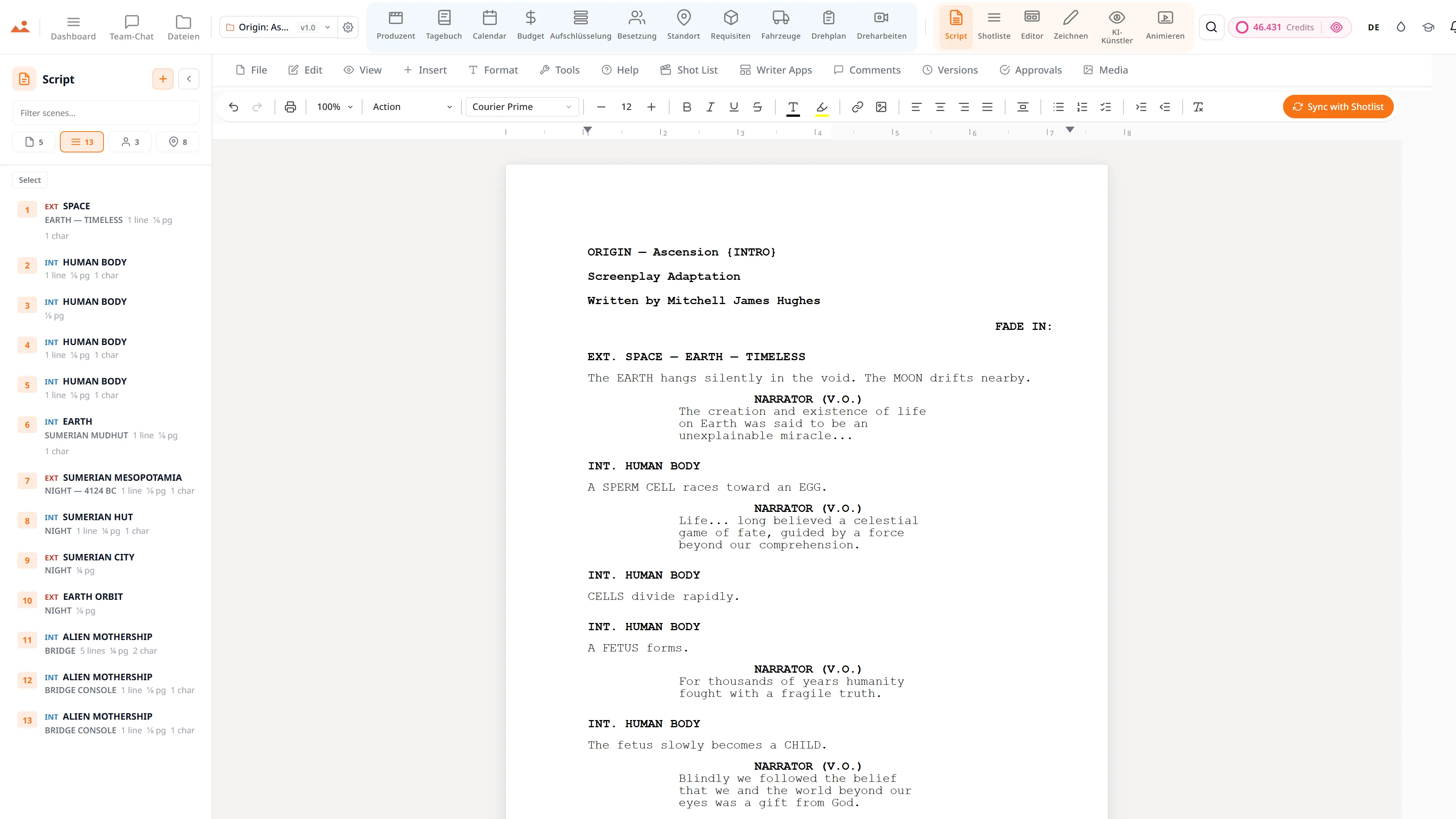
Drehbuch-App - professioneller Drehbuch-Editor mit live Szenen-Navigator und einem KI-Schreibassistenten.
Script
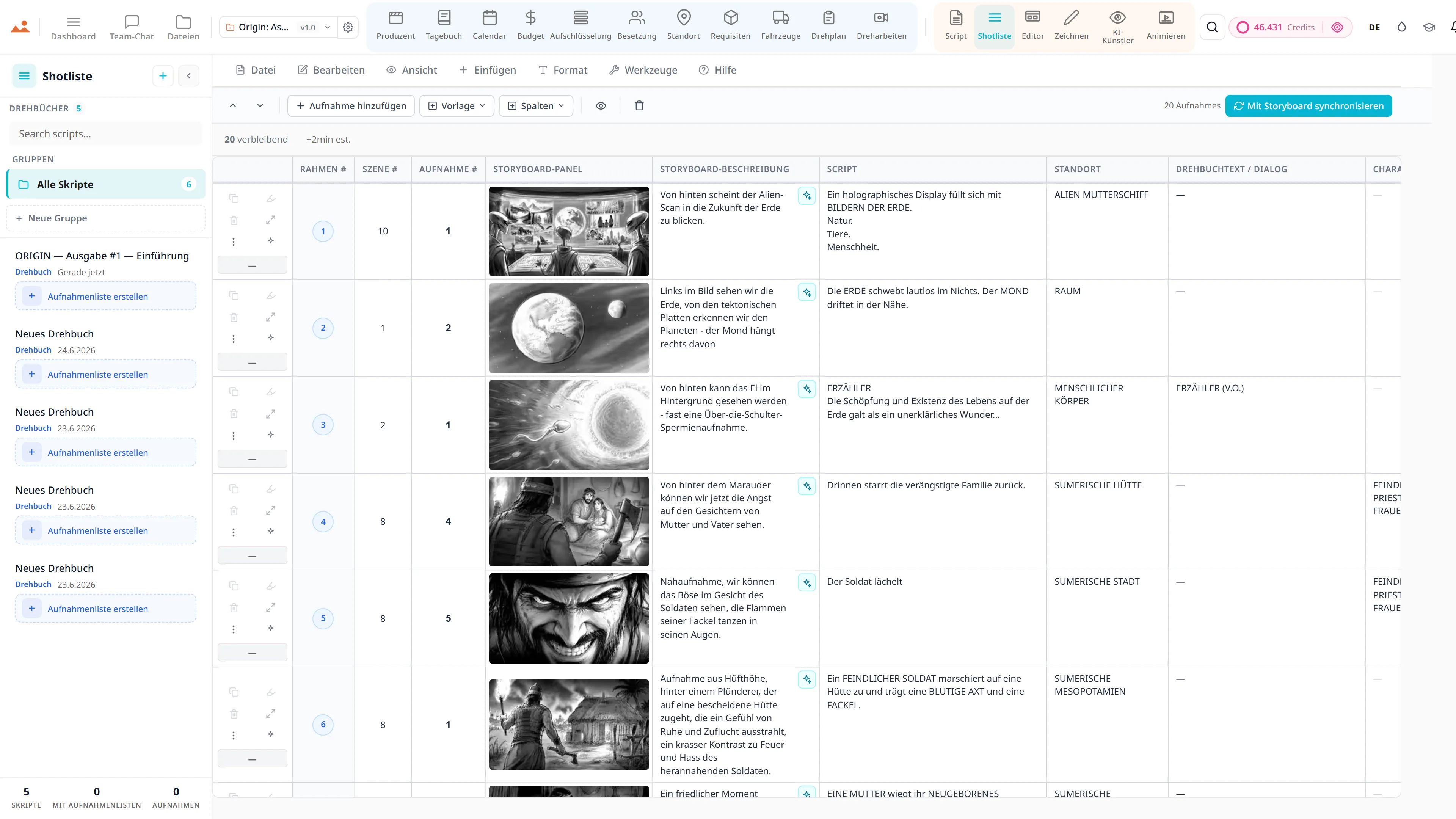
Shotlist-App - Kamera, Objektiv und Bewegung pro Aufnahme, verknüpft mit Storyboard-Frames.
Shot List
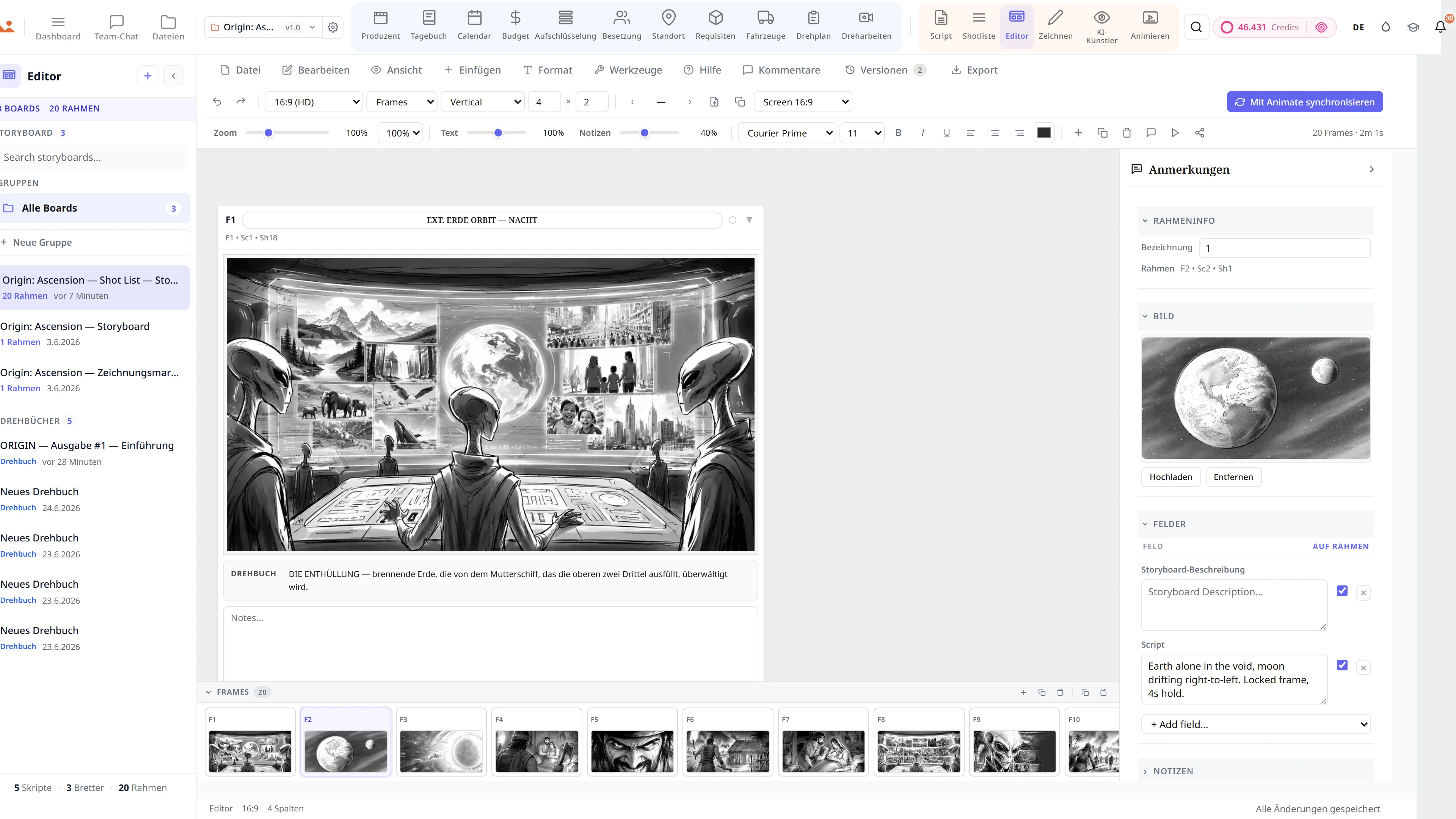
Storyboard-Editor - eine Science-Fiction-Sequenz mit Shot-Typ und Kamera-Bewegungsannotationen.
Storyboard
Draw app - GPU storyboard sketching with 450+ professional brushes and layers.
Draw
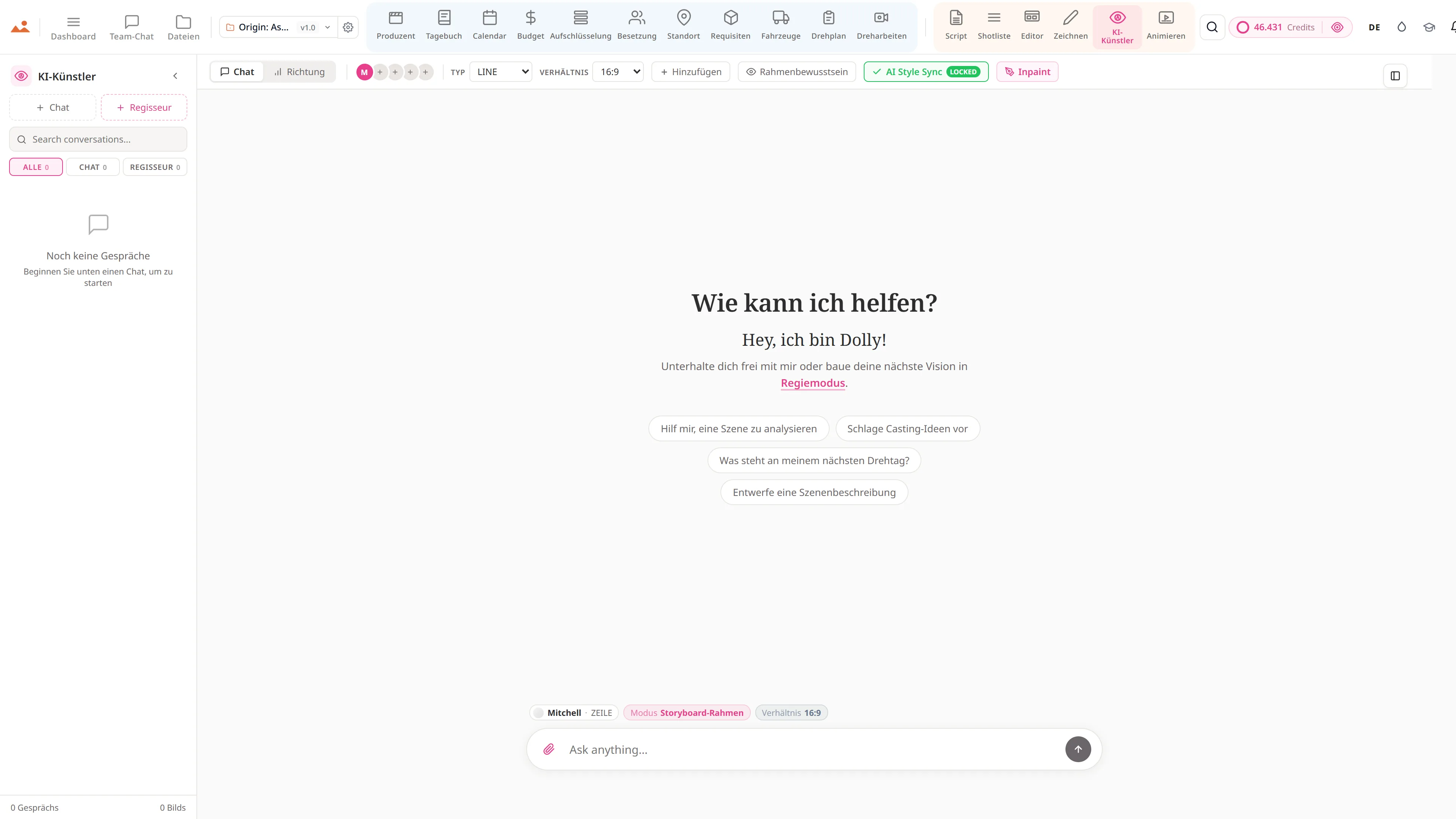
AI Artist - stilgebundene Storyboard-Bilderzeugung mit der DollyAI™-Engine.
AI Artist
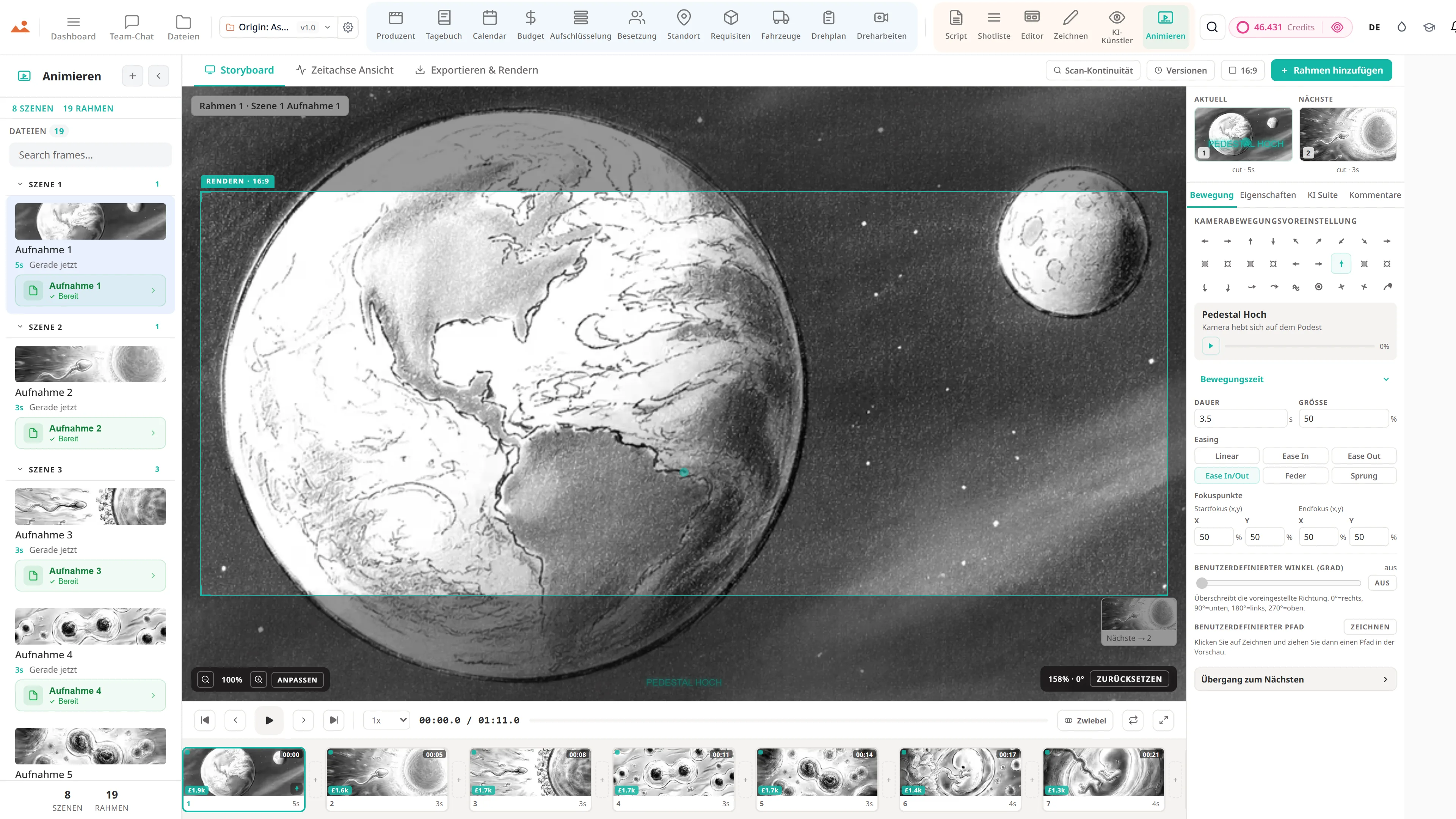
Animatic-App - Frame-Zeitleiste mit Kamerabewegungen, Übergängen und Videoexport.
Animate
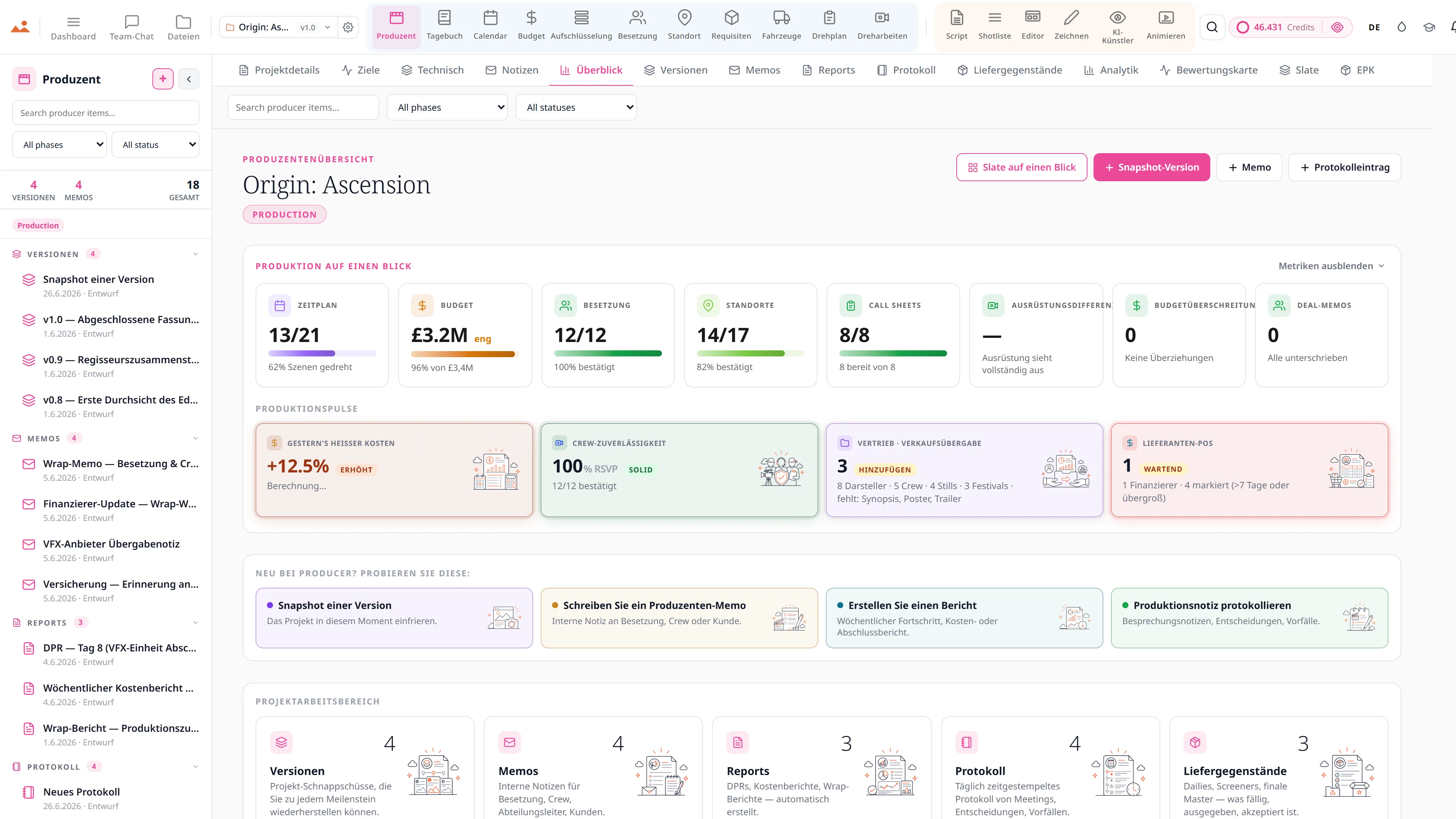
Produzentenanalysen - Zeitplanverzögerung auf Kurs bei 0,0 Tagen, ein vier-tägiger Wrap-Countdown bei 50% abgeschlossen, Kreditverbrauch über alle Projekte und Szenen, die gegen die täglich geplanten Szenen gedreht wurden.
Producer
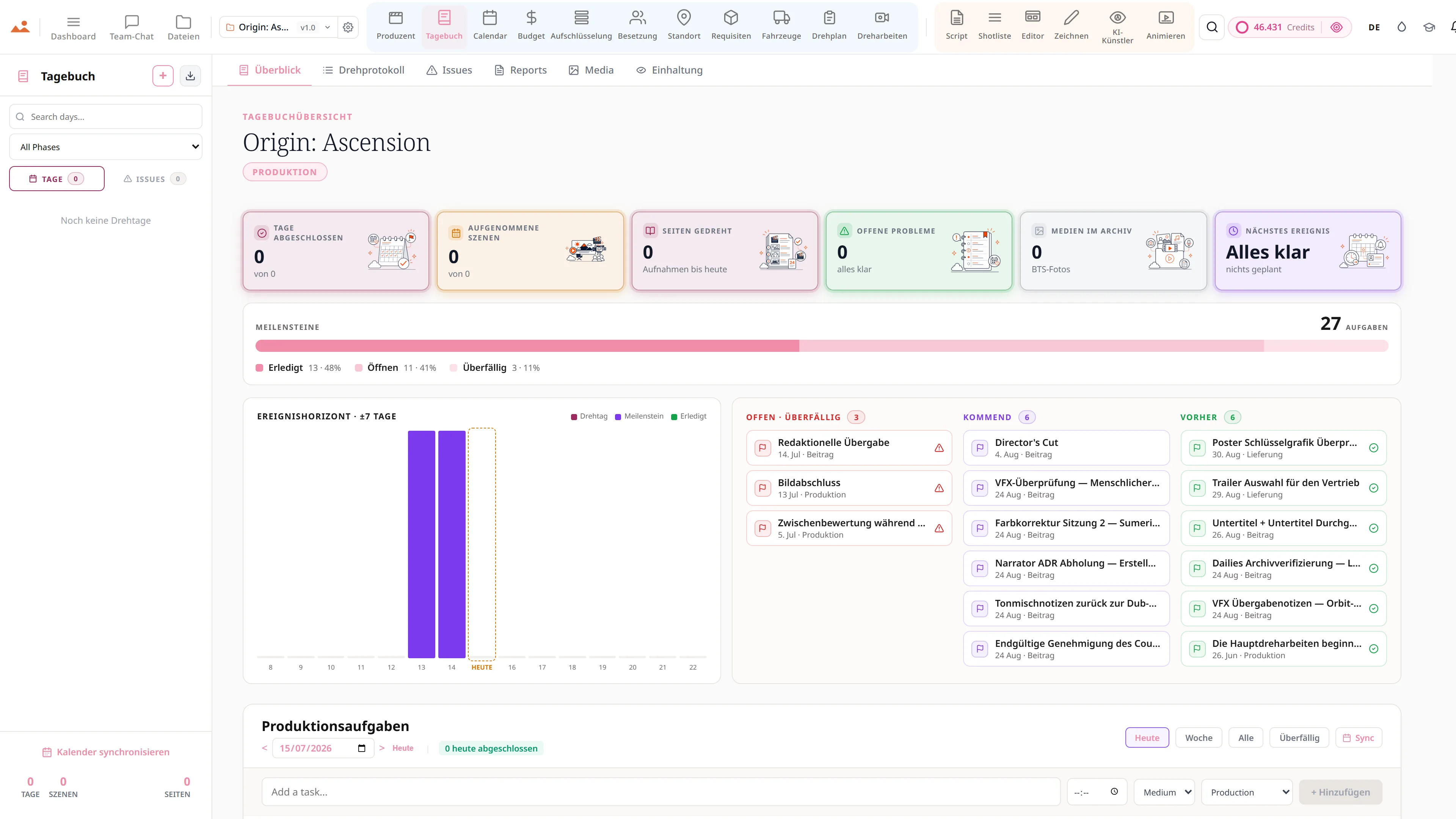
Die Übersicht des Produktions-Tagebuchs - 8 von 8 Tagen abgeschlossen, 13 von 13 Szenen gedreht, 7 Seiten bis heute gedreht, keine offenen Probleme, BTS-Stills im Archiv und Bildabschluss als nächstes Ereignis heute, über einer Meilensteinleiste und einem Ereignishorizont der sieben Tage vor und nach heute.
Diary
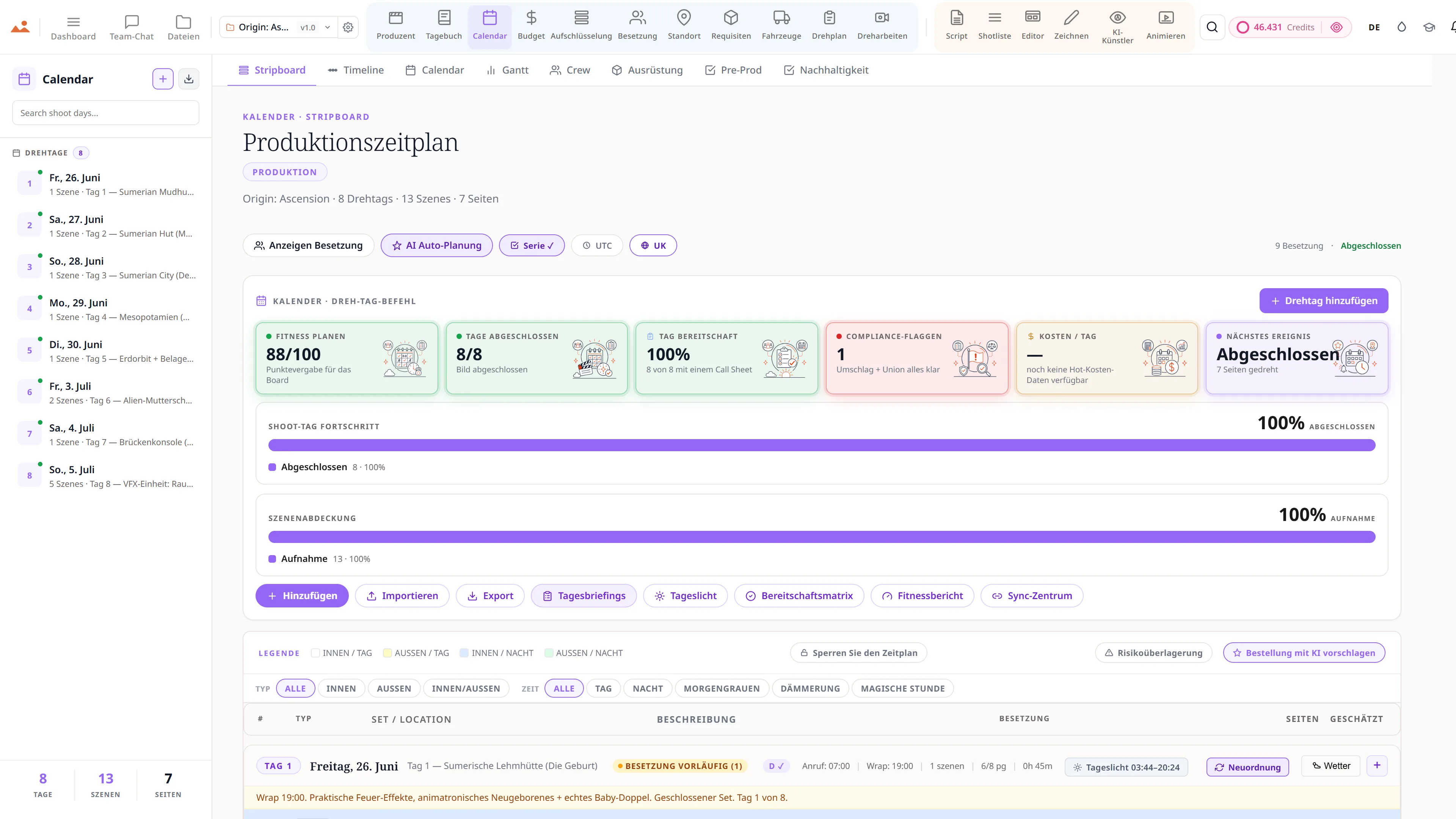
Produktionskalender und Stripboard - farbcodierte Szenenstreifen über die Drehtage.
Calendar
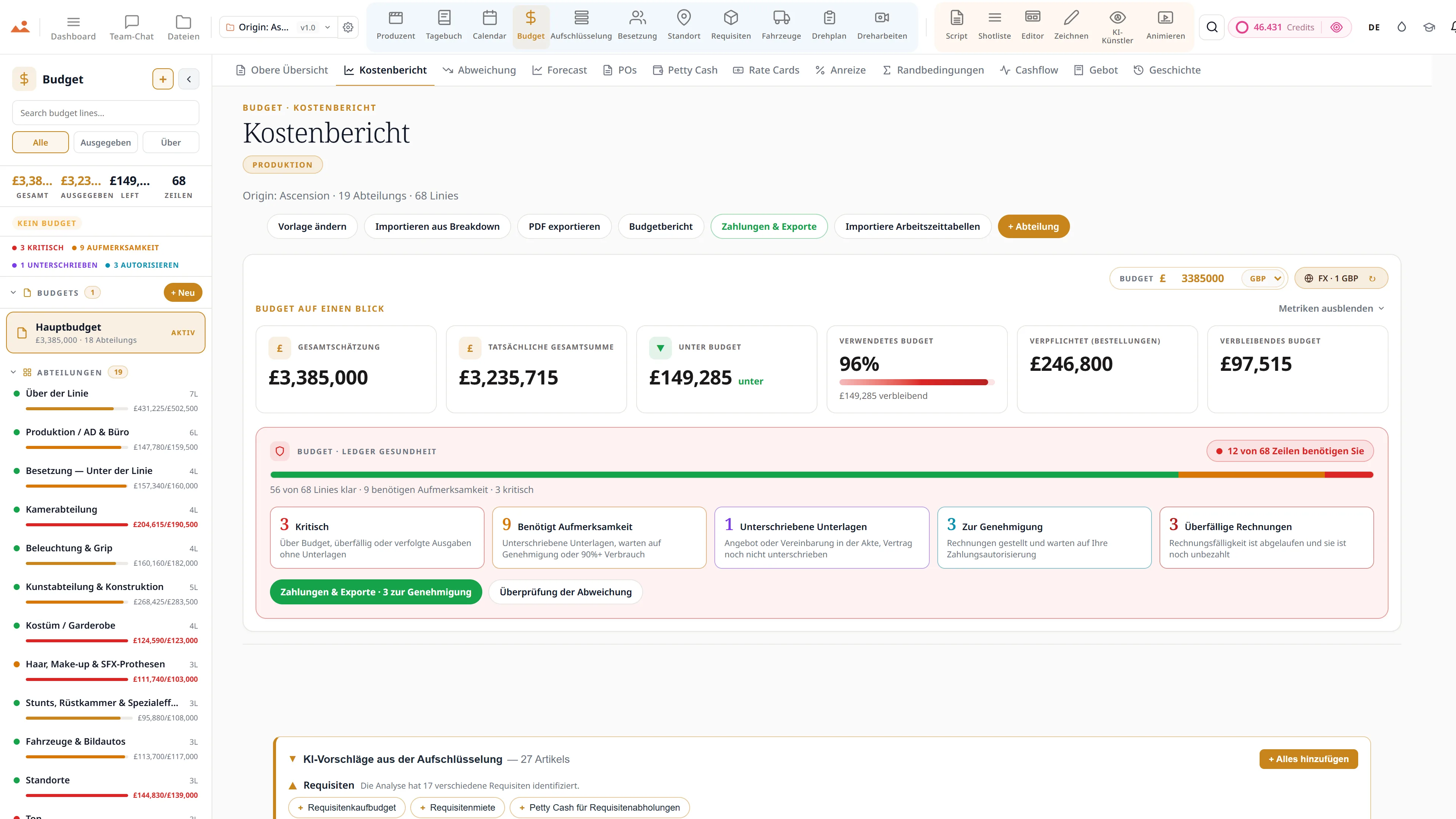
Film Budget App - Deckblatt, Kostenbericht und Abweichungsverfolgung in GBP.
Budget
Drehbuch-App - professioneller Drehbuch-Editor mit live Szenen-Navigator und einem KI-Schreibassistenten.
Script
Shotlist-App - Kamera, Objektiv und Bewegung pro Aufnahme, verknüpft mit Storyboard-Frames.
Shot List
Storyboard-Editor - eine Science-Fiction-Sequenz mit Shot-Typ und Kamera-Bewegungsannotationen.
Storyboard
Draw app - GPU storyboard sketching with 450+ professional brushes and layers.
Draw
AI Artist - stilgebundene Storyboard-Bilderzeugung mit der DollyAI™-Engine.
AI Artist
Animatic-App - Frame-Zeitleiste mit Kamerabewegungen, Übergängen und Videoexport.
Animate
Produzentenanalysen - Zeitplanverzögerung auf Kurs bei 0,0 Tagen, ein vier-tägiger Wrap-Countdown bei 50% abgeschlossen, Kreditverbrauch über alle Projekte und Szenen, die gegen die täglich geplanten Szenen gedreht wurden.
Producer
Die Übersicht des Produktions-Tagebuchs - 8 von 8 Tagen abgeschlossen, 13 von 13 Szenen gedreht, 7 Seiten bis heute gedreht, keine offenen Probleme, BTS-Stills im Archiv und Bildabschluss als nächstes Ereignis heute, über einer Meilensteinleiste und einem Ereignishorizont der sieben Tage vor und nach heute.
Diary
Produktionskalender und Stripboard - farbcodierte Szenenstreifen über die Drehtage.
Calendar
Film Budget App - Deckblatt, Kostenbericht und Abweichungsverfolgung in GBP.
Budget
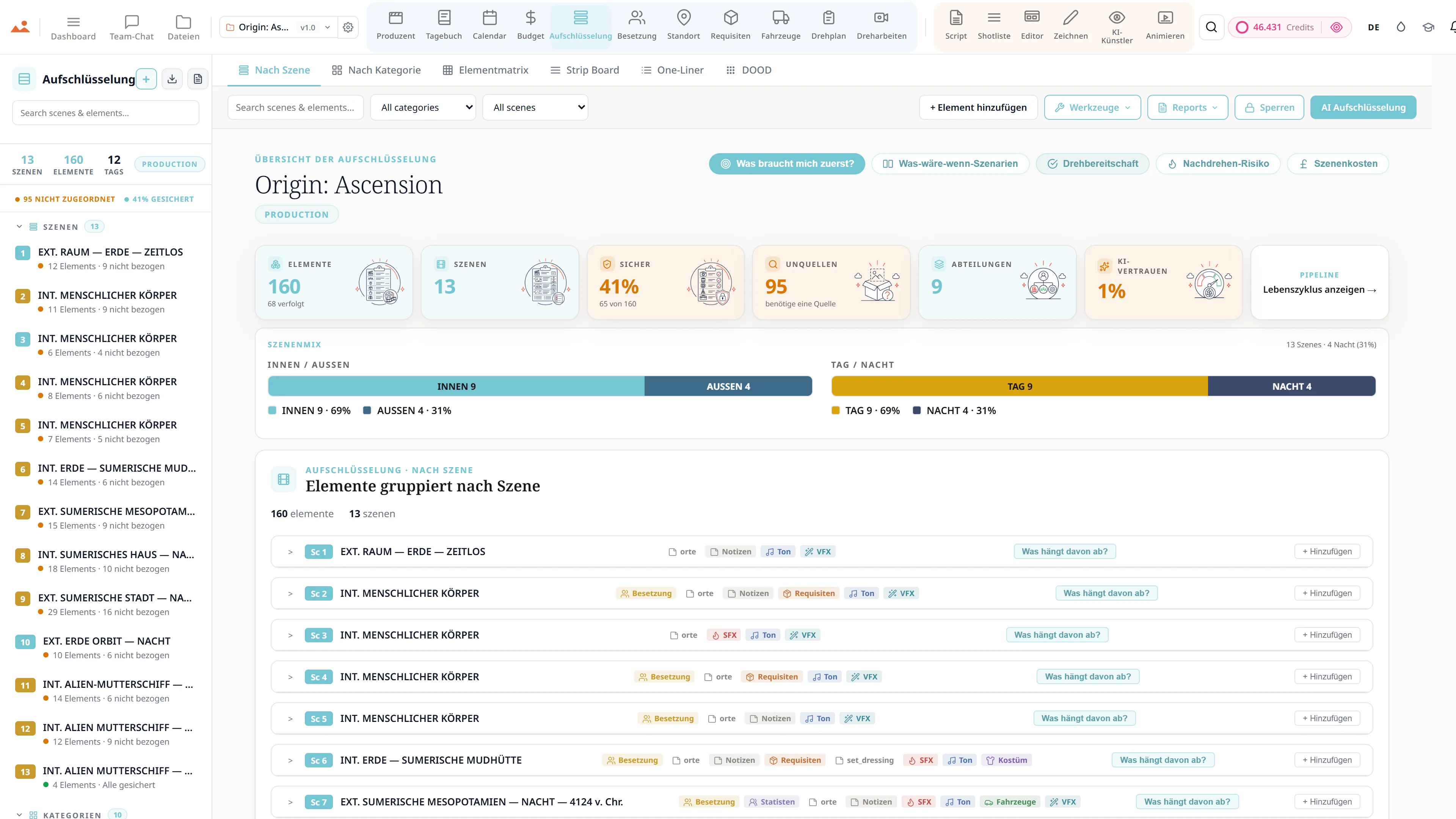
Drehbuchanalyse - 12-kategorisierte, farbcodierte Produktionselemente mit Szenen-für-Szenen Elementzählungen.
Breakdown
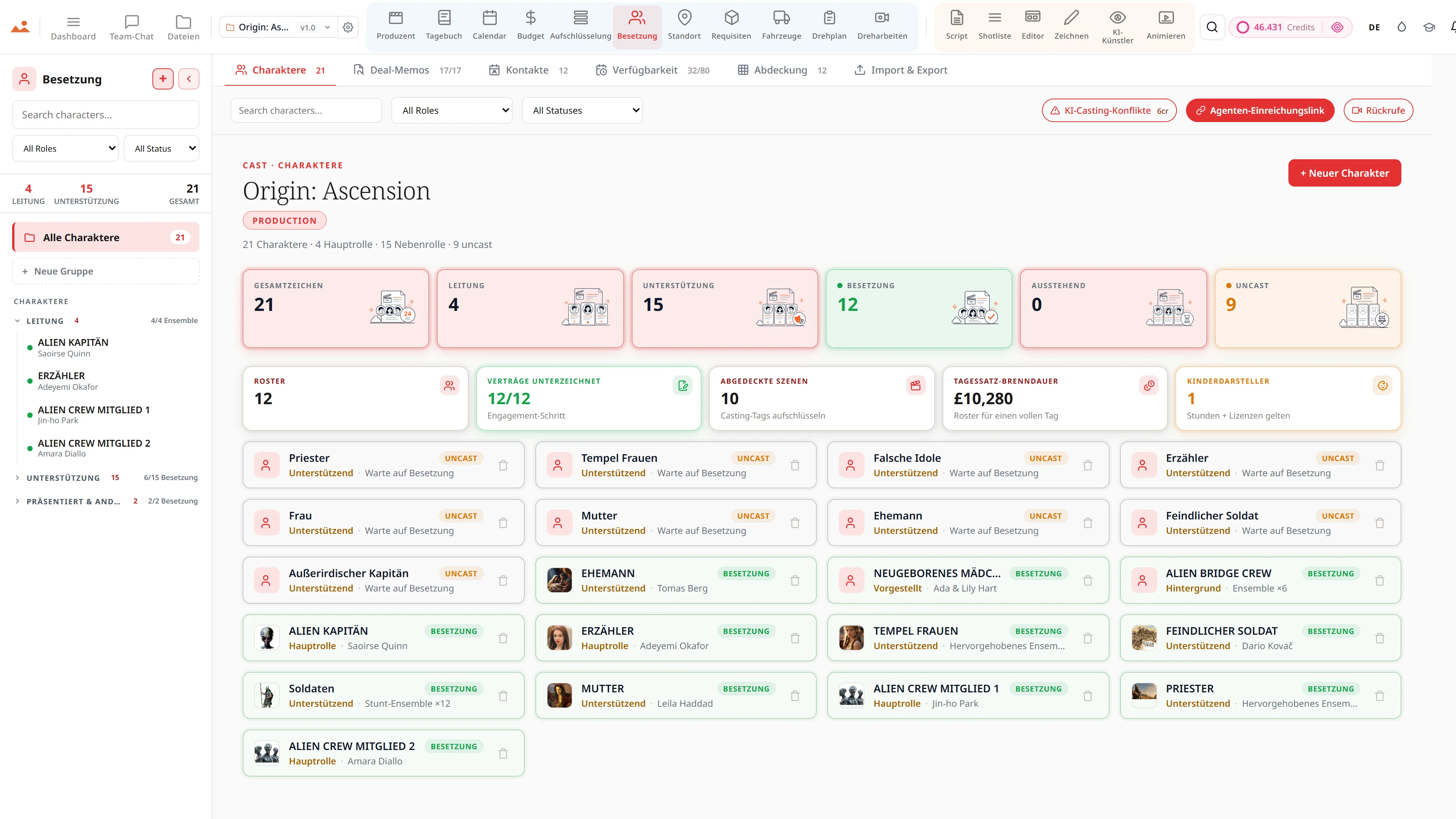
Casting-Management - Charakterprofile, Verfügbarkeit und Deal-Memos für ein Ensemble-Film.
Cast
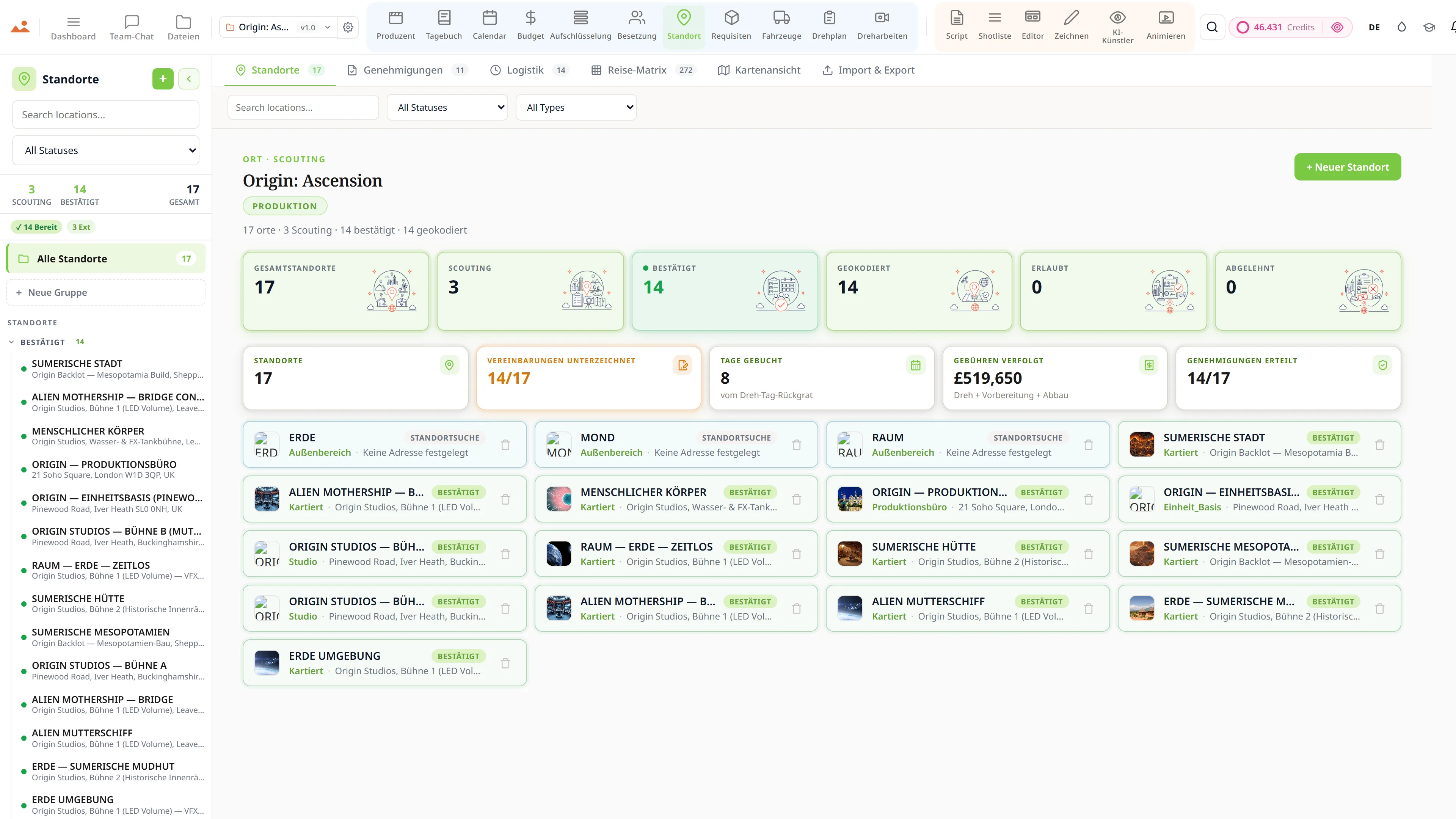
Standortsuche - Standorte mit Genehmigungen, Logistik und Foto-Referenzen.
Locations
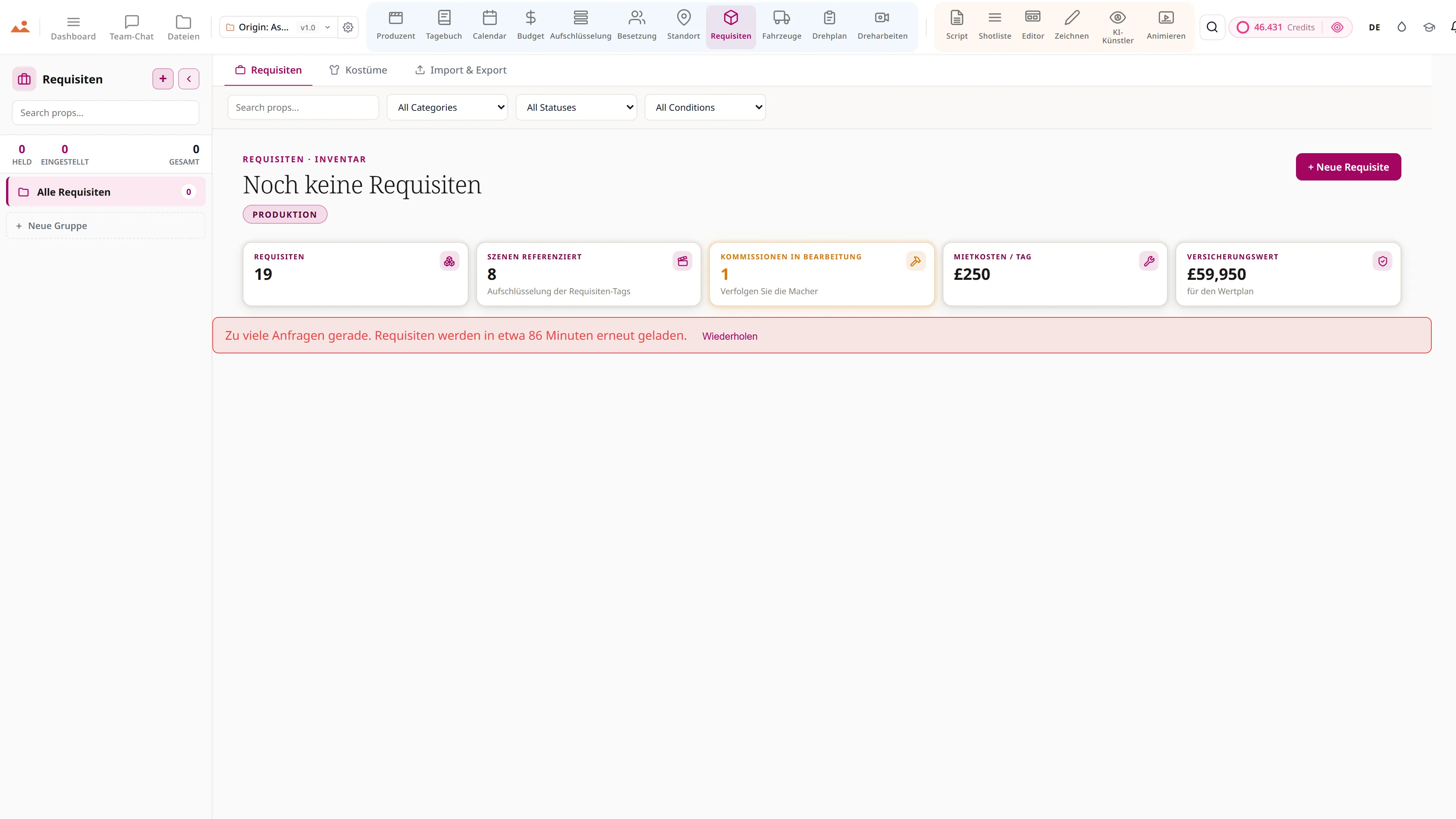
Requisiten- und Kostümkontinuität - Requisiteninventar mit Mietstatus und Szenenreferenzen.
Props
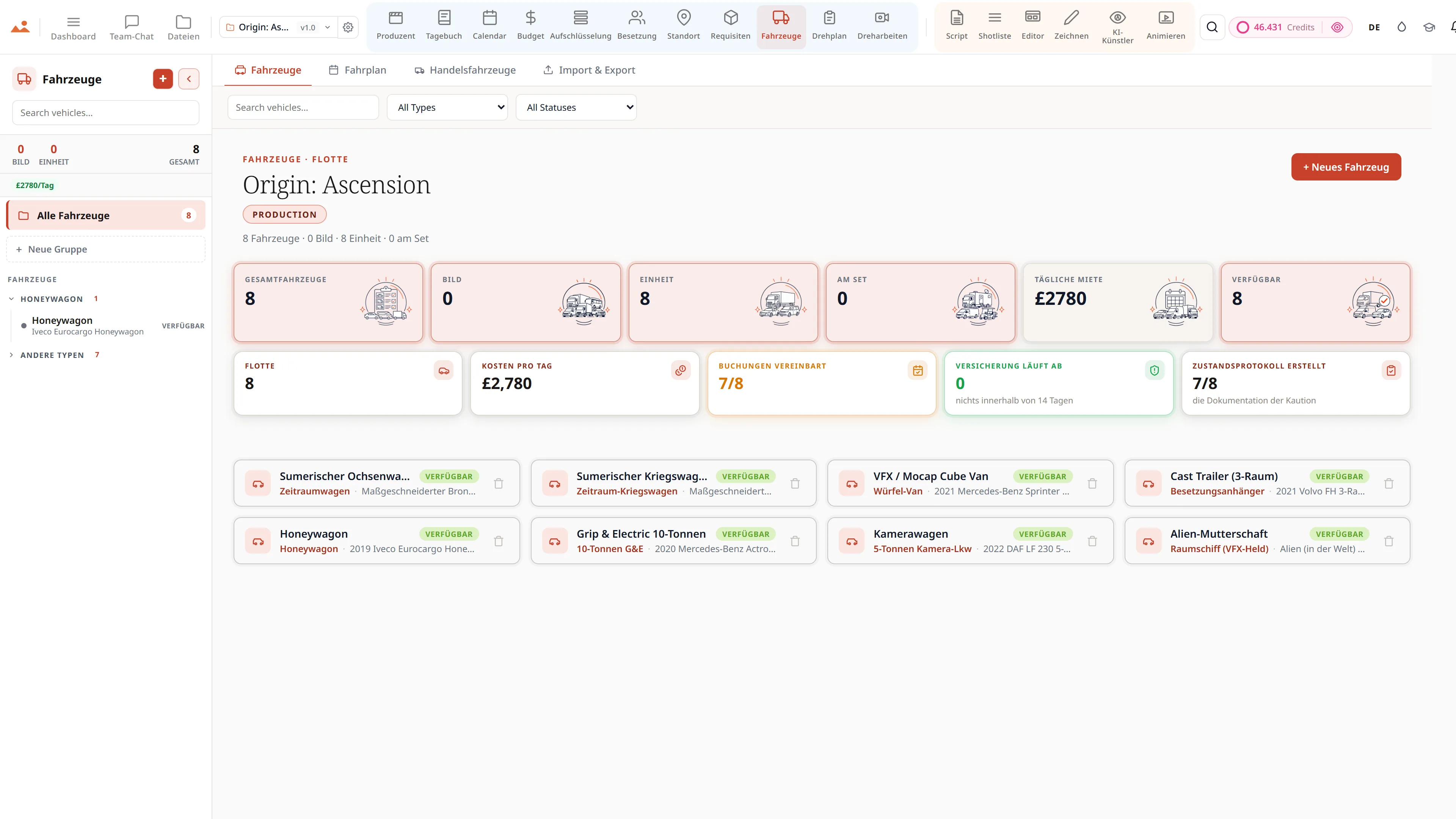
Bild- und Fahrzeugflotte - Flotteninventar mit Versicherung, Nummernschildern und Fahrereinsatzplanung.
Vehicles
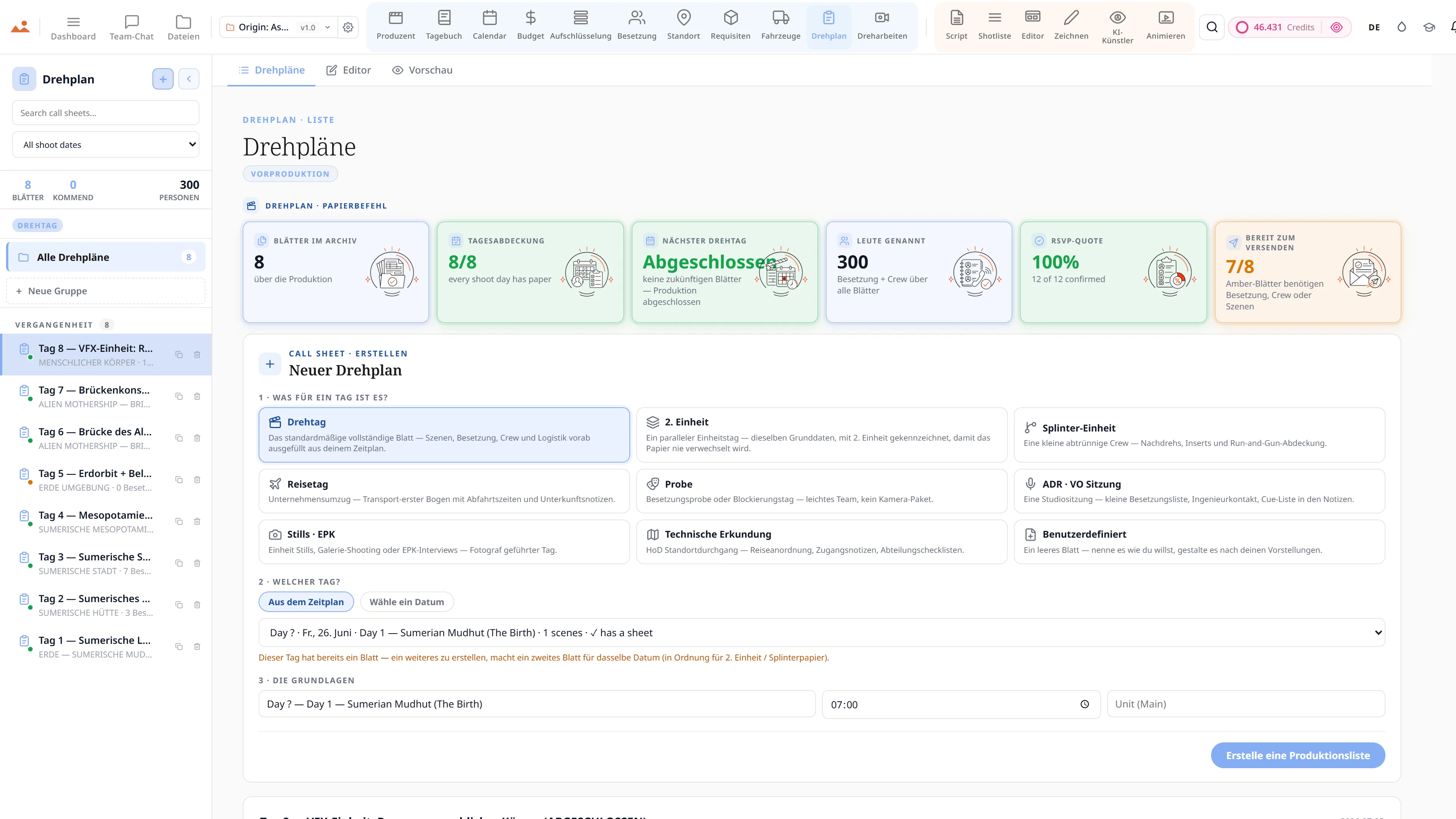
Call Sheet App - Besetzungs- und Crew-Anrufzeiten, Wetter und Szenenreihenfolge mit Ein-Klick-Versand.
Call Sheet
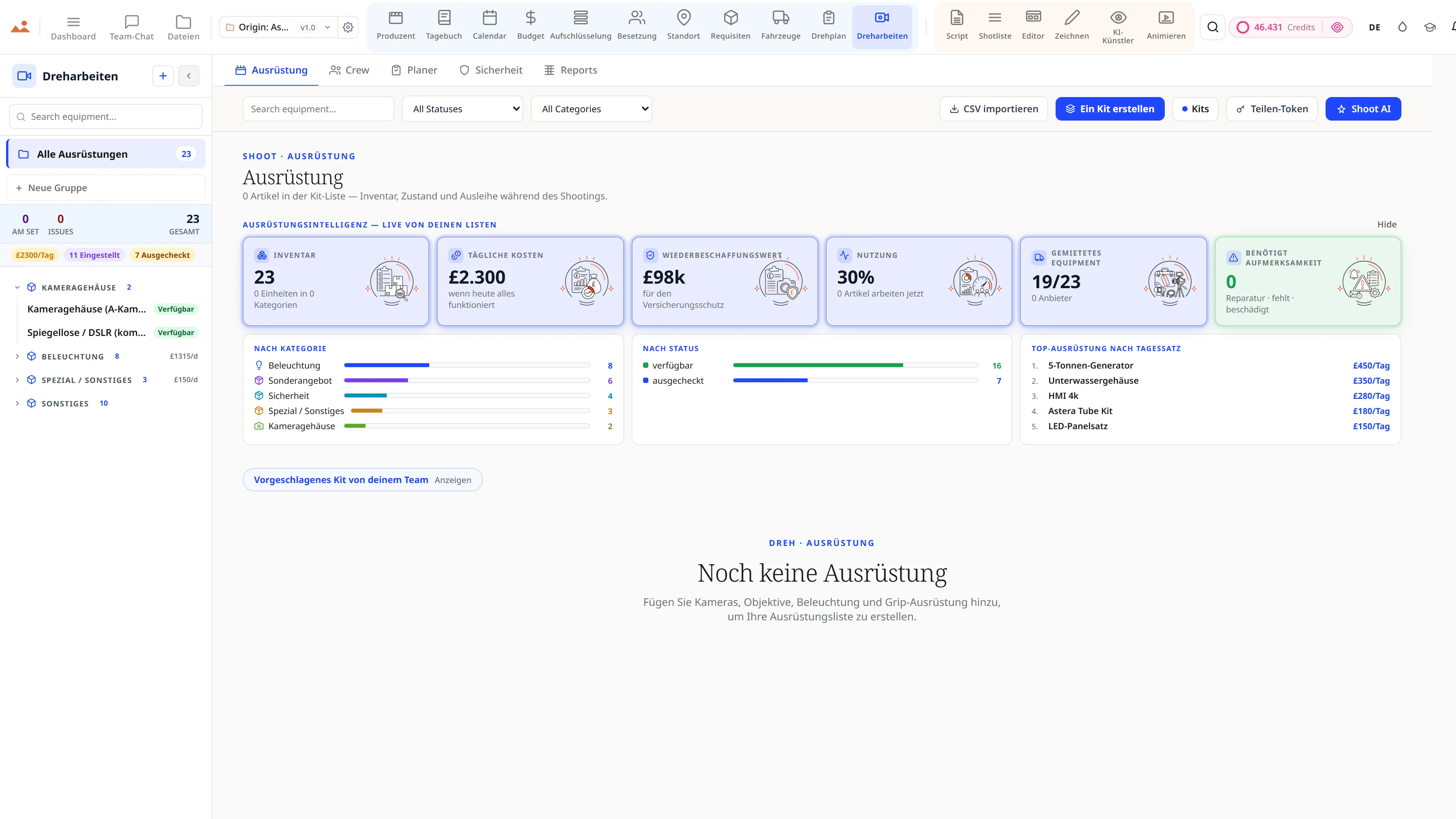
On-Set Shoot Hub - Ausrüstung Inventar in 13 Kategorien und die vollständige Crew-Liste.
Shoot Day
Drehbuchanalyse - 12-kategorisierte, farbcodierte Produktionselemente mit Szenen-für-Szenen Elementzählungen.
Breakdown
Casting-Management - Charakterprofile, Verfügbarkeit und Deal-Memos für ein Ensemble-Film.
Cast
Standortsuche - Standorte mit Genehmigungen, Logistik und Foto-Referenzen.
Locations
Requisiten- und Kostümkontinuität - Requisiteninventar mit Mietstatus und Szenenreferenzen.
Props
Bild- und Fahrzeugflotte - Flotteninventar mit Versicherung, Nummernschildern und Fahrereinsatzplanung.
Vehicles
Call Sheet App - Besetzungs- und Crew-Anrufzeiten, Wetter und Szenenreihenfolge mit Ein-Klick-Versand.
Call Sheet
On-Set Shoot Hub - Ausrüstung Inventar in 13 Kategorien und die vollständige Crew-Liste.
Shoot Day
The official DollyAI extension for Google Chrome - StoryboardCanvas is built on the web platforms the world trusts.
WE ARE TRUSTED BY GOOGLE

We are trusted by Google.

StoryboardCanvas runs beautifully in every modern browser - Chrome, Edge, Safari, Firefox and Brave - with nothing to install and no plugins to configure. But we build and test on Google Chrome first, so for the fastest, smoothest experience Chrome is the one we recommend.

Download the official DollyAI™ Chrome extension to add your production's assistant to your browser - built on the web platforms the world trusts.

  • DollyAI in every tab - Chat with your production's assistant while you browse and research, without ever leaving the page.
  • Capture anything, anywhere - Send a reference image, a location, a cast headshot or a quick note straight into the right app in your project, in one click.
  • She knows where it fits - Dolly suggests the right app and files your find for you, always aware of the exact production you are working on.
  • Nothing to install for the suite - The whole app suite runs in Chrome with zero downloads. Only the optional DollyAI extension is added to your browser.
Get DollyAI for ChromeWorks in Edge, Safari, Firefox and Brave too.
Built on the platforms the world trusts

Every app, every tier

Twenty connected production apps, one project file.

Every plan from Hobbyist to Enterprise ships the full suite. Tiers differ on seats, monthly credits, cloud storage, white labelling and queue priority - never on capability.

Free forever

The whole suite. £0. Forever.

Not a trial. Not a demo. All twenty apps - script, breakdown, storyboard, stripboard, budget, call sheets, shoot day, wrap - open, unlocked, and yours to keep.

The only thing Free doesn’t include is AI credits - DollyAI is the one feature that costs real money per use. Add a Booster from £5 the day you want it, or never.

All 20 apps, fully unlockedNo card. No trial clock.You own everything you makeWe never train on your work

Or compare every plan, from Free to Enterprise →

The free tier - the whole StoryboardCanvas suite unlocked: storyboard frames, script, shot list, budget, team chat, call sheets and the drawing canvas, with no card and no trial clock.
Die KI-Bildmaschine

Die einzige Storyboard-KI, die weiß, was in deinem Film ist.

Jedes andere Bildwerkzeug beginnt mit einem leeren Eingabefeld und vergisst deinen Film in dem Moment, in dem es antwortet. Unseres beginnt mit dem Film.

The StoryboardCanvas image engine: choose a house style or upload your own reference, lock it, and every generated storyboard frame holds the same line, shading, composition and colour across the whole project.

Es beginnt mit dem Film

Es liest dein Drehbuch, die Besetzung, die Garderobe, Requisiten und Drehorte, sodass ein Frame ankommt, der weiß, wer darin ist und wo sie stehen.

Style-Lock Engine

Wähle eine Hand und jeder Frame hält sie, Aufnahme für Aufnahme. Ein Blick, fixiert, über ein ganzes Board.

Trainiere deinen eigenen Künstler

Lade dein Referenzmaterial hoch und die Style Bible lernt deinen Strich, deinen Ton und deine Farben. Sie wird dein Künstler.

Regiemodus

Ziele die Kamera in 3D, stelle den Winkel und die Höhe ein, überschreite absichtlich die 180°-Linie. Die Anweisung schreibt sich von selbst.

Jenseits des Boards

Poster, Key Art, Konzeptzeichnungen, Moodboards, EPK-Stills und Titelkarten, alles in derselben gesperrten Hand.

Und es gehört dir

Vollständige kommerzielle Rechte an allem, was du generierst, und wir trainieren niemals mit deiner Arbeit. Niemals.

Sehen Sie die Bildmaschine →

Entwickelt von einem Storyboard-Künstler, der es leid war, mit einem Eingabefeld zu streiten.

See it for yourself

Step inside a real production, completely free.

Open the actual software on Origin: Ascension, a finished short film, and explore every app exactly as the crew left it. Read the script, walk the boards, open the budget, print the call sheet. Fully read-only, with no sign-up. Nothing you touch is saved.
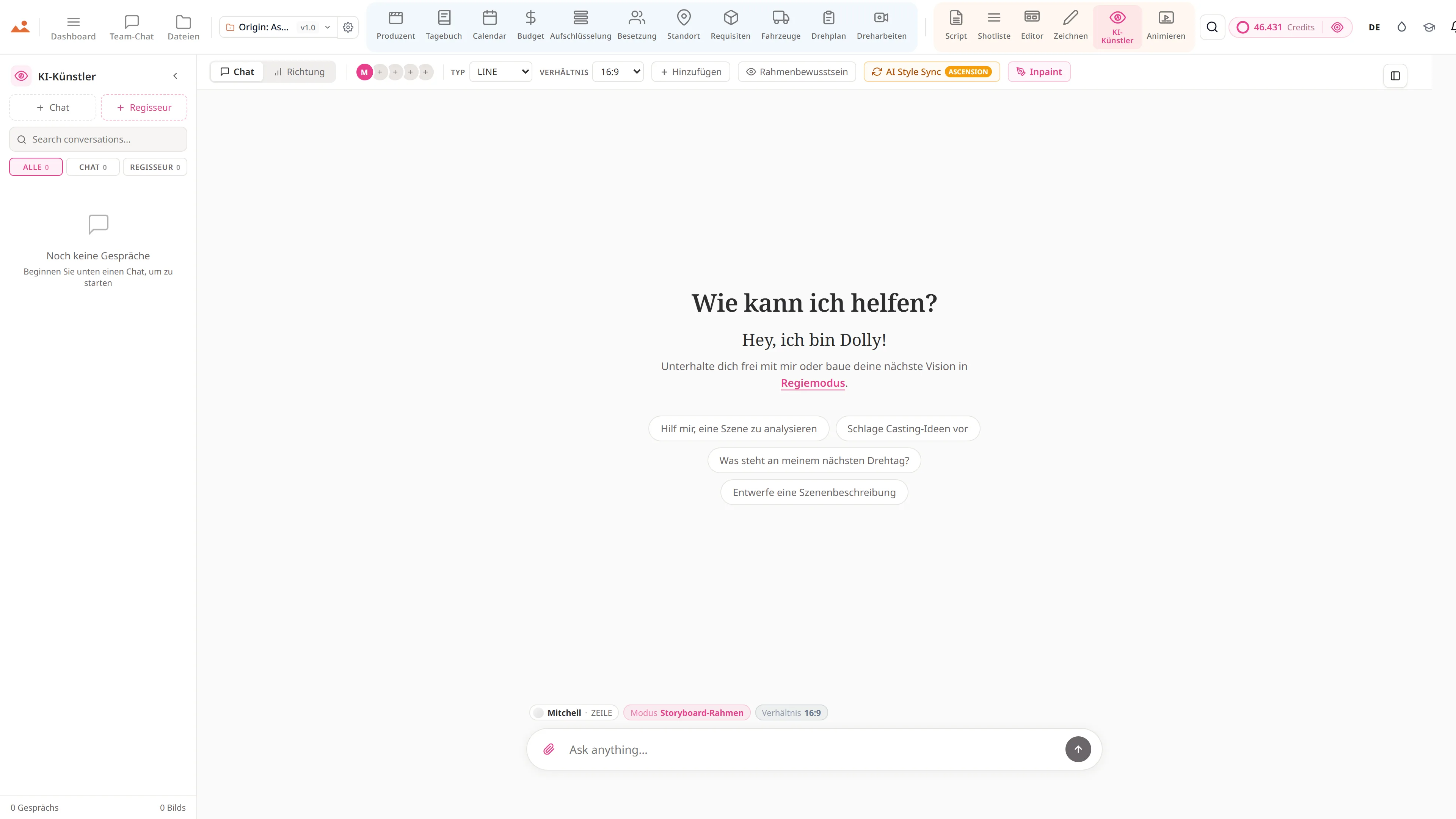

Try the free demo20 apps · one project file · 0 seconds of setup
No sign-upNo cardNo downloadFully read-onlyNothing you touch is saved
Live demo · Origin: Ascension
Die AI Artist-App in der kostenlosen Demo, die einen Origin: Ascension Storyboard-Rahmen im gesperrten Hausstil des Projekts generiert.
The Draw studio in the free demo, painting over an Origin: Ascension storyboard frame on the GPU canvas.
Die Animate-App in der kostenlosen Demo, die das zeitlich abgestimmte Origin: Ascension Animatic abspielt.
Die Call Sheet-App in der kostenlosen Demo, die ein fertiges Origin: Ascension Drehtag-Call-Sheet anzeigt.

Script · breakdown · boards · animatic · call sheets · budget

The demo is a view-only copy shared for exploration. Some features need a paid subscription to run.

Mitch, founder of StoryboardCanvas and a working storyboard artist.
Mitchell Hughes
Founder · Storyboard Artist

Build your own style - or pick from ours.

The only AI storyboard generator built by a storyboard artist.

Mitch has spent nearly two decades turning scripts into frames for advertising, film and branded content, long before a camera rolls. The job was never just drawing. It is emotion, pacing, composition and the language of cinema.

He used the popular AI models on his own paid jobs, and they kept missing what a board is for. So he built this one.

You can talk to it in chat, or open the Frame Builder in Director mode. Every dropdown is already wired to your scenes, cast, props and notes, so your prompt is built in seconds.

His line, tone and colour ship as the house style. Pick one of them, or train your own artist in the Style Bible. Either way, the Style-Lock Engine holds every frame to that one hand, whether you want clean line, greyscale tone or full colour.

The boards that built Origin: Ascension

Twenty frames of a real production - drawn, locked and made in StoryboardCanvas.

Storyboard frame from Origin: Ascension, drawn by the AI Artist in Mitch's locked house style.

The Style-Lock Engine

Pick a style, or build your own - and it stays locked.

01

Built by the founder, a working artist

Mitch is our founder and a working storyboard artist, and he drew every reference frame himself. The line, the tone and the colour are one person's hand, so the look you get is real craft rather than something scraped off the internet.

02

Train your own custom styles

Drop in a few reference frames and run AI Style Sync. Your studio's look becomes a locked artist you can pick from any time, exactly like Mitch's, and every future board can be drawn in it.

03

A lock no prompt can break

Your locked style sits above your prompt rather than beside it. Ask for photoreal and the board stays on style, because the locked look wins every frame, every time.

04

Re-drawn the moment it drifts

Every frame is scored against the reference for line, tone and colour. The instant one falls off the look, the engine redraws it, so drift never reaches your board.

05

Surgical inpainting

Repaint one corner of a frame and only that region is redrawn. It comes back in the same locked hand, and the rest of the board is left exactly as you had it.

06

Synced to your whole project

The Frame Builder reads the scenes, characters, props and notes already in your project. A board lands with your script's own detail baked in, instead of whatever a generic prompt happened to invent.

One locked style, every creative mode:

StoryboardsConcept artPostersKey artMood boardsEPK stillsTitle cardsProduction design
Mitch's reference set

One frame. Three finishes.

Line
Clean pen-and-ink. Fast to read for blocking and sign-off.
Tone
Greyscale marker over the line. Light, depth and mood.
Colour
Muted paint over both. Pitch-ready frames.
A frame drawn by the AI Artist in all three house-style finishes - line on top, tone in the middle, colour beneath.

Or lock your own. Drop a few reference frames, run AI Style Sync, and the engine holds every future frame to your studio look - across storyboards, posters, concept art and key art alike.

One connected production workflow

From the blank page to the final wrap, in one place.

Write the script, break it down, build the shot list, board it, schedule it, budget it, shoot it and wrap it - every department reading from the same project file. No exports, no re-typing, no “which version is this?”
See how it works
A filmmaker presenting a storyboard built in StoryboardCanvas, with numbered scene frames and a script-to-screen workflow.
The connective thread

What makes twenty apps feel like one.

A connected suite is only as good as the thread running through it. Dolly is that thread - the same assistant in every app, holding the whole film in her head so the pieces never drift apart.
Explore DollyAI
Dolly, the AI production assistant, present across every app in the StoryboardCanvas suite.
LERNEN SIE DOLLY KENNEN

Dolly AI, dein KI-Produktionsassistent - allgegenwärtig über jede App und Oberfläche, Text, Daten und Bilder, damit Sie es nicht sein müssen.

Dolly liest Ihr Projekt einmal - Drehbuch, Aufschlüsselung, Zeitplan, Call Sheets, Storyboards, jede verbundene App - und bleibt von dort an auf jeder Seite montiert. Und sie remembers: gesperrte kreative Entscheidungen, dein persönlicher Geschmack, die Bibel deines Films, die zwischen den Sitzungen getragen wird.

Frag sie alles und sie antwortet basierend auf deinen Live-Produktionsdaten, nicht auf Vermutungen - und bietet dann an, darauf zu reagieren. Der Agentenmodus schlägt die Ergänzung vor; nichts wird geschrieben, bis du es genehmigst. Aktiviere die Doppelprüfung und sie bewertet ihre eigene Antwort anhand der realen Fakten des Projekts, bevor du sie jemals siehst. Und wenn eine Frage zu einem Spezialisten gehört, holt sie die Familie ins Boot - Marlowe für das Skript, Sable für das Budget, Cass für den Tag, Indra für das Casting, Vee für die Kontinuität.

Die Entscheidungen liegen bei dir. Die repetitive Arbeit - das erneute Tippen, das Überprüfen, das "warte, habe ich das überall aktualisiert?" - ist das, was Dolly übernehmen soll. In jedem kostenpflichtigen Plan, in jeder App.

Liest dein gesamtes Projekt

Skript, Aufschlüsselung, Zeitplan, Besetzung, Drehorte - alles synchron. Bearbeite eines, die anderen folgen.

Erinnert sich an deinen Film

Festgelegte Entscheidungen, dein persönlicher Geschmack, die kreative Bibel - zwischen den Sitzungen getragen, für die gesamte Produktion.

Handelt - mit deiner Genehmigung

Der Agentenmodus antwortet mit Daten aus dem Live-Projekt und schlägt Ergänzungen vor. Nichts wird geschrieben, bis du jede einzelne genehmigst.

Überprüft ihre eigene Arbeit

Aktiviere die Doppelprüfung und jede wesentliche Antwort wird mit den realen Fakten deines Projekts abgeglichen - und überarbeitet - bevor du sie siehst.

Bringt die Familie ins Spiel

Marlowe (Drehbuch), Sable (Line Producer), Cass (1. AD), Indra (Casting), Vee (Continuity) - Spezialisten nur einen Klick entfernt.

Sieht die Boards, briefed den Morgen

Notizen des Regisseurs zu Ihren Storyboard-Frames sowie ein nach Risiko geordnetes Produktionsbriefing, wann immer Sie es wünschen.

AGENTENMODUS - fragen → sie schlägt mit einer Vorschau Feld für Feld vor → Sie genehmigen mit einem Klick → rückgängig machen mit einem Klick. Plus die proaktiven Modi: stündliche Produktionsüberwachung, ein morgendliches Briefing und eine wöchentliche Regisseurüberprüfung Ihrer Boards. Sie kann sogar das offene Web durchsuchen und die Referenzen zurückbringen.

Jede KI-Aktion zeigt ihren Preis bevor du klickst und berechnet nur bei Erfolg - ein schnelles Gespräch beginnt bei einem Viertel eines Credits.

Dolly in jeder App

ScriptSzenenüberschrift-Hilfe, Beat-Analyse, Überarbeitungszusammenfassungen
ShotlisteSchlägt Abdeckung basierend auf den Skriptbeats vor
EditorAnalyse der Sequenzgeschwindigkeit und Erkennung fehlender Aufnahmen
ZeichnenReferenzskizzen + Hilfe bei Komposition und Blockierung
KI-KünstlerRahmenbewusste Generierung mit festgelegtem Stil + Charakter
AnimierenZeitvorschläge basierend auf dem Skriptfluss + Szenenlänge
AufschlüsselungAuto-Tags für Requisiten, Garderobe, VFX, Stunts, SFX, Fahrzeuge
BudgetAbweichungsüberwachung + detaillierte Kostensparvorschläge
CalendarTagesreihenfolge-Optimierer - findet günstigere Drehreihenfolgen, kennzeichnet Konflikte
DrehplanFüllt automatisch Abholungen, Essenspausen, Wetter, nächstes Krankenhaus aus
ProduzentStellt jeden Morgen bis 6 Uhr automatisch den DPR + den wöchentlichen Kostenbericht zusammen
BesetzungCharakterkontinuitätsgrafik + Casting-Abdeckungs-Vorschläge
StandortSzene-zu-Standort-Zuordnung, Scout-Tipps, Genehmigungs-Erinnerungen
RequisitenExtrahiert jedes Haupt- + Hintergrund-Requisit direkt aus dem Skript
FahrzeugeBildfahrzeug-Hinweise aus Skript-Erwähnungen + Transportlogistik
DreharbeitenAusrüstungs-Empfehlungen pro Drehtag + Erinnerungen für die Crew-Abteilungen
TagebuchTägliche Drehzusammenfassung + BTS-Medienorganisator + DPR-Entwürfe
DashboardNächste Maßnahmen-Übersichten, Anomalieerkennung, Burndown-Synthese, projektbewusste Cmd-K-Sprünge
DateienVereinheitlichte Bildgrafik über neun Oberflächen, send-to-Animate / send-to-Editor Chips
Team-ChatKanal- + DM-Zusammenfassungen, Aktionspunkt-Extraktion, erwähnungsbewusste Benachrichtigungen
AssetsAsset-Bibliothekssuche, automatische Tagging, Duplikaterkennung, plattformübergreifende Zustellung

IM HINTERGRUND ARBEITEN

Sie behält die gesamte Produktion im Auge während du schläfst.

Stündliche Produktionsüberwachung

Überprüft jedes aktive Projekt anhand seiner eigenen Risikoregeln - nicht unterzeichnete Deal-Memos, ein unterbesetzter Drehtag, eine Budgetlinie, die kurz davor ist, zu brechen - und kennzeichnet es, bevor es dich etwas kostet.

Morgenbriefing

Jeden Tag stellt sie zusammen, was Ihre Aufmerksamkeit benötigt - selbst überprüft anhand Ihrer realen Produktionsdaten - und bringt es direkt in Ihre Benachrichtigungen.

Wöchentliche Board-Überprüfung

Sie betrachtet Ihre Storyboards mit dem Blick einer Regisseurin und hinterlässt Anmerkungen zu Komposition, Abdeckung und Kontinuitätsabweichungen - eine laufende Überprüfung, nach der Sie nie fragen müssen.

Genehmigungs-Posteingang

Jede Änderung, die sie vorschlägt, wartet in einem Posteingang, über Sitzungen hinweg - genehmigen, rückgängig machen oder ablehnen, wann immer Sie bereit sind. Nichts wird ohne Ihr Einverständnis geschrieben.

Planen und dann ausführen

Geben Sie ihr ein mehrstufiges Ziel und sie entwirft den Plan; eine Genehmigung steuert das gesamte Vorhaben, mit Kontrollpunkten, sodass es genau dort fortgesetzt wird, wo es aufgehört hat.

Produktionsgedächtnis

Sie erinnert sich an festgelegte kreative Entscheidungen und Ihren persönlichen Geschmack zwischen den Sitzungen und verbessert ihr Gedächtnis jede Woche, damit es schärfer wird, anstatt sich aufzublähen.

Hintergrundarbeit ist plattformfreundlich und gibt niemals ein Guthaben ohne einen Eigentümer aus - und Sie können jede davon projektweise ein- oder ausschalten.

Make it yours · the colour studio

Paint the whole production suite in your brand colours.

Open the colour studio from the droplet in the menu bar - pick a curated palette or set your own accent for every one of the twenty apps. Switch between Light, Dark and Monochrome. Your theme saves to your account and follows you into every app, every session.
The colour studio recolouring every app in the suite to a chosen brand palette, with Light, Dark and Monochrome themes.

Zwanzig Apps. Ein Projekt. Null Ersatzteile.

Entwickelt für Filmemacher, die möchten, dass ihre Werkzeuge miteinander kommunizieren und ihre KI für sie arbeitet, nicht über sie hinweg. Ab £15/Monat - vom Skript bis zur Leinwand, auf einer Rechnung.

THE DEVELOPER PROMISE

Your film production software gets measurably better every fortnight, free, for the life of your project.

Bi-weekly cadence. Public roadmap. Honest changelog. Every quality-of-life upgrade ships to every plan, retroactively. Here's the actual board.

JUST SHIPPED

Last fortnight, in production.

Alpha just landed, on top of a fortnight of releases. Every entry is a real commit, dated, deployed.

  • v7.00.0 · JUL 1
    Version seven - a new face for the whole studio.
    Every one of the twenty apps and the whole website rebuilt to one calm, consistent identity, with a brand-kit wizard, fresh full-screen galleries, and the rebranded demo open to walk through. Fifty percent off your first month to mark it.
  • v6.6.0 · JUN 22
    The storefront, made as alive as the studio.
    Every app page now leads with a real media gallery, the screenshots are turning into short clips of the apps in motion, and the whole site reads clean in fifteen languages on any screen.
  • v6.0.0 · JUN 11
    Version six - the launch build. All twenty apps, finished, working as one studio.
    Write a script and the breakdown reads it; the connected production fills itself end to end. Live in the demo now.
  • v4.0.01 · JUN 2
    Alpha - version four of the whole suite.
    Twenty synchronized apps you can run a real production on, with a live read-only demo open on the homepage.
Every other Friday, like clockwork.
SHIPPING NEXT

What's on the bench right now.

The next two fortnights, scoped, dated, public. No NDA pitches.

  • FORTNIGHT · JUL 11
    The suite, captured in your language.
    Every app and key function photographed in all fifteen languages, so a visitor browsing in Japanese, German or Spanish sees the studio actually working in their language - not an English screenshot with a translated caption under it.
  • FORTNIGHT · JUL 25
    Your language, all the way down.
    The interface already speaks fifteen languages; next, Dolly's replies and your exported documents - call sheets, PDFs, reports - come through in your team's language too, not just the chrome around them.
  • FORTNIGHT · AUG 8
    A look for every production.
    Save a theme per project, so the noir thriller and the toy commercial each open in their own light. The full appearance studio already ships; this pins a chosen look to a single production.
  • FORTNIGHT · AUG 22
    Read-only share links across the planning apps.
    The shot list and call sheet already mint a no-login share link; next, the same secure read-only share comes to the breakdown, schedule and budget so any collaborator sees exactly what you choose.
Two cadences out, then it's the next bench.
ON THE ROADMAP · VOTE LIVE

Rolling out across the Alpha - you pick the order.

Alpha is live - and this is everything still to come during it. The vote buttons are real: tap one and the count climbs for everyone. Top askers ship first.

  • Your screenplay, translated without losing your voice.
    The suite already speaks fifteen languages. This is the harder one: translating the script itself for a co-production, keeping the rhythm, the idiom and the character's voice intact, with the original always one click away.
  • Brand kits for studios and agencies.
    Every document you send a client - the call sheet, the deck, the board, the PDF - carrying your company's mark rather than ours. One kit, applied across the suite, per production.
  • WhatsApp dispatch.
    Crews do not read email at 05:40. Call sheets, sides and call-time changes go to the channel they actually have open, alongside the email and SMS routes that already work.
  • An agent for each department.
    A 1st AD agent that drafts tomorrow's sheet. A script supervisor agent that logs the day. Work queued while you are out of signal, waiting for you when you come back.
  • On-set mode, installed on the phone.
    Between setups you are holding a phone, not a laptop. Call sheets, diary, breakdown and schedule, on the home screen. The drawing apps stay on a tablet, where they belong.
  • Everyone in the same document at once.
    Director, producer, AD and artists in one script, board or schedule, every keystroke landing live. No refresh. No arguing about which file is the latest one.
  • Animatics that move on-model.
    Motion that holds your locked hand frame to frame instead of dissolving into someone else's style by the third second. With music and voice, from the boards you already drew.
  • Casting, with the paperwork handled.
    Right-to-work, child-performer hours, likeness consent and publicity rights checked as you cast, plus an AI casting director that reads the self-tapes and surfaces the strongest read for the role.
  • The cut comes back.
    Handoff to Premiere, DaVinci and Final Cut already works one way. The return leg brings the timing, the markers and the editor's notes back onto the boards they came from.
  • MORE · TBC
    And plenty more we are not ready to name yet.
    The vote buttons above are real. Whatever gets asked for most is what gets built next.
You decide what jumps the queue - literally.

All data and claims within this website are based on current software. Go have a look around in our read-only DEMO - please note some of the apps need a paid subscription. Track the developers in the changelog. Thanks for the on-going support - every share helps us keep the prices where they are.

DER ABSCHLUSSZUG

Automatisch Abspann von Ihrem Drehbuch, mit einem Klick.

Wir kennen bereits jeden Darsteller, jedes Crewmitglied, jede Abteilung und jeden Beitragenden Ihrer Produktion - das mussten wir, um Ihre Drehpläne zu erstellen. Also haben wir einen Button gebaut. Klicken Sie darauf und Sie erhalten einen vollständigen Produktionsabspann, alphabetisch nach Abteilung sortiert, ordnungsgemäß formatiert für Film- und TV-Konventionen, bereit zum Einfügen in Ihren Schnitt.

Zieht von Darstellern, Crew, AbteilungenAlphabetisch · ordnungsgemäß formatiertExportieren als PDF, PNG oder Einfügen in den Schnitt
Generiere deine Abspann →

Verfügbar in jeder kostenpflichtigen Stufe · keine zusätzlichen Kosten

One suite, twenty apps

Twenty connected apps, one project file.

Script, breakdown, shot list, storyboard, schedule, call sheets, budget, producer and more - each one finishing the others' work, every department reading from the same source of truth.
The twenty connected apps of the StoryboardCanvas suite, from script to wrap, working from one project file.
EVERY APP, A LITTLE CLOSER

Every app in the suite, from script to shoot day.

Each app carries its own colour in the in-app nav so you always know where you are. The project file underneath stays one - change a scene heading and every other app updates with you.

PRODUCER APPS

The page a producer keeps open every morning.

Ten apps for breakdown, budget, schedule, cast, crew, locations, props, vehicles, equipment, and the diary that saves your bond company.

Breakdown

AI script breakdown software, in one pass.

  • Element matrix
  • One-line schedule
  • Day out of Days built straight from the breakdown, with a cast cost roll-up underneath: days worked times daily rate, totalled
  • Strip board that carries each scene's synopsis, cast, elements, page count and estimated screen time
  • Full-script AI breakdown in a single pass, batched in parallel
Replaces: Legacy scheduling apps and two days of AD labourOpen the Breakdown app →

Producer

Production office software, automated.

  • Mission control
  • Slate view
  • Production scorecard: schedule slip, OT exposure, RSVP rate, weather losses, budget variance, all derived rather than typed
  • EPK assembled from the production itself
  • Wrap package
Replaces: The 4am spreadsheet update, the four-tab budget review, the bond-co email chain, the EPK courier brief, the portfolio Google DocOpen the Producer app →

Budget

Film budget software, tax credits to bid.

  • AICP bid builder
  • Union rate finder
  • Cashflow schedule with a budget exhaust point
  • Fringe matrix and payroll loading, plus a tax-incentive estimator
  • Purchase orders that write themselves back onto their budget line when they are paid, so committed spend is never a guess
Replaces: Legacy budgeting desktop apps and a dozen fragile spreadsheetsOpen the Budget app →

Cast

Cast management with a self-tape portal.

  • Deal memos that walk a visible stepper from draft to sent to negotiating to signed, with committed fees rolled up
  • Self-tape portal and a callback comparison tool
  • Availability grid
  • Contacts export as a cast list, a contact sheet, or a redacted PDF for the people who should not have private numbers
  • Child-performer hours and licences flagged on the roster, not buried in a folder
Replaces: Legacy casting-paperwork apps and spreadsheetsOpen the Cast app →

Locations

Location management and scouting.

  • The nearest A&E is a required field
  • Travel matrix
  • Company-move carbon pushed into the production carbon model, which otherwise defaults transport to zero and quietly excludes the largest line on most shoots
  • Permits tracked per location with status, and a map that plots every geocoded location in company-move order
  • Interactive map with pins for every scouted location
Replaces: Legacy location-management apps and map screenshots and spreadsheetsOpen the Locations app →

Props

Prop management and costume continuity.

  • Costume continuity
  • Hire burn per day and an insurance schedule of values across the whole prop inventory
  • Quantities the way an art department thinks: one hero plus three doubles, with period, sourcing and what the prop must do on camera
  • Seeded straight from the breakdown's prop tags, so the list starts as everything the script asks for
  • AI-extracted props list from your script
Replaces: Legacy props-inventory modules across multiple desktop appsOpen the Props app →

Vehicles

Picture-car and unit-vehicle management.

  • Driver schedule
  • Counts the runs nobody has agreed to yet and the ones with no driver number to ring, because those are the two that ruin a 06:00
  • Condition-out reports on every vehicle: the photographic paper trail that decides who pays for the scratch
  • Picture vehicles and unit vehicles on one fleet, each with its insurance, day rate and agreement
  • Picture-car and crew-transport tracking
Replaces: Assistant Director clipboards + rental paperworkOpen the Vehicles app →

Calendar

Film scheduling with a stripboard.

  • Schedule fitness scored out of 100, with a compliance flag when turnaround is tight
  • Crew availability matrix
  • Equipment bookings day by day with vendor, daily rate and a live rental spend
  • Pre-production milestone spine
  • Daylight hours and golden hour on the day itself, so an exterior is scheduled against the light rather than against hope
Replaces: Legacy stripboard-scheduling desktop appsOpen the Calendar app →

Call Sheet

Call sheet software, auto-generated.

  • Nine kinds of day, not one: shoot, second unit, splinter, travel, rehearsal, ADR, stills and EPK, tech recce, or a blank sheet you build yourself
  • Arrival board
  • Set status live on the day: prep, blocking, shooting, company move, lunch, wrapped
  • Pre-flight check on memos, permits and insurance before the sheet can be dispatched
  • Catering with dietary flags, transport and basecamp, walkie channels, parking and the nearest hospital, all pulled from the Locations app
Replaces: Legacy call-sheet apps and on-set messaging toolsOpen the Call Sheet app →

Shoot

Equipment and crew, on shoot day.

  • Risk assessment register
  • Kit and crew planner
  • Gear intelligence: daily rate burn, replacement value for the insurance schedule, utilisation, and what is checked out right now
  • Crew payroll normalised per shoot day, with a count of who has an emergency contact on file and who does not
  • Suggested kit per department, drawn from the crew you actually hired
Replaces: Legacy shoot-day apps and department spreadsheetsOpen the Shoot app →

Diary

Production diary, DPRs and continuity.

  • The daily production report writes itself from the day you logged: a director's narrative, the Exhibit G cast-time table, a weekly progress digest and the end-of-day wrap, one button each
  • DPR register shows which shoot days have their report on file and which do not, so the gap is visible before a financier finds it
  • Issues log with severity and lifecycle
  • BTS media filed against the shoot day it belongs to, feeding the EPK and the wrap binder automatically
  • 11 view modes
Replaces: DPR apps + a shared Google Doc that always rotsOpen the Diary app →
DIRECTOR APPS

The creative spine - script to animatic, end to end.

Six apps for the writers, directors, DPs, and visual storytellers - with DollyAI™ riding shotgun the whole way.

Script

Screenplay software that writes the breakdown.

  • Every scene heading carries a stable scene id, so renaming a heading never breaks the shot list, the boards or the schedule downstream
  • Read-through with AI character voices, or your own browser voices, for a table read you can run alone
  • Screenplay translation for co-productions, with the original always one click away
  • Voice-to-script dictation, and a clearance scan that flags the names and marks a lawyer will ask about
  • Typed screenplay blocks with Tab cycling
Replaces: Legacy desktop screenwriting apps, collaborative-doc subscriptions and script-distribution servicesOpen the Script app →

Shotlist

AI shot list with lens planning.

  • AI generates the first pass of coverage from the scene itself
  • Every shot carries its scene id through to the storyboard editor and the animatic, so nothing loses its place in the film
  • Bulk parse a whole screenplay into shots, scene by scene, streaming as it goes
  • Full shot grammar: angle, size, lens, movement
  • Cinematography parameters per row
Replaces: Legacy shot-list apps and visual-reference desktop toolsOpen the Shotlist app →

Editor

Storyboard editor and frame canvas.

  • Frames arrive from the shot list already carrying their scene, shot size and description
  • Frame-anchored comments for review, with threaded replies and a share link that needs no login
  • Drag, snap, group, and layer frames on a pixel canvas
  • Smart alignment guides and auto-spacing
  • Camera-movement overlays
Replaces: Legacy storyboard apps and pitch-deck subscriptionsOpen the Editor app →

Draw

Pro storyboard drawing software.

  • Send the canvas straight to the Animate timeline as a frame, with its storyboard linkage intact
  • Photoshop ABR brush import, so the brushes you already own come with you
  • Stock ABR brush library + brush studio with full settings controls
  • Custom Tip Painter
  • Custom Texture Creator
Replaces: Legacy desktop drawing and digital-painting apps for storyboard workOpen the Draw app →

AI Artist

AI storyboard generator, style-locked.

  • 3D camera picker
  • The 180-degree rule as an explicit control
  • Camera coverage helper
  • Every camera choice resolves into a real cinematographer directive that goes into the prompt, not a vague style word
  • Frame Builder pulls every choice from your production
Replaces: a dozen browser tabs and half a dozen paid AI subscriptionsOpen the AI Artist app →

Animate

Storyboard to animatic software.

  • Boards from the same project, timed against the script
  • Camera moves, transitions, audio and a video export, plus handoff to Premiere, DaVinci and Final Cut
  • One-click: frames + camera arrows + script timing -> animatic
  • 27 camera presets + 9 transitions + proper timeline editor (trim, ripple, snap)
  • Onion skinning + auto-tweening across keyframes
Replaces: Legacy animatic-mode tools and rough-cut editing appsOpen the Animate app →
PLATFORM

The shared layer underneath every app.

Dashboard, files, team chat, cloud library - the connective tissue every other app rides on.

Every app, every tier

The whole suite on every plan.

No feature gates and no surprise upsells. Every tier from Hobbyist to Enterprise unlocks all twenty apps - you choose your plan on seats and credits, never on which tools you get. From £15/month.
See pricing
Every StoryboardCanvas app and feature included on every plan tier, from Hobbyist to Enterprise.

Häufig gestellte Fragen

Fragen, die Filmemacher zu Filmproduktionssoftware stellen

StoryboardCanvas is the complete script → shoot day software suite - 20 production apps covering the entire pipeline from first draft to wrap, powered by our proprietary IP: DollyAI™ (cross-module AI director), the Style-Lock Engine, the AI Image Engine (eight generation modes), Canvas Draw (GPU brush engine), Frame Brain (animate-aware AI), the Cross-App Spine, the Brand Kit Engine, and the IATSE Turnaround Engine. It's live and open to everyone - sign up, pick a plan, and start your production today. Every app is included on every tier; annual billing saves roughly 20%.

Six director apps (Script, Shotlist, Editor, Draw, AI Artist, Animate). Ten producer apps unified under one production stack (Breakdown, Cast, Locations, Props, Vehicles, Calendar, Call Sheet, Shoot, Diary, Budget). Four platform apps that tie them together (Dashboard, Files, Team Chat, Cloud Library). Twenty in total. They share one project file - change a scene heading once, and the breakdown, schedule, call sheet, and storyboard all update themselves.

It's a full screenplay word-processing suite - not a glorified textarea. Typed screenplay blocks with Tab cycling, intelligent element assist, scene navigator, dual dialogue, revision mode with industry-coloured pages and locked scene numbers, autosave history with named versions and editable drafts, comments with @-mentions, real-time multi-user collaboration, approval workflows, sides generation, episodic support, readthrough TTS, File/Edit/View/Help menus, and import/export for FDX, Fountain, Celtx, HTML, RTF, and PDF. Built to replace Final Draft entirely.

Those are single-purpose tools. StoryboardCanvas covers 22 out of 22 capabilities on our comparison matrix - Final Draft covers 3, Celtx 9, StudioBinder 14, Movie Magic 4, Gorilla 4, Boords 4, Storyboarder 3, LTX Studio 6, Midjourney 4. Change a scene heading once, and every dependent document updates. No copy-paste between five different logins.

DollyAI™ is not a chatbot. She's the AI director layered into every app in the suite - 200+ typed, prompt-engineered actions across every route, with selection awareness (knows which scene / shot / character / prop you've clicked) and image awareness (can see your storyboard frames, character photos, location scouts, props, vehicles, costumes, behind-the-scenes media, and recent AI generations). She's powered by a six-engine intelligence stack: production memory (remembers your film and your taste across sessions), agent mode (proposes changes with a field-by-field preview, your approval, and one-click undo), a self-critique loop, the AI Family of specialist department heads you can bring in by name (Marlowe, Sable, Cass, Indra, Vee), proactive briefings (an hourly watch, a self-checked morning briefing, a weekly frame review and an approval inbox), and deeper vision that reviews your actual frames. She can even read a web page or run a search when you ask. Per-row Ask Dolly menus on the major tables. Every action starts with a parallel 16-table project-context fetch so she answers with full awareness of your script, breakdown, cast, schedule and visual style bible - not generic chat. Streaming responses. Credit-gated, micro-billed from a quarter-credit. Included on every tier.

A world-beating web-based GPU-accelerated drawing engine with a custom brush builder. 450+ stock brushes across ink, pencil, oils, watercolour, charcoal, airbrush, gouache, chalk, markers and bristle sets. 120+ paper and canvas textures - cold-press, hot-press, rough, smooth. 15+ blend modes, non-destructive layers with groups / masks / alpha locks, adjustment layers, full stylus pressure + tilt, five smoothing modes, Adobe ABR brush-file import, 60fps rendering - all in your browser with no plugins, no install, no download. Start with stick figures for quick blocking or paint a finished frame.

Credits are the fuel for AI actions - every DollyAI™ chat, script action, breakdown, shotlist parse, and style-locked frame generation consumes credits. Simple actions cost 1–3 credits, image generations and long-context actions 10–25. Your monthly allocation refreshes on your billing date: Free comes with none (add a Booster from £5 whenever you want DollyAI), Hobbyist, Solo and Team credits are use-it-or-lose-it, Studio gets 25% rollover, and Agency, Network and Enterprise get 50–75%. Booster credits are different: they are kept in a separate balance that no monthly refresh ever resets, on any plan including Free, so credits you have paid for stay yours until you spend them. Upgrading carries unused credits across automatically.

Free, plus seven paid tiers: Free (£0 forever), Hobbyist (£19/mo · gateway), Solo (£39/mo), Team (£99/mo), Studio (£269/mo · most popular), Agency (£599/mo), Network (£1,599/mo) and Enterprise (£3,329/mo · self-serve). Annual billing locks in 20% off any paid tier. Every app, every feature, every export format is available on every tier, including Free - no feature gating, ever. Tiers differ only on seats, AI credits and credit rollover. Free gets the same revision-mode Script app and the same DollyAI™ as Enterprise; the only thing it doesn't come with is a monthly credit allocation, and you can buy a Booster from £5 any time.

Annual billing locks in 20% off any paid tier - equivalent to 2.4 months free over the year. Hobbyist £15/mo billed annually (£180/yr) versus £19/mo monthly. Solo £31/mo (£372/yr) versus £39/mo. Team £79/mo (£948/yr) versus £99/mo. Studio £215/mo (£2,580/yr) versus £269/mo. Agency £479/mo (£5,748/yr) versus £599/mo. Network £1,279/mo (£15,348/yr) versus £1,599/mo. Enterprise £2,663/mo (£31,956/yr) versus £3,329/mo. Cancel any time from the billing portal and keep access through the end of your paid period.

Yes. Script imports FDX (Final Draft), Fountain, Celtx, PDF, DOCX, RTF, and HTML - full screenplay fidelity. Breakdown imports StudioBinder CSVs. Schedule and stripboard import from Movie Magic Scheduling and Gorilla Scheduler CSV exports - vendor auto-detected, scene #, I/E, day/night, location, cast, page count, and duration all mapped automatically. Cast sheets from CSV/XLSX. Images from any common format. You can start mid-production without losing a single scene, strip, or deal memo.

Your account, billing and the whole marketing site work on any device, including your phone. The production app suite is built for a bigger canvas - a tablet (iPad 10.2" and up), laptop or desktop - because the script editor, stripboard, call sheets and drawing canvas genuinely need the room to work properly; on a smaller screen we show a friendly note pointing you to a larger device rather than cramming the UI. Canvas Draw runs with full stylus pressure + tilt on iPad, Surface and any Chromebook or Windows tablet. The on-set surfaces - call sheets, Shoot Day Live arrival check-in, diary entries, BTS photo capture - are tuned for the tablet you'll actually carry on set. No native install required, ever.

Real-time presence with live cursors and selection highlights across every app. Per-frame, per-line, and per-row comments with resolve/reopen threads, @-mentions, and email notifications. Review sessions with share tokens for external reviewers - they can approve, reject, or comment without creating an account. Role-based permissions (Owner, Editor, Commenter, Viewer). Team chat with channels and reactions. Full audit log.

You retain full commercial rights to everything you create on every paid tier. We never train on your projects. Your style bibles, scripts, cast data, and generated frames are yours. We use append-only audit logs for credits and immutable version snapshots for documents so nothing is ever silently deleted or altered.

Three-day grace period with full access, then read-only mode (you can still view and export everything), then after 14 days the account suspends. No data is ever deleted - reactivate any time and everything is exactly where you left it.

No - and we're unapologetic about it. Free-tier theatre costs us real money running your AI calls, and it costs you real time evaluating a deliberately crippled version of a tool you'd actually use. The apps aren't speculative: StoryboardCanvas replaces Final Draft, StudioBinder, Movie Magic Scheduling, Gorilla Budget, Filmustage, and Boords in one suite. It pays for itself on your first short, let alone your first feature. Hobbyist starts at £19/mo (or £15/mo billed annually) - full capability from day one. Solo at £39/mo (£31 annual) is the recommended starting tier with team-collaboration upgrades. Cancel any time from the billing portal and keep access through the end of your paid period. No retention traps, no guilt prompts. You can also explore a finished, read-only demo production right now - no sign-up, no card.

Yes - open the live read-only demo from the homepage. It loads a complete, finished production (script, breakdown, 8 shoot days, full cast and crew, call sheets, a £3.4M budget, storyboards and an animatic) so you can click through every app on real data without signing up or entering a card. You can look at everything; saving and AI generation are the parts you unlock when you join.

It's a full line-producing ledger, not a spreadsheet - twelve tabs covering Cost Report, Variance, Forecast, Top Sheet, Purchase Orders, Petty Cash and Rate Cards, plus a Tax Incentive Estimator that ranks film-tax-credit jurisdictions and compares up to three side by side, a Fringe Matrix with SAG-AFTRA / IATSE / DGA / non-union and BECTU preset packs, a Cashflow Schedule with peak-week and budget-exhaust warnings, an AICP Bid Builder that maps every line to a chart-of-accounts code and prints an agency-ready firm bid, and a Union Rate Finder with 30 dated 2026 scale rates and a live cost calculator. Per-line traffic-light readiness, contract uploads, VAT / locale tax handling and accounting exports (generic ledger, Xero, QuickBooks, and an authorised-payments bank file) are all built in. These tools are informational aids - you stay responsible for filings in your jurisdiction.

Yes. The Shoot app has a Safety tab with a 5×5 risk-assessment matrix and AI safety briefings; the Diary runs a due-diligence Compliance board with a daily safety score, an hours / turnaround / meal / daylight / incident check per shoot day, and an incident log. Cast carries a compliance document vault with a 30/14/7/1-day expiry ladder for COIs, work permits and releases, plus a child-performer work-hours tracker with jurisdiction-banded limits. The Calendar flags IATSE turnaround violations automatically. It's organisational support, not legal advice - local law remains your responsibility.

Yes. Script Distribution mints a separate watermarked link for each recipient - every page is stamped with that reader's name, links expire on a date you set, you can revoke any of them instantly, and you see download telemetry per recipient so a leaked PDF traces straight back to who shared it. There's also an AI Clearance Scanner that flags brands, real people, music, trademarks and artwork in your script for E&O review before you go to camera.

The marketing site and the app interface ship in fifteen languages (English, Spanish, French, German, Italian, Portuguese, Dutch, Polish, Turkish, Russian, Japanese, Korean, Chinese, Hindi and Indonesian), switchable from the language chip - your account, the demo and the everyday app chrome all follow your choice. Prices show an estimate in your local currency from live exchange rates, while billing itself is taken in GBP. Your actual work is never translated - your script stays in whatever language you wrote it.

Each paid tier includes a number of seats and a per-seat add-on price (Solo +£19/mo per seat up to 3, Team +£15 up to 10, Studio +£12 up to 25, Agency +£10 up to 50, Network +£8 up to 100). Seats are billed when you add them and end at the close of the current billing period when you remove one. The account owner controls exactly which apps and how many credits each seat can use, and read-only viewers are unlimited and free on every tier - bring in financiers, clients or department heads to look without paying for a seat.

No - that's the whole point. The cross-over importer takes a drop of almost anything: Movie Magic Scheduling, Final Draft, StudioBinder, Gorilla, Yamdu, Celtx or any screenplay file. We recognise the source, run an AI breakdown and route the result into the right apps automatically (Movie Magic stripboards come in structured, with no AI credits charged). Script also imports FDX, Fountain, Celtx, PDF, DOCX, RTF and HTML at full fidelity. You can pick up mid-production without losing a scene, strip or deal memo.

Approved storyboard frames flow straight into Animate, where you drop them on a timeline with 27 camera-move presets, transitions, easing (including Bounce), scratch audio and timing, then export to MP4 / MOV / WebM with audio plus editorial hand-off formats - XMEML (Premiere / DaVinci), FCPXML (Final Cut Pro X), EDL, OpenTimelineIO and SRT captions. The whole creative spine runs Script → Shotlist → Storyboard Editor → Animatic with one project file underneath, so nothing is re-typed or re-imported between stages.

The Producer app is the page a producer keeps open every morning: a live scorecard, hot-cost rollups, an AI overtime predictor, schedule-risk scoring, a deliverables tracker (ProRes master, DCP, stems, captions, QC, chain-of-title, E&O and more on a click-along delivery pipeline), an EPK / sales hand-off package, a PO command centre with approval routing, an immutable cross-app audit trail of every change, and a multi-project portfolio view. Weekly cost reports and DPRs assemble themselves from the spine and are ready to email by 6am.

Beyond your statutory consumer rights, refunds are considered case by case as a goodwill gesture - just contact us. You can cancel any subscription from the billing portal at any time and keep full access through the end of the period you've already paid for; we never delete your data when you cancel.