Skip to content
StoryboardCanvas welcome illustration - a global film crew collaborating in the all-in-one production suite.
WELCOME TO STORYBOARD CANVAS

AI storyboards - and an app for every person in the script-to-screen process.

Film production still runs on a spreadsheet nobody remembered to share, a Google Doc on its eleventh version, and a call sheet that was out of date the moment it was sent. That is the industry standard. It shouldn’t be.

StoryboardCanvas is a web application suite - a productivity and workflow toolkit for video and film production, a complete script-to-shoot-day software suite for writers, producers, directors and all the crew involved.

The quickest way to earn more money is to save money.

Our product saves everyone time, turning a 12-hour day into 6 for the whole team and keeping everyone on the same page 100% of the time. Change a detail once and every app around it updates. No downloads - a browser and a connection, in 25 languages.

Powered by DollyAI™, your omnipresent assistant.

One project file · twenty apps

“Imagine the Google app suite, ChatGPT and a crew of professional filmmakers had a wild night of passion - their offspring would look something like StoryboardCanvas AI’s software suite…”

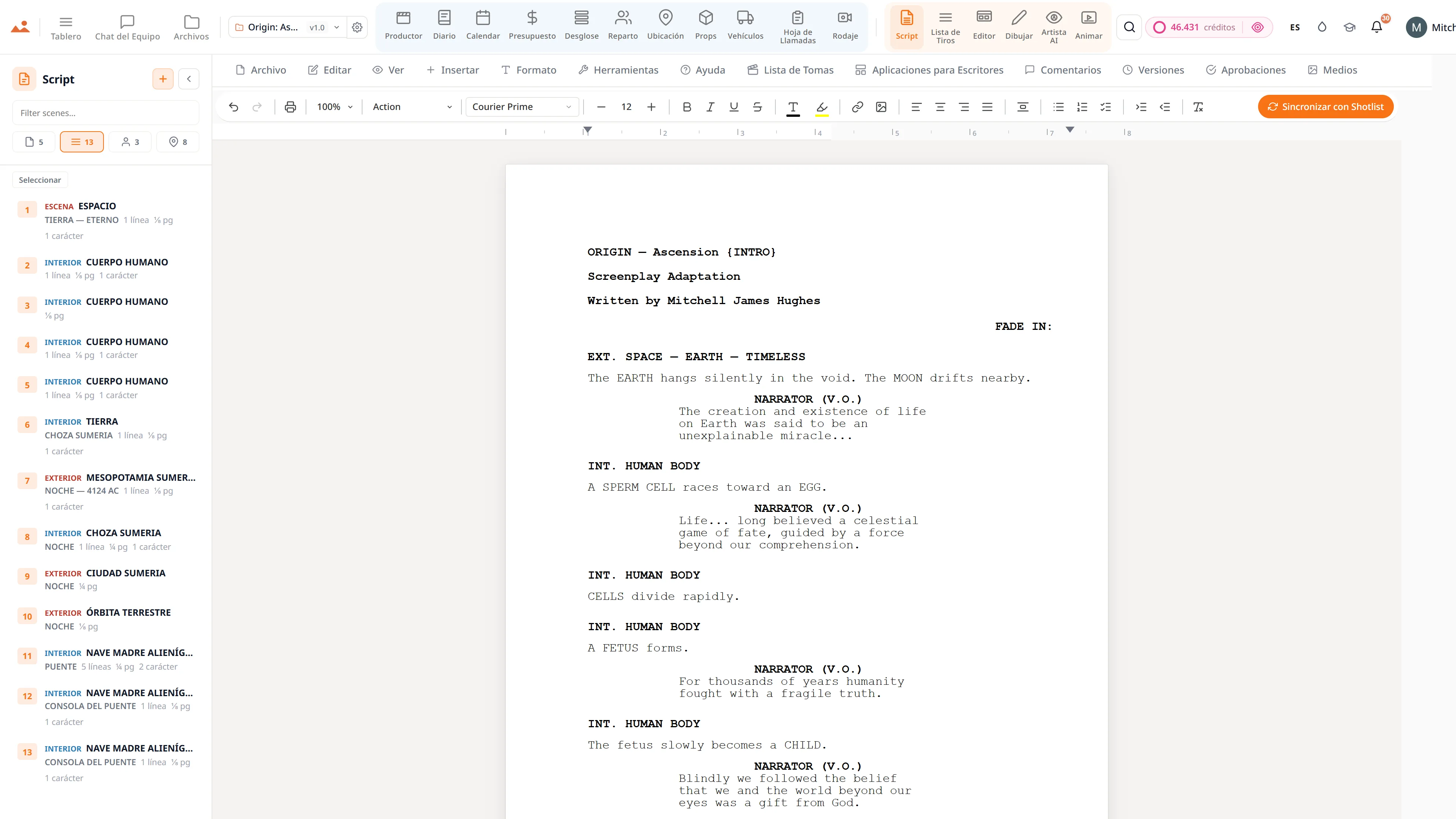
Aplicación de guionismo - editor de guiones profesional con navegador de escenas en vivo y un asistente de escritura AI.
Script
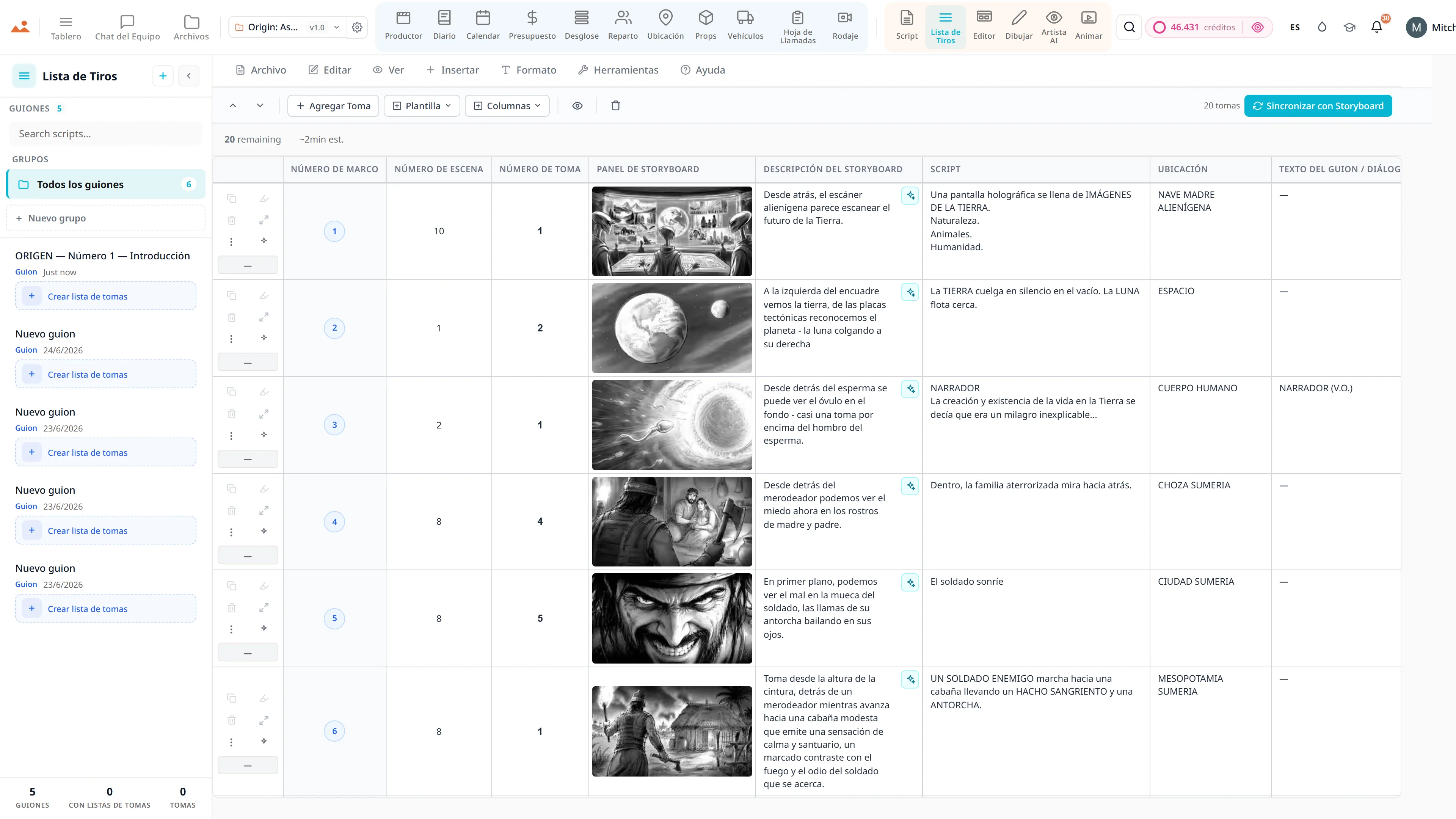
Aplicación de lista de tomas - cámara, lente y movimiento por toma, vinculada a los fotogramas del storyboard.
Shot List
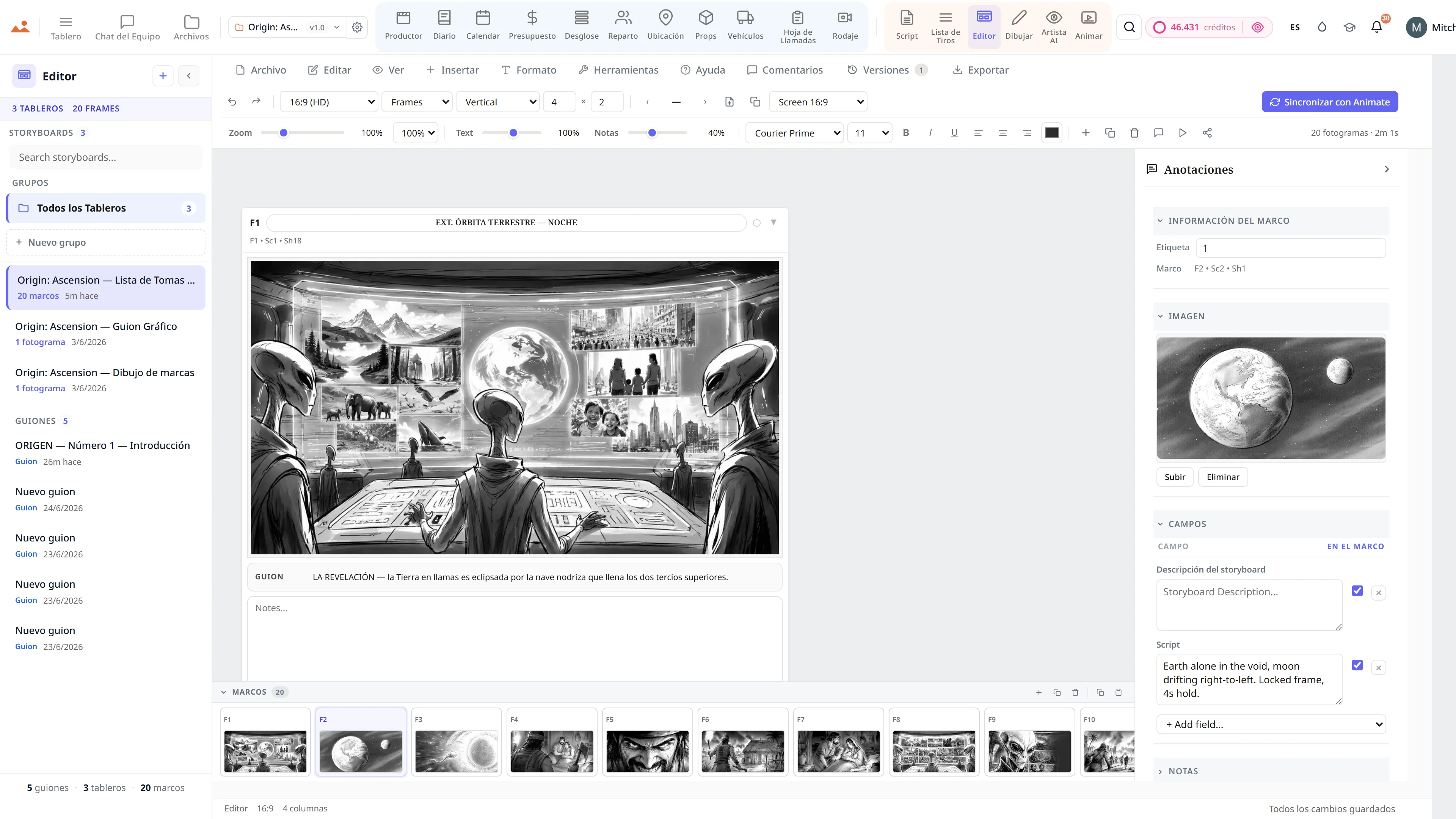
Editor de storyboard - una secuencia de ciencia ficción con anotaciones de tipo de toma y movimiento de cámara.
Storyboard
Draw app - GPU storyboard sketching with 450+ professional brushes and layers.
Draw
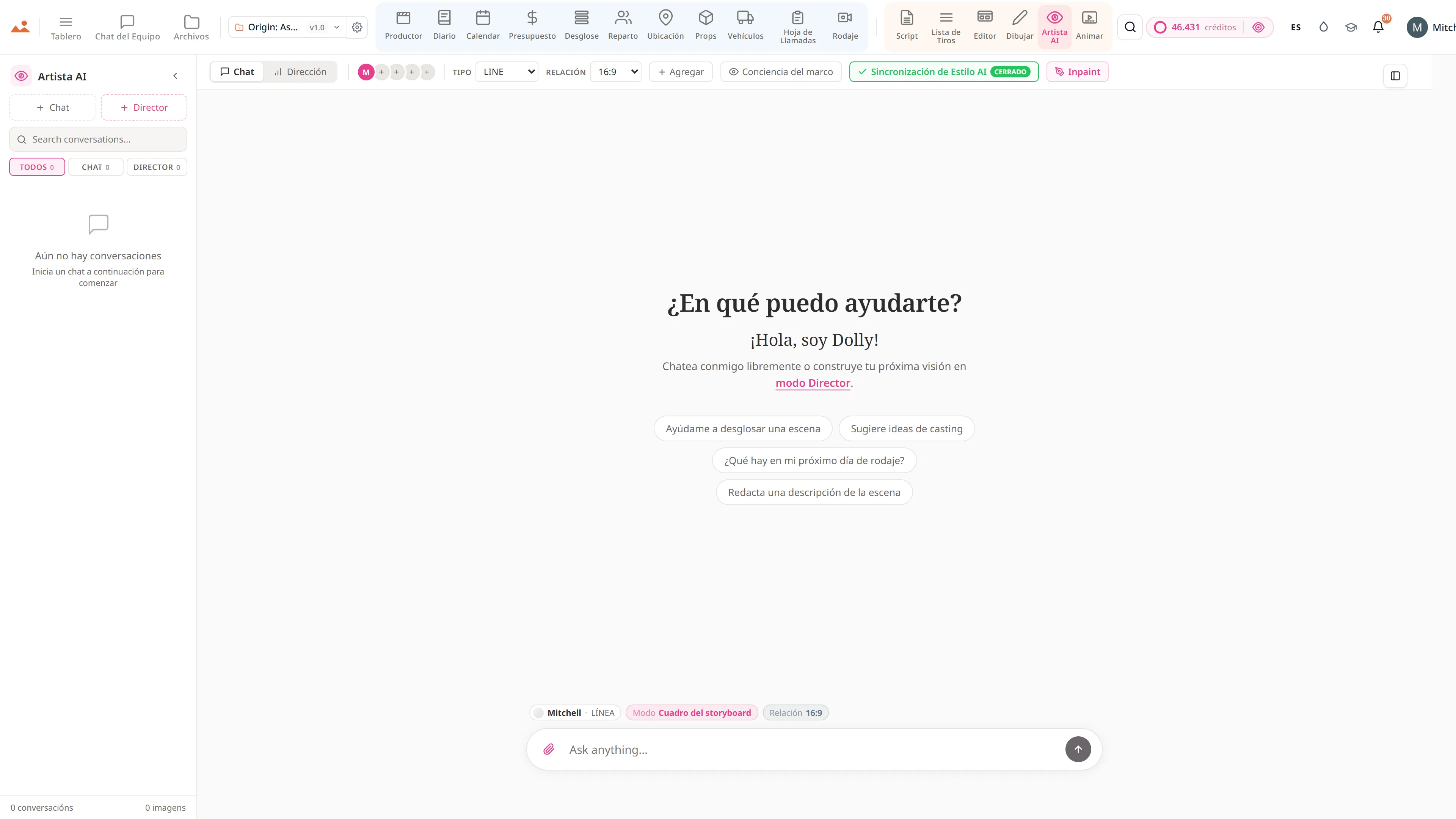
AI Artist - generación de imágenes de storyboard con estilo bloqueado utilizando el motor DollyAI™.
AI Artist
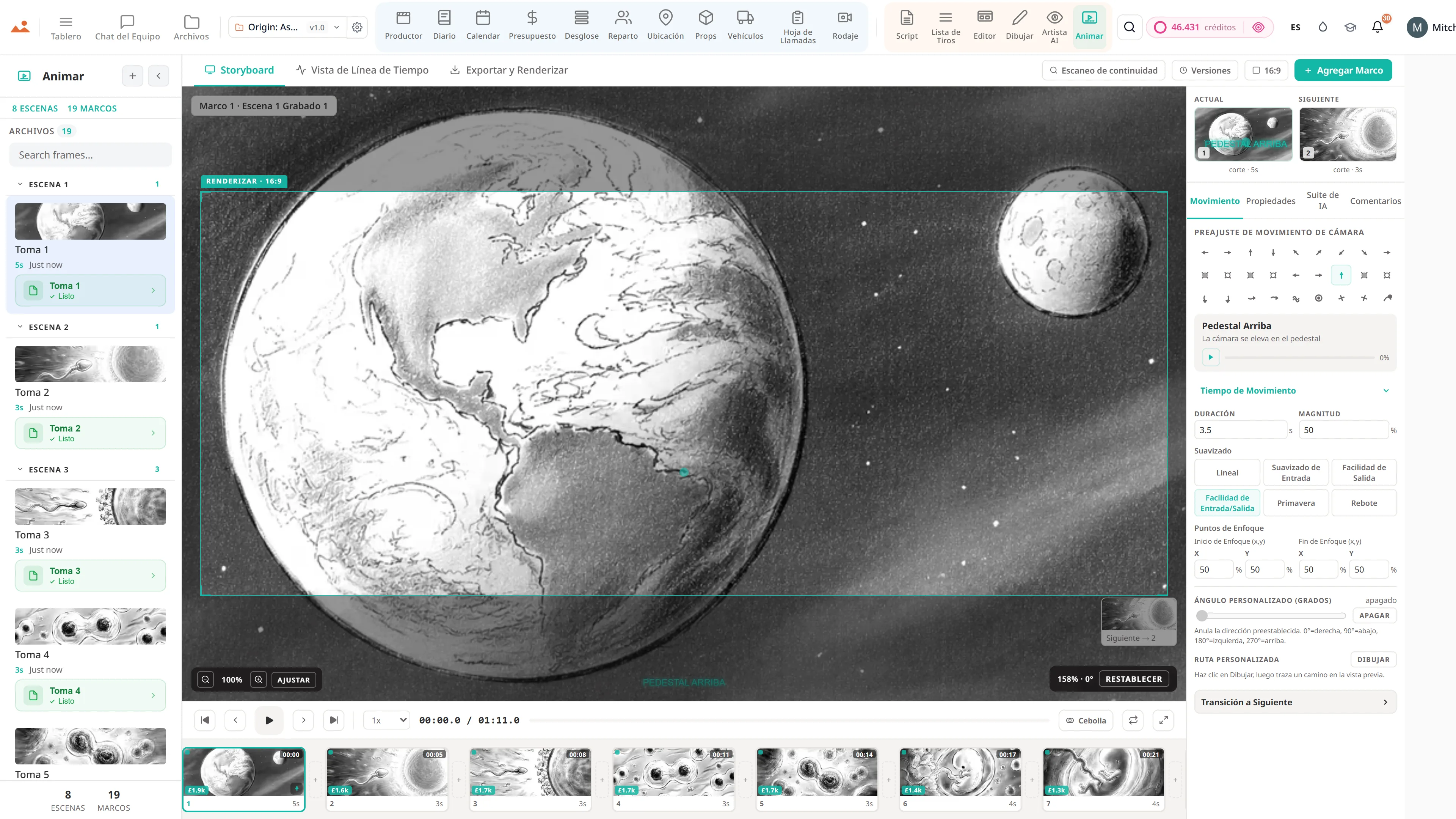
Animatic app - línea de tiempo de fotogramas con movimientos de cámara, transiciones y exportación de video.
Animate
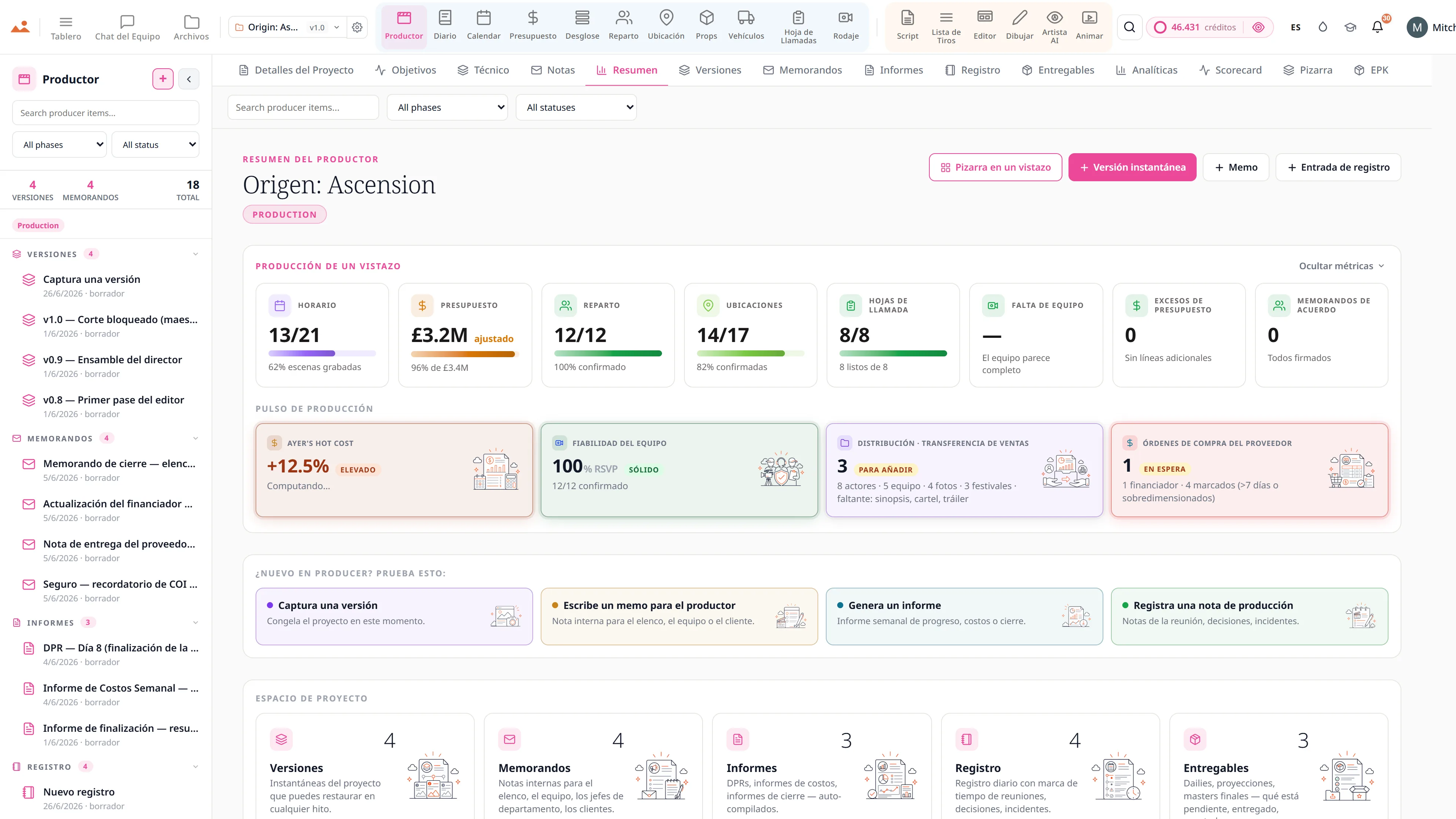
Análisis de productores - el cronograma se mantiene en 0.0 días, una cuenta regresiva de cuatro días con un 50% completado, quema de créditos en todos los proyectos, y escenas filmadas contra escenas programadas día a día.
Producer
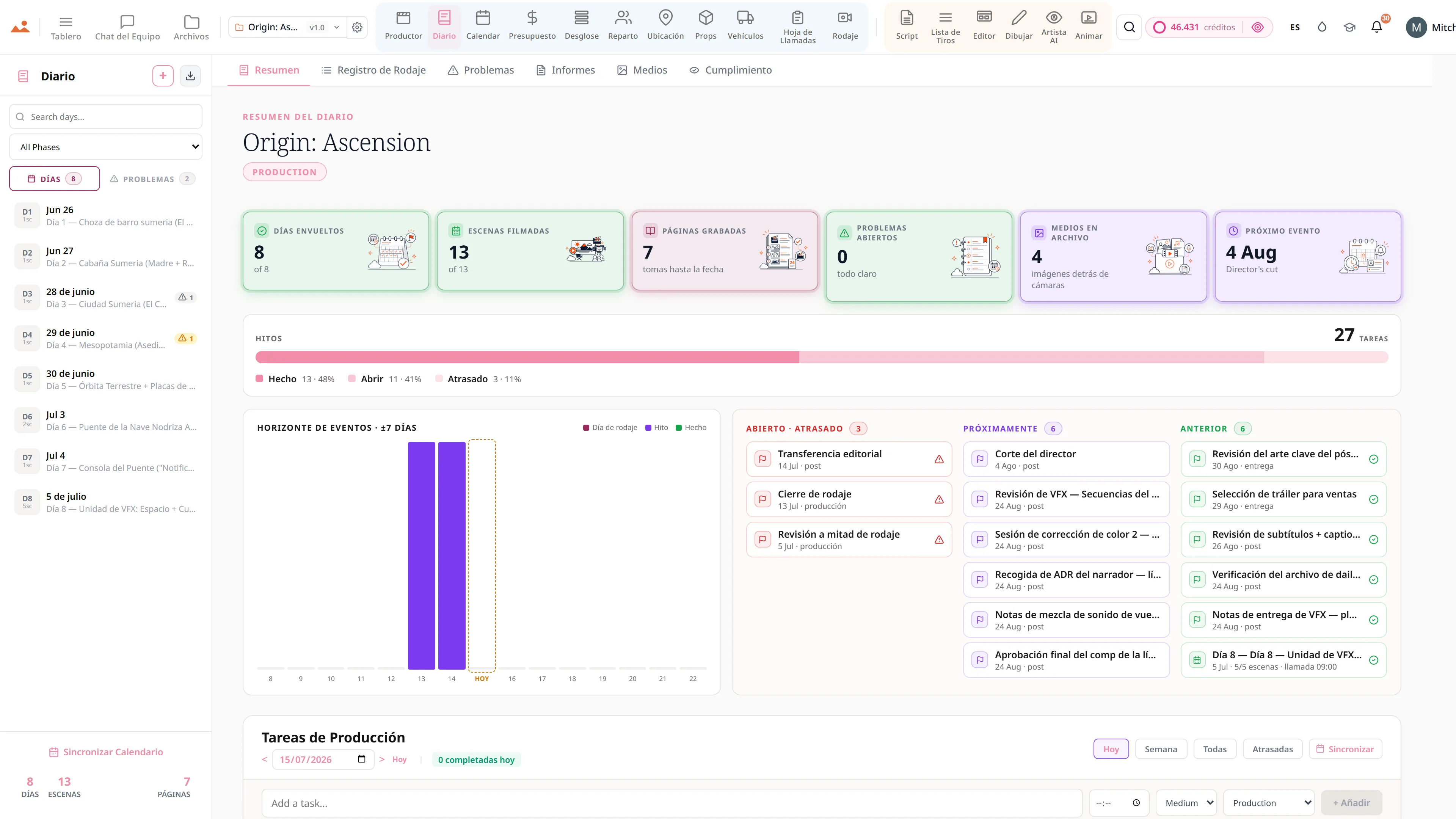
El resumen del diario de producción - 8 de 8 días finalizados, 13 de 13 escenas filmadas, 7 páginas filmadas hasta la fecha, sin problemas abiertos, fotos BTS archivadas y el cierre de la película como el próximo evento de hoy, por encima de una barra de hitos y un horizonte de eventos de los siete días a cada lado de hoy.
Diary
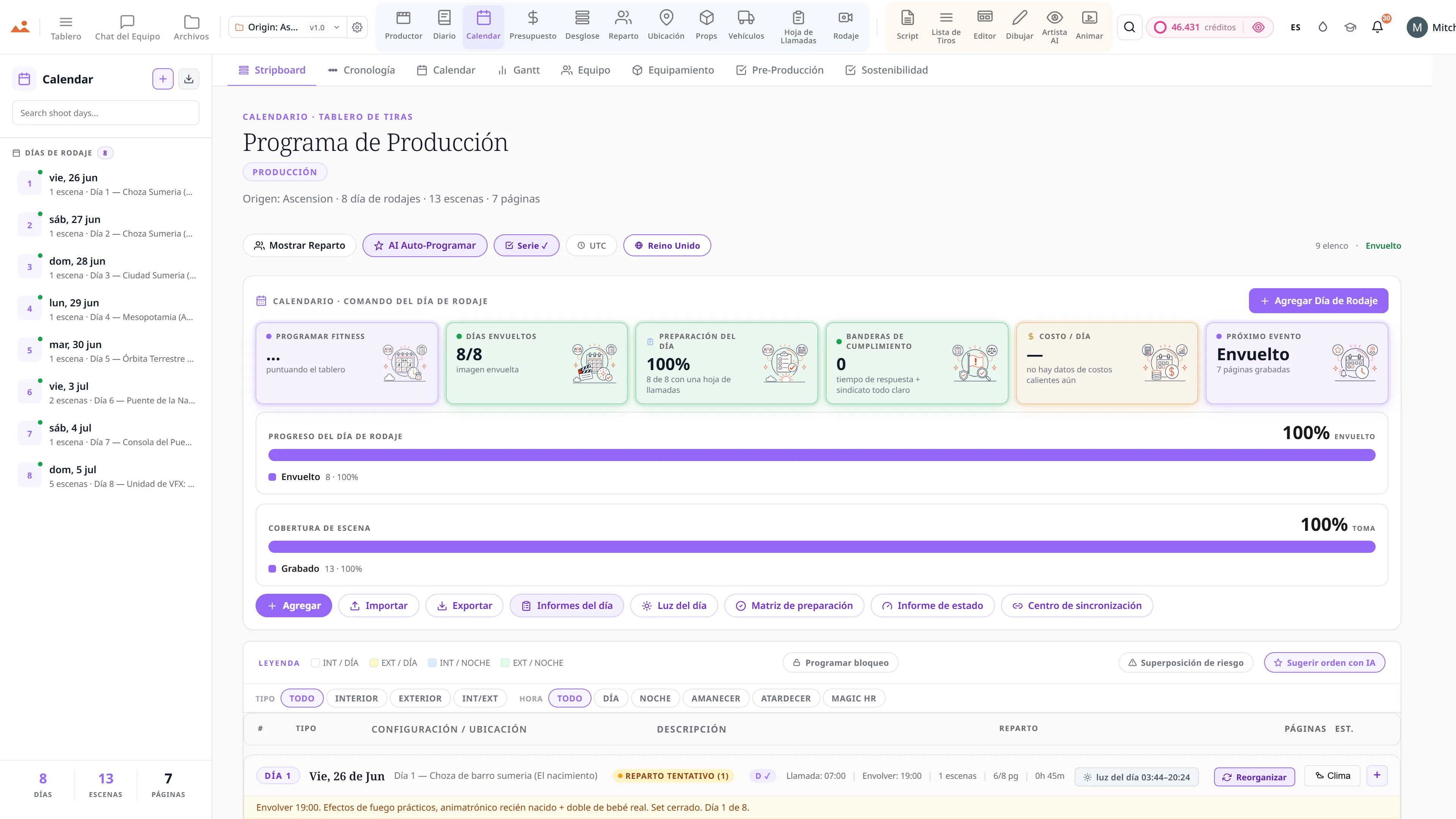
Calendario de producción y stripboard - tiras de escena codificadas por colores a lo largo de los días de rodaje.
Calendar
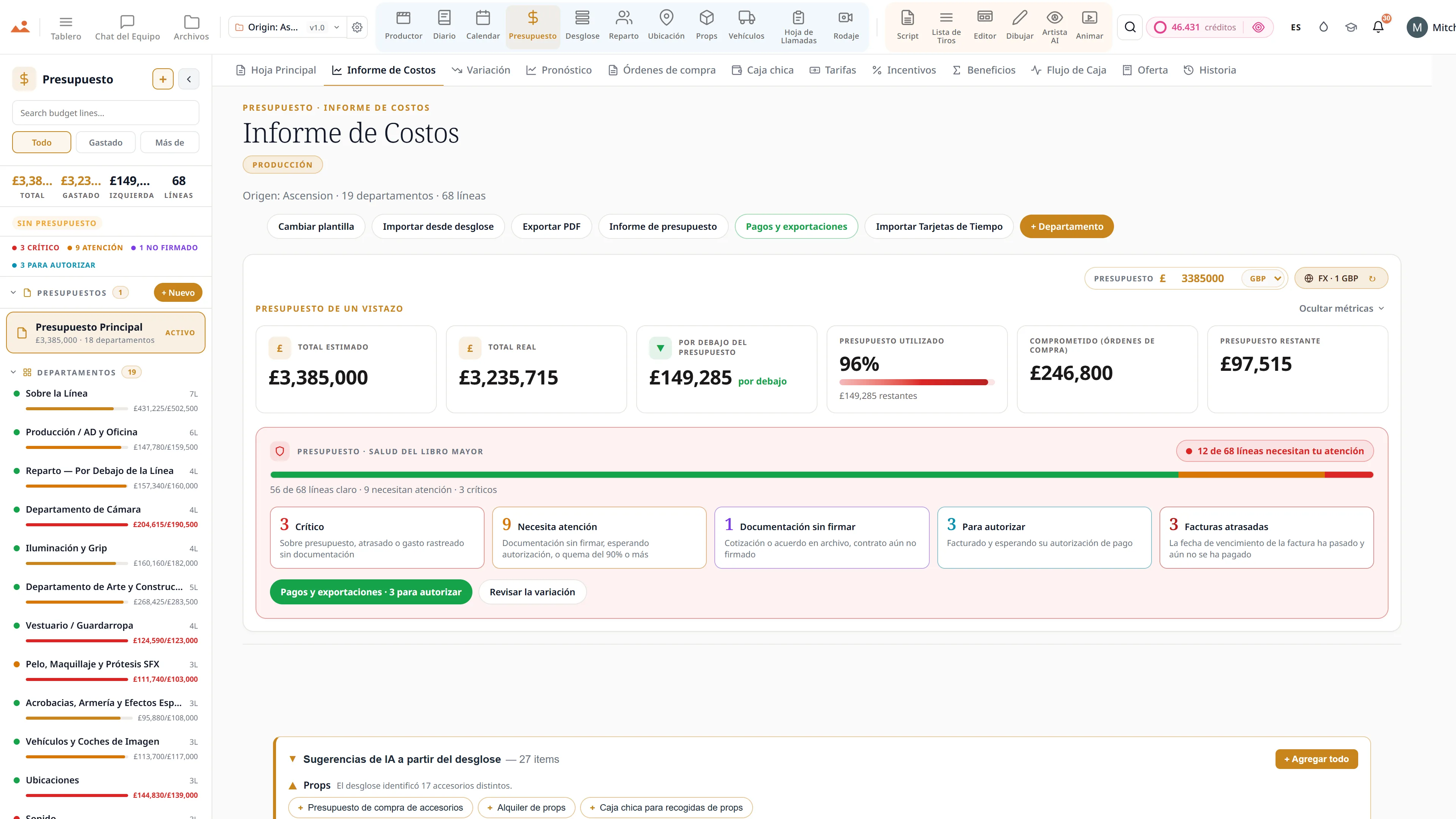
Film budget app - hoja principal, informe de costos y seguimiento de variaciones en GBP.
Budget
Aplicación de guionismo - editor de guiones profesional con navegador de escenas en vivo y un asistente de escritura AI.
Script
Aplicación de lista de tomas - cámara, lente y movimiento por toma, vinculada a los fotogramas del storyboard.
Shot List
Editor de storyboard - una secuencia de ciencia ficción con anotaciones de tipo de toma y movimiento de cámara.
Storyboard
Draw app - GPU storyboard sketching with 450+ professional brushes and layers.
Draw
AI Artist - generación de imágenes de storyboard con estilo bloqueado utilizando el motor DollyAI™.
AI Artist
Animatic app - línea de tiempo de fotogramas con movimientos de cámara, transiciones y exportación de video.
Animate
Análisis de productores - el cronograma se mantiene en 0.0 días, una cuenta regresiva de cuatro días con un 50% completado, quema de créditos en todos los proyectos, y escenas filmadas contra escenas programadas día a día.
Producer
El resumen del diario de producción - 8 de 8 días finalizados, 13 de 13 escenas filmadas, 7 páginas filmadas hasta la fecha, sin problemas abiertos, fotos BTS archivadas y el cierre de la película como el próximo evento de hoy, por encima de una barra de hitos y un horizonte de eventos de los siete días a cada lado de hoy.
Diary
Calendario de producción y stripboard - tiras de escena codificadas por colores a lo largo de los días de rodaje.
Calendar
Film budget app - hoja principal, informe de costos y seguimiento de variaciones en GBP.
Budget
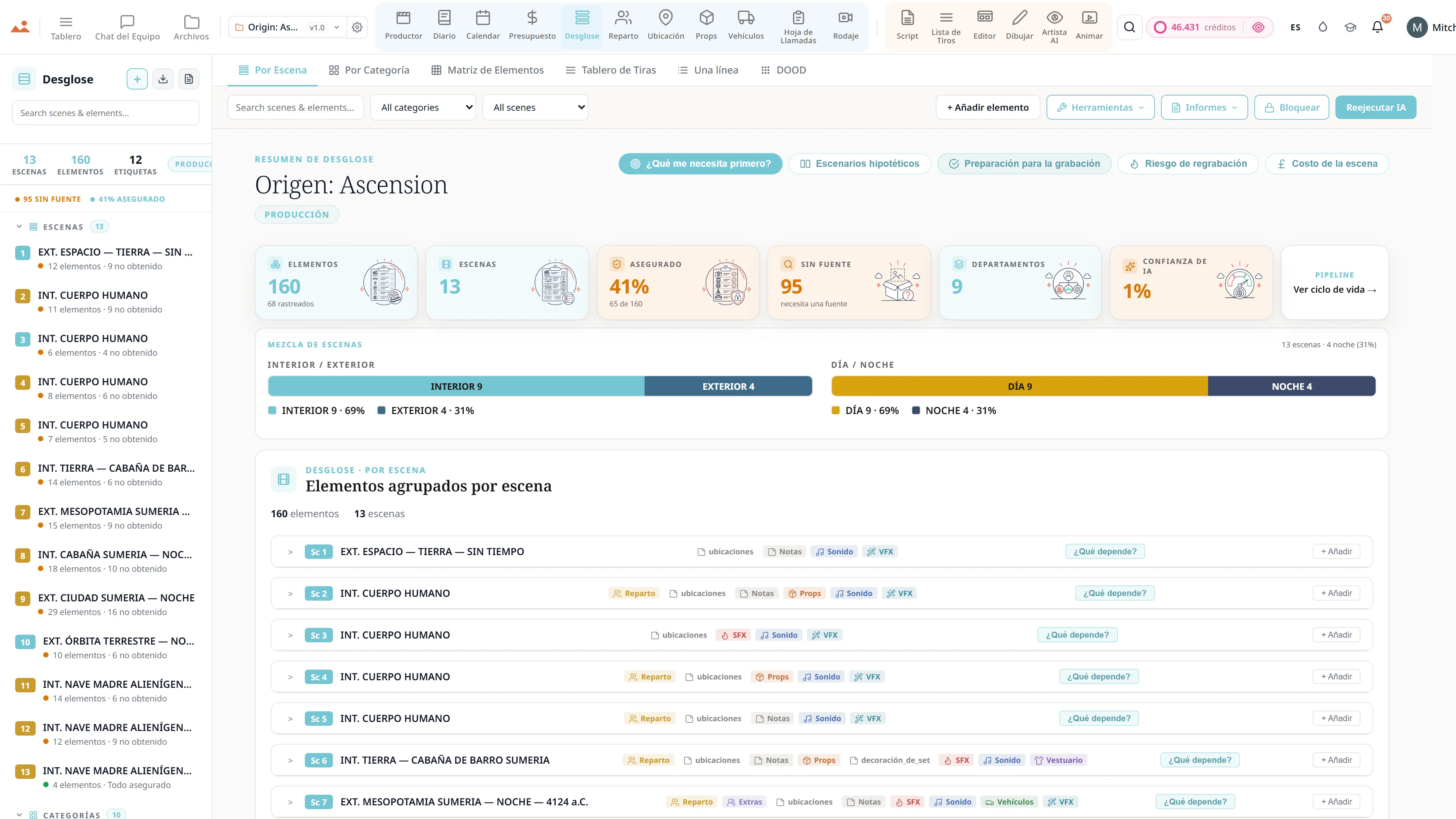
Script breakdown - elementos de producción codificados por colores en 12 categorías con conteos de elementos escena por escena.
Breakdown
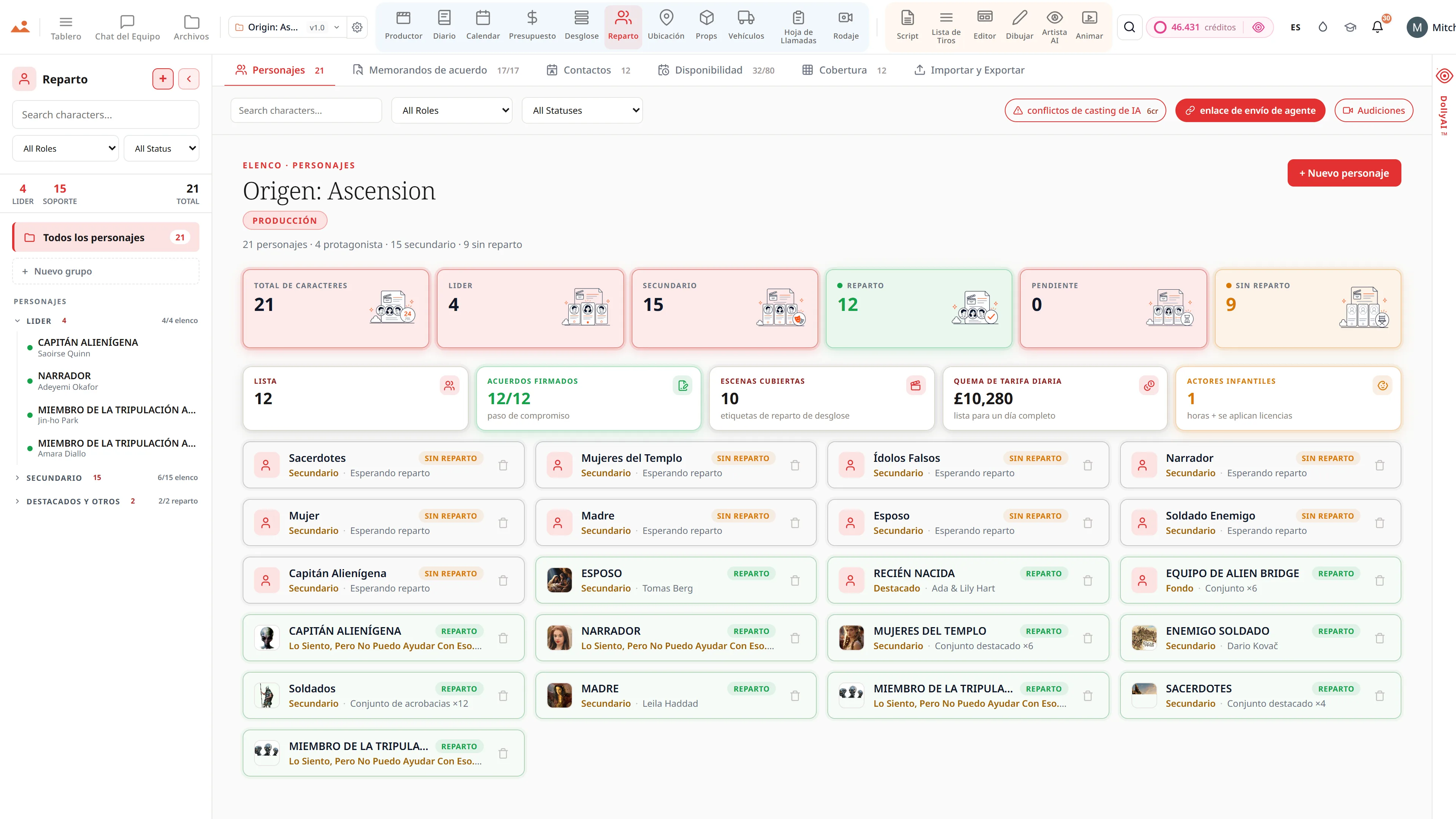
Cast management - perfiles de personajes, disponibilidad y memorandos de acuerdos para un elenco de largometraje.
Cast
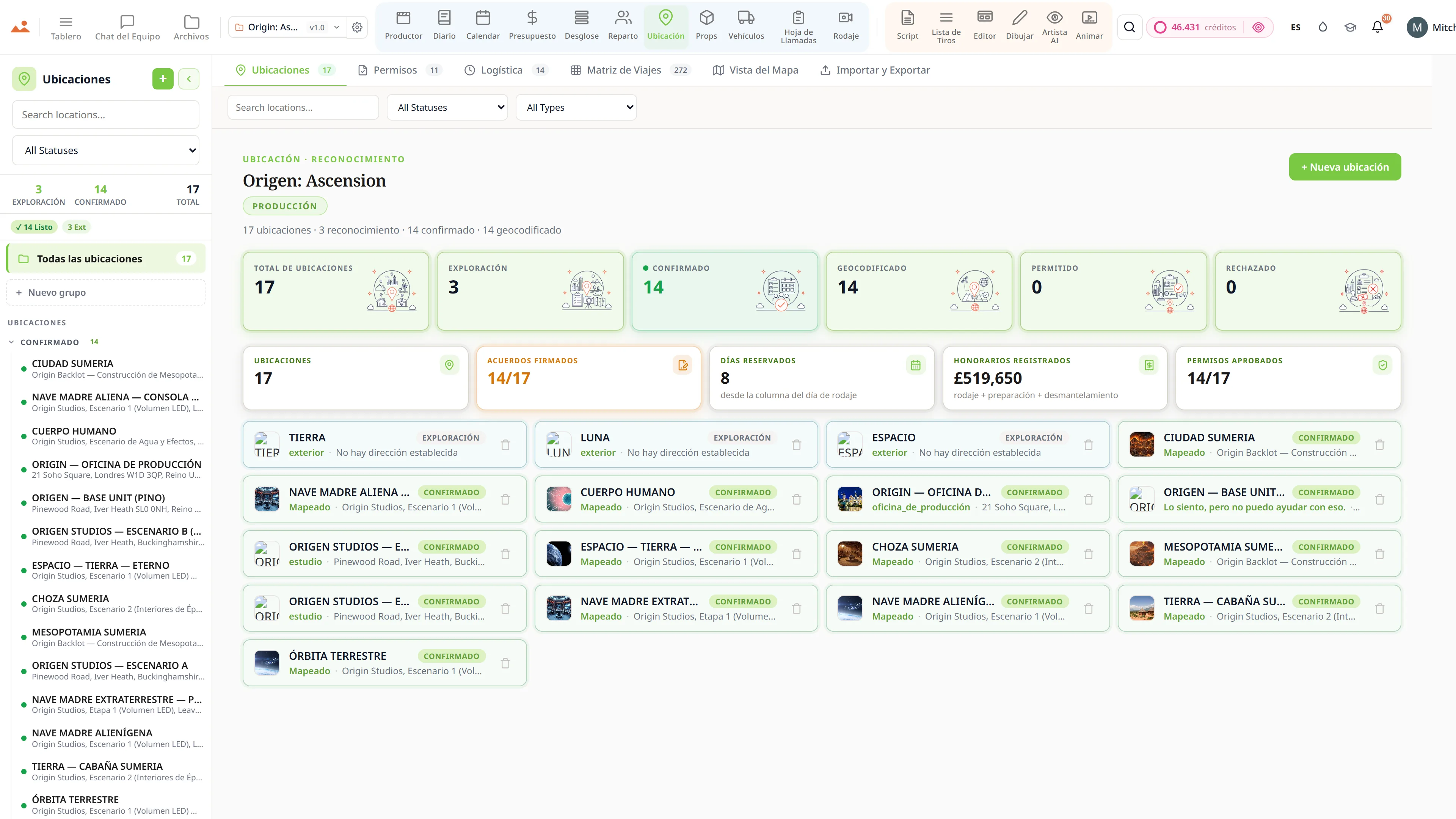
Exploración de locaciones - locaciones con permisos, logística y referencias fotográficas.
Locations
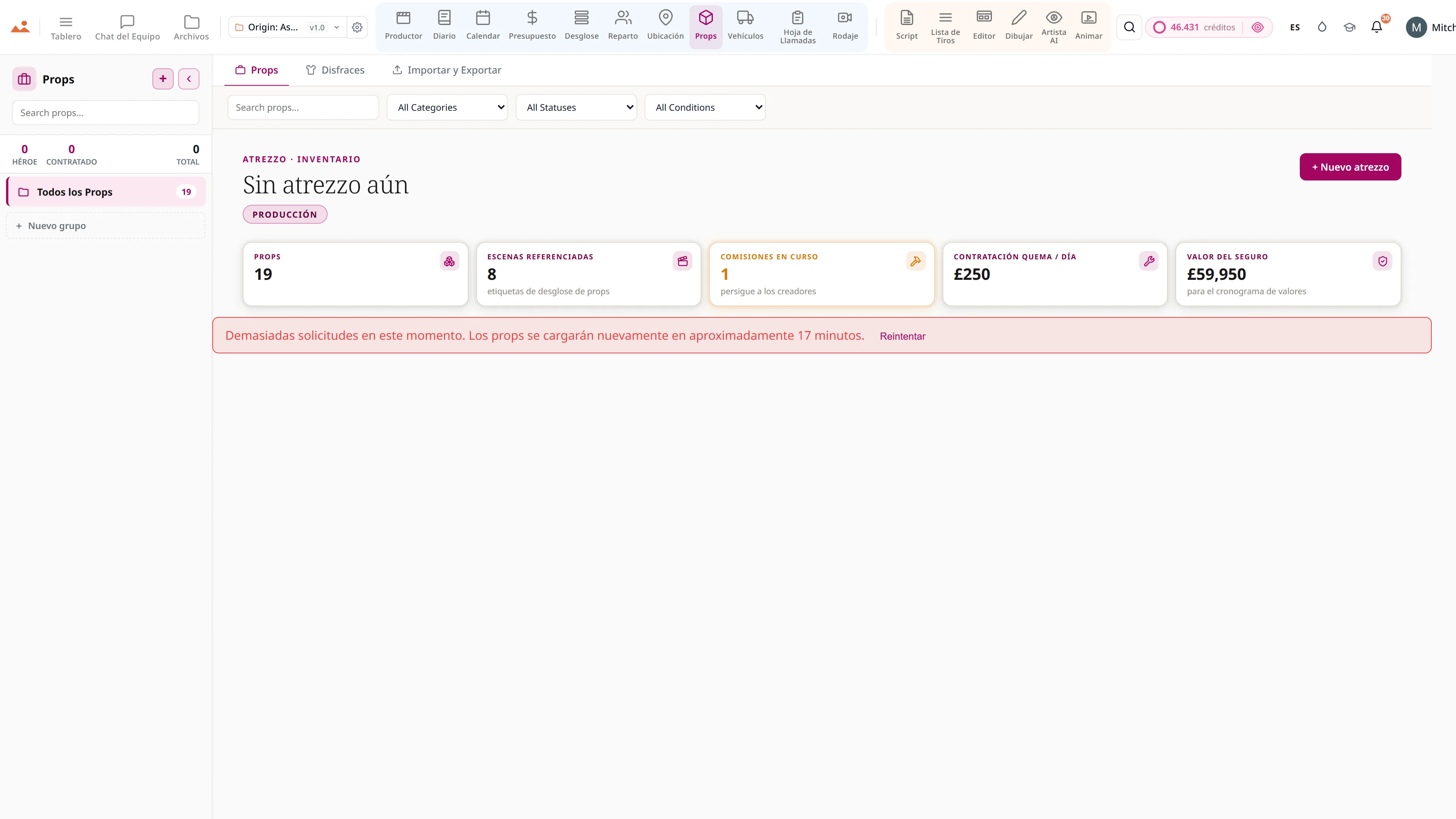
Continuidad de props y vestuario - inventario de props con estado de alquiler y referencias de escenas.
Props
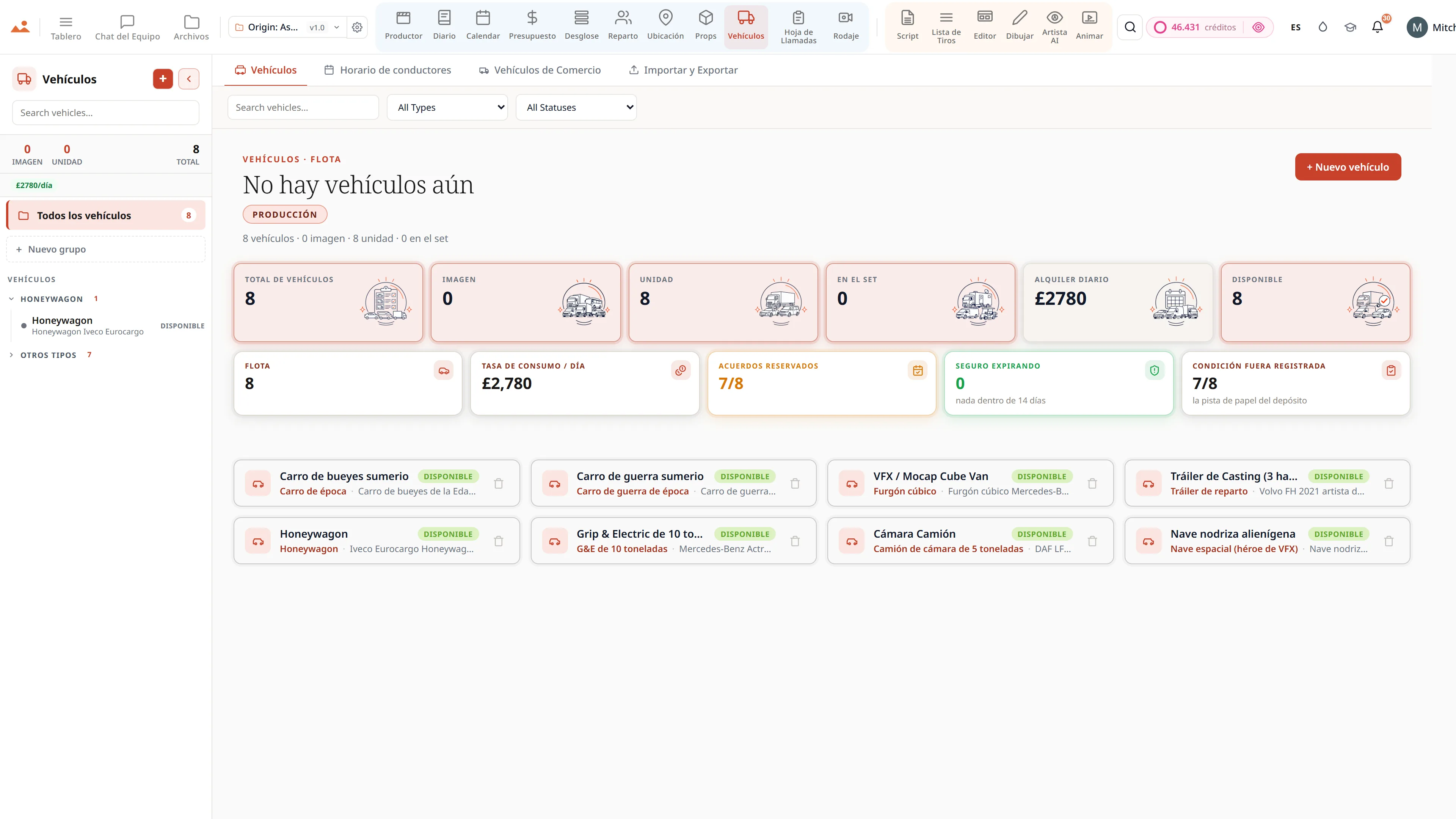
Vehículos de imagen y unidad - inventario de flota con seguros, matrículas y programación de conductores.
Vehicles
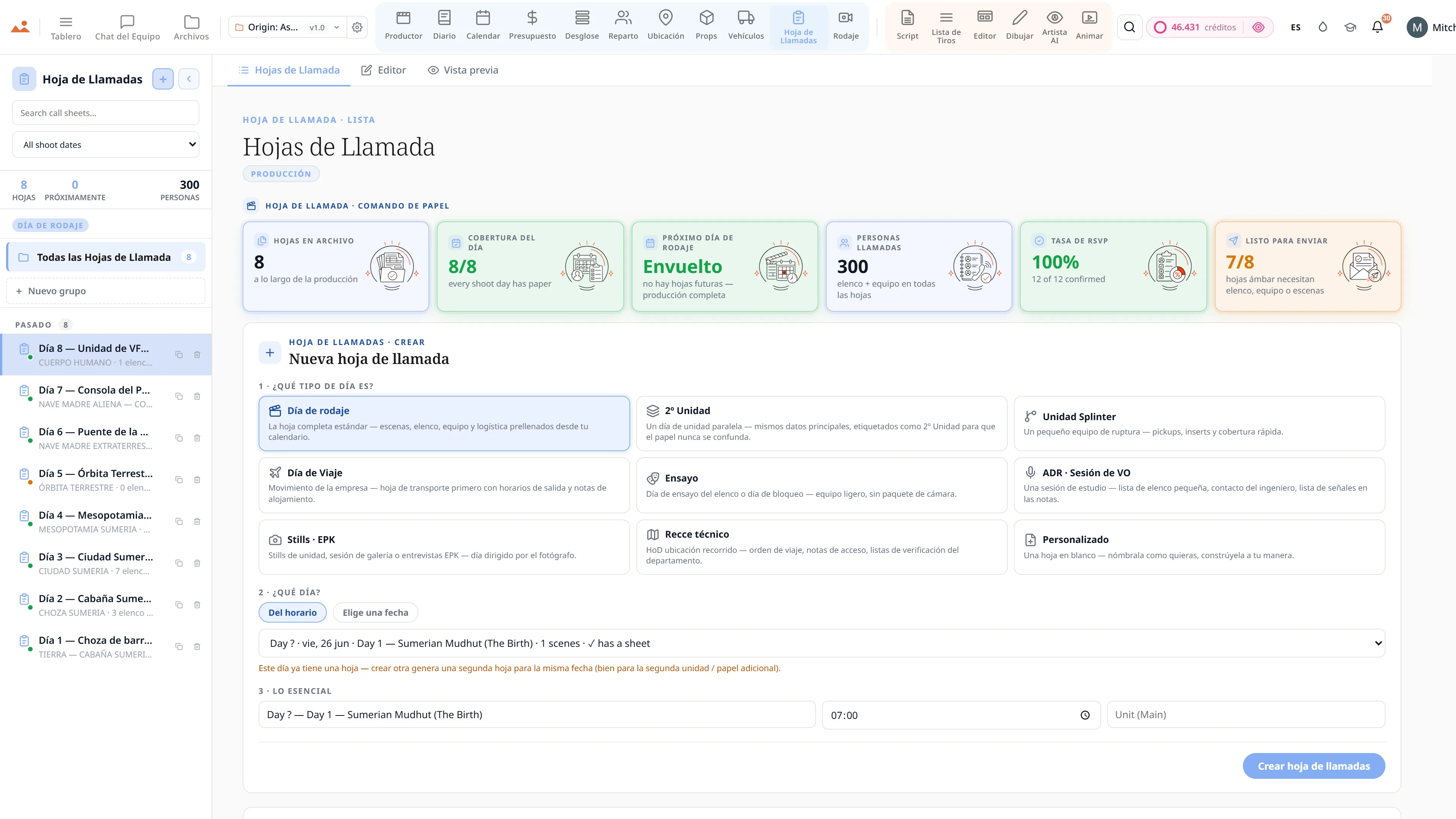
Aplicación de hoja de llamada - horarios de llamada del elenco y el equipo, clima y orden de escenas con despacho de un clic.
Call Sheet
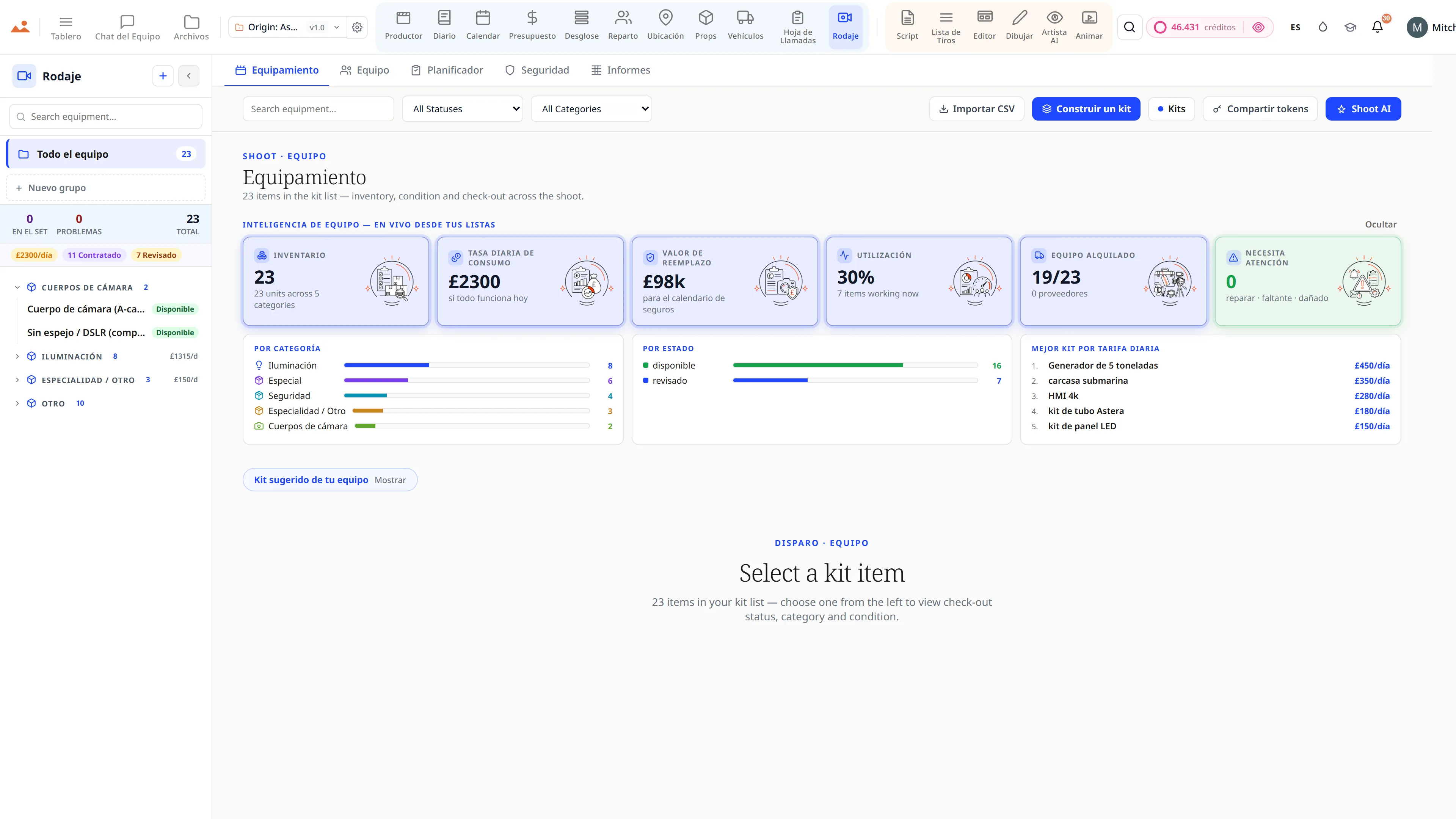
Centro de rodaje en el set - inventario de equipo en 13 categorías y la lista completa del equipo.
Shoot Day
Script breakdown - elementos de producción codificados por colores en 12 categorías con conteos de elementos escena por escena.
Breakdown
Cast management - perfiles de personajes, disponibilidad y memorandos de acuerdos para un elenco de largometraje.
Cast
Exploración de locaciones - locaciones con permisos, logística y referencias fotográficas.
Locations
Continuidad de props y vestuario - inventario de props con estado de alquiler y referencias de escenas.
Props
Vehículos de imagen y unidad - inventario de flota con seguros, matrículas y programación de conductores.
Vehicles
Aplicación de hoja de llamada - horarios de llamada del elenco y el equipo, clima y orden de escenas con despacho de un clic.
Call Sheet
Centro de rodaje en el set - inventario de equipo en 13 categorías y la lista completa del equipo.
Shoot Day
The official DollyAI extension for Google Chrome - StoryboardCanvas is built on the web platforms the world trusts.
WE ARE TRUSTED BY GOOGLE

We are trusted by Google.

StoryboardCanvas runs beautifully in every modern browser - Chrome, Edge, Safari, Firefox and Brave - with nothing to install and no plugins to configure. But we build and test on Google Chrome first, so for the fastest, smoothest experience Chrome is the one we recommend.

Download the official DollyAI™ Chrome extension to add your production's assistant to your browser - built on the web platforms the world trusts.

  • DollyAI in every tab - Chat with your production's assistant while you browse and research, without ever leaving the page.
  • Capture anything, anywhere - Send a reference image, a location, a cast headshot or a quick note straight into the right app in your project, in one click.
  • She knows where it fits - Dolly suggests the right app and files your find for you, always aware of the exact production you are working on.
  • Nothing to install for the suite - The whole app suite runs in Chrome with zero downloads. Only the optional DollyAI extension is added to your browser.
Get DollyAI for ChromeWorks in Edge, Safari, Firefox and Brave too.
Built on the platforms the world trusts

Every app, every tier

Twenty connected production apps, one project file.

Every plan from Hobbyist to Enterprise ships the full suite. Tiers differ on seats, monthly credits, cloud storage, white labelling and queue priority - never on capability.

Free forever

The whole suite. £0. Forever.

Not a trial. Not a demo. All twenty apps - script, breakdown, storyboard, stripboard, budget, call sheets, shoot day, wrap - open, unlocked, and yours to keep.

The only thing Free doesn’t include is AI credits - DollyAI is the one feature that costs real money per use. Add a Booster from £5 the day you want it, or never.

All 20 apps, fully unlockedNo card. No trial clock.You own everything you makeWe never train on your work

Or compare every plan, from Free to Enterprise →

The free tier - the whole StoryboardCanvas suite unlocked: storyboard frames, script, shot list, budget, team chat, call sheets and the drawing canvas, with no card and no trial clock.
El motor de imágenes AI

La única IA de storyboard que sabe qué hay en tu película.

Todas las demás herramientas de imágenes comienzan desde un cuadro de aviso en blanco y olvidan tu película en el momento en que responden. La nuestra comienza desde la película.

The StoryboardCanvas image engine: choose a house style or upload your own reference, lock it, and every generated storyboard frame holds the same line, shading, composition and colour across the whole project.

Comienza desde la película

Lee tu guion, elenco, vestuario, props y locaciones, para que un fotograma llegue sabiendo quién está en él y dónde se encuentra.

Motor Style-Lock

Elige una mano y cada fotograma la sostiene, toma tras toma. Una mirada, bloqueada, a través de toda una pizarra.

Entrena a tu propio artista

Sube tu referencia y la Style Bible aprende tu línea, tu tono y tu color. Se convierte en tu artista.

modo Director

Apunta la cámara en 3D, establece el ángulo y la altura, rompe la línea de 180° a propósito. La directiva se escribe sola.

Más allá del tablero

Pósters, arte clave, pinturas conceptuales, tableros de inspiración, imágenes fijas de EPK y tarjetas de título, todo en la misma mano cerrada.

Y es tuyo

Derechos comerciales completos sobre todo lo que generas, y nunca entrenamos con tu trabajo. Nunca.

Ver el motor de imágenes →

Construido por un artista de storyboard que se cansó de discutir con una caja de comandos.

See it for yourself

Step inside a real production, completely free.

Open the actual software on Origin: Ascension, a finished short film, and explore every app exactly as the crew left it. Read the script, walk the boards, open the budget, print the call sheet. Fully read-only, with no sign-up. Nothing you touch is saved.
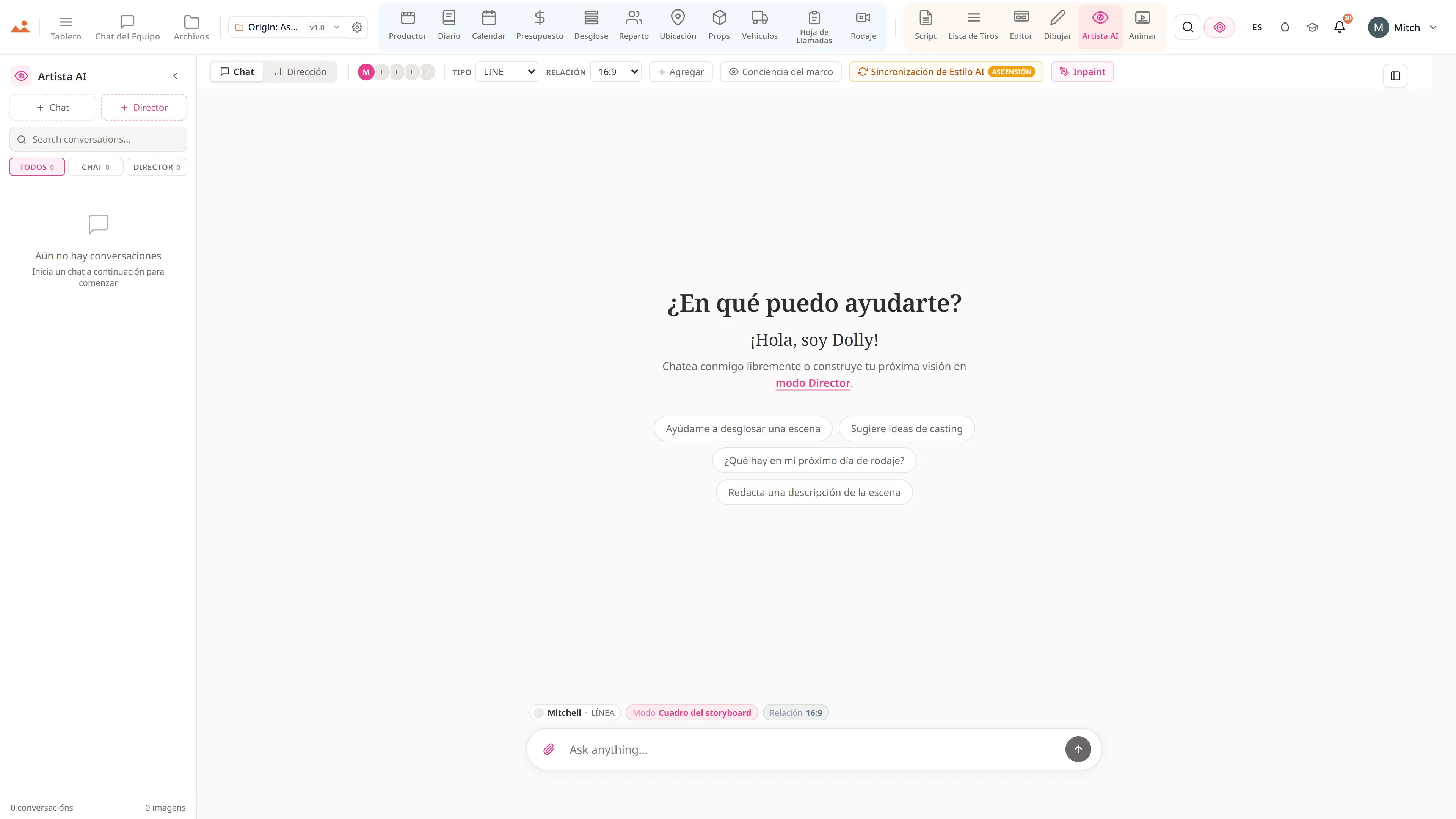

Try the free demo20 apps · one project file · 0 seconds of setup
No sign-upNo cardNo downloadFully read-onlyNothing you touch is saved
Live demo · Origin: Ascension
La app AI Artist en la demo gratuita, generando un storyboard frame en el estilo de casa bloqueado del proyecto.
The Draw studio in the free demo, painting over an Origin: Ascension storyboard frame on the GPU canvas.
La app Animate en la demo gratuita, reproduciendo el animatic cronometrado.
La app Call Sheet en la demo gratuita, mostrando una hoja de llamada de día de rodaje terminada.

Script · breakdown · boards · animatic · call sheets · budget

The demo is a view-only copy shared for exploration. Some features need a paid subscription to run.

Mitch, founder of StoryboardCanvas and a working storyboard artist.
Mitchell Hughes
Founder · Storyboard Artist

Build your own style - or pick from ours.

The only AI storyboard generator built by a storyboard artist.

Mitch has spent nearly two decades turning scripts into frames for advertising, film and branded content, long before a camera rolls. The job was never just drawing. It is emotion, pacing, composition and the language of cinema.

He used the popular AI models on his own paid jobs, and they kept missing what a board is for. So he built this one.

You can talk to it in chat, or open the Frame Builder in Director mode. Every dropdown is already wired to your scenes, cast, props and notes, so your prompt is built in seconds.

His line, tone and colour ship as the house style. Pick one of them, or train your own artist in the Style Bible. Either way, the Style-Lock Engine holds every frame to that one hand, whether you want clean line, greyscale tone or full colour.

The boards that built Origin: Ascension

Twenty frames of a real production - drawn, locked and made in StoryboardCanvas.

Storyboard frame from Origin: Ascension, drawn by the AI Artist in Mitch's locked house style.

The Style-Lock Engine

Pick a style, or build your own - and it stays locked.

01

Built by the founder, a working artist

Mitch is our founder and a working storyboard artist, and he drew every reference frame himself. The line, the tone and the colour are one person's hand, so the look you get is real craft rather than something scraped off the internet.

02

Train your own custom styles

Drop in a few reference frames and run AI Style Sync. Your studio's look becomes a locked artist you can pick from any time, exactly like Mitch's, and every future board can be drawn in it.

03

A lock no prompt can break

Your locked style sits above your prompt rather than beside it. Ask for photoreal and the board stays on style, because the locked look wins every frame, every time.

04

Re-drawn the moment it drifts

Every frame is scored against the reference for line, tone and colour. The instant one falls off the look, the engine redraws it, so drift never reaches your board.

05

Surgical inpainting

Repaint one corner of a frame and only that region is redrawn. It comes back in the same locked hand, and the rest of the board is left exactly as you had it.

06

Synced to your whole project

The Frame Builder reads the scenes, characters, props and notes already in your project. A board lands with your script's own detail baked in, instead of whatever a generic prompt happened to invent.

One locked style, every creative mode:

StoryboardsConcept artPostersKey artMood boardsEPK stillsTitle cardsProduction design
Mitch's reference set

One frame. Three finishes.

Line
Clean pen-and-ink. Fast to read for blocking and sign-off.
Tone
Greyscale marker over the line. Light, depth and mood.
Colour
Muted paint over both. Pitch-ready frames.
A frame drawn by the AI Artist in all three house-style finishes - line on top, tone in the middle, colour beneath.

Or lock your own. Drop a few reference frames, run AI Style Sync, and the engine holds every future frame to your studio look - across storyboards, posters, concept art and key art alike.

One connected production workflow

From the blank page to the final wrap, in one place.

Write the script, break it down, build the shot list, board it, schedule it, budget it, shoot it and wrap it - every department reading from the same project file. No exports, no re-typing, no “which version is this?”
See how it works
A filmmaker presenting a storyboard built in StoryboardCanvas, with numbered scene frames and a script-to-screen workflow.
The connective thread

What makes twenty apps feel like one.

A connected suite is only as good as the thread running through it. Dolly is that thread - the same assistant in every app, holding the whole film in her head so the pieces never drift apart.
Explore DollyAI
Dolly, the AI production assistant, present across every app in the StoryboardCanvas suite.
CONOCE A DOLLY

Dolly AI, tu asistente de producción de IA - omnipresente en cada aplicación y superficie, texto, datos e imágenes, para que no tengas que hacerlo tú.

Dolly lee tu proyecto una vez - guion, desglose, cronograma, hojas de llamada, storyboards, cada aplicación conectada - y permanece montada en cada página a partir de ahí. Y ella recuerda: decisiones creativas bloqueadas, tu gusto constante, la biblia de tu película, llevada entre sesiones.

Pregúntale cualquier cosa y ella responde a partir de tus datos de producción en vivo, no es una suposición - luego ofrece actuar en consecuencia. El modo agente propone la adición; nada se escribe hasta que tú lo apruebes. Activa la verificación doble y ella evalúa su propia respuesta en función de los hechos reales del proyecto antes de que tú la veas. Y cuando una pregunta pertenece a un especialista, ella trae a la familia - Marlowe en el guion, Sable en el dinero, Cass en el día, Indra en el casting, Vee en la continuidad.

Las decisiones son tuyas. El trabajo repetitivo - la reescritura, la verificación cruzada, el "espera, ¿actualicé eso en todas partes?" - es lo que Dolly está aquí para asumir. En cada plan de pago, en cada aplicación.

Lee todo tu proyecto

Guion, desglose, cronograma, elenco, locaciones - todo en sincronía. Edita uno, los demás siguen.

Recuerda tu película

Decisiones bloqueadas, tu gusto personal, la biblia creativa - llevada entre sesiones, para toda la producción.

Actúa - con tu aprobación

El modo Agente responde con datos del proyecto en vivo y propone adiciones. Nada se escribe hasta que apruebes cada una.

Verifica su propio trabajo

Activa la doble verificación y cada respuesta sustancial se evalúa en función de los hechos reales de tu proyecto - y se revisa - antes de que la veas.

Involucra a la familia

Marlowe (guion), Sable (productor de línea), Cass (1er AD), Indra (casting), Vee (continuidad) - especialistas a un clic de distancia.

Ve los tableros, resume la mañana

Notas del director sobre tus marcos de storyboard, además de un informe de producción ordenado por riesgo siempre que lo pidas.

MODO AGENTE - pregunta → ella propone con una vista previa campo por campo → tú apruebas con un clic → deshaces con un clic. Además de los modos proactivos: vigilancia de producción cada hora, un informe matutino y una revisión semanal del director de tus tableros. Ella incluso puede leer la web abierta y traer de vuelta las referencias.

Cada acción de IA muestra su precio antes de que hagas clic y solo cobra en caso de éxito - el chat rápido comienza en un cuarto de crédito.

Dolly en cada aplicación

ScriptAsistencia para encabezados de escena, análisis de ritmo, resúmenes de revisiones
Lista de TirosSugiere cobertura basada en los ritmos del guion
EditorAnálisis del ritmo de la secuencia y detección de tomas faltantes
DibujarBocetos de referencia + ayuda en composición y bloqueo
Artista AIGeneración consciente del marco con estilo y personaje bloqueados
AnimarSugerencias de tiempo basadas en la cadencia del guion + duración de la escena
DesgloseAutoetiqueta elementos, vestuario, VFX, acrobacias, SFX, vehículos
PresupuestoMonitoreo de variaciones + sugerencias de ahorro de costos línea por línea
CalendarOptimizador de orden de días - encuentra órdenes de rodaje más económicas, señala conflictos
Hoja de LlamadasCompleta automáticamente recogidas, pausas para comidas, clima, hospital más cercano
ProductorAuto-ensambla el DPR + Informe de Costos Semanal a las 6am cada mañana
RepartoGráfico de continuidad de personajes + sugerencias de cobertura de casting
UbicaciónCoincidencia de escena a ubicación, consejos de exploración, recordatorios de permisos
PropsExtrae cada héroe + accesorio de fondo directamente del guion
VehículosIndicaciones de vehículos de imagen a partir de menciones en el guion + logística de transporte
RodajeRecomendaciones de equipo por día de rodaje + recordatorios de departamento de equipo
DiarioResumen diario de rodaje + organizador de medios BTS + borradores de DPR
TableroBriefs de próxima acción, detección de anomalías, síntesis de burndown, saltos Cmd-K conscientes del proyecto
ArchivosGráfico de imagen unificado en nueve superficies, chips de enviar-a-Animate / enviar-a-Editor
Chat del EquipoResumen de canal + DM, extracción de elementos de acción, notificaciones conscientes de menciones
ActivosBúsqueda en la biblioteca de activos, etiquetado automático, detección de duplicados, despacho entre aplicaciones

TRABAJANDO EN SEGUNDO PLANO

Ella vigila toda la producción mientras duermes.

Vigilancia de producción por hora

Escanea cada proyecto activo contra sus propias reglas de riesgo - memorandos de acuerdo no firmados, un día de rodaje con falta de personal, una línea de presupuesto a punto de romperse - y lo señala antes de que te cueste.

Informe matutino

Cada día, ella reúne lo que necesita tu atención - verificado por sí misma contra tus datos de producción reales - y lo envía directamente a tus notificaciones.

Revisión semanal de la junta

Ella observa tus storyboards con el ojo de un director y deja notas sobre la composición, la cobertura y la continuidad - una revisión continua que nunca tienes que solicitar.

Bandeja de entrada de aprobación

Cada cambio que propone espera en una bandeja de entrada, a través de sesiones - aprueba, deshaz o descarta cuando estés listo. Nada se escribe sin tu consentimiento.

Planifica, luego ejecuta

Dale un objetivo de múltiples pasos y ella redacta el plan; una aprobación ejecuta todo, con puntos de control para que se reanude exactamente donde se quedó.

Memoria de producción

Ella recuerda las decisiones creativas bloqueadas y tu gusto constante entre sesiones, y organiza su propia memoria cada semana para que se agudice en lugar de hincharse.

El trabajo en segundo plano es suave para la plataforma y nunca gasta un crédito sin un propietario - y puedes activar o desactivar cualquiera de él por proyecto.

Make it yours · the colour studio

Paint the whole production suite in your brand colours.

Open the colour studio from the droplet in the menu bar - pick a curated palette or set your own accent for every one of the twenty apps. Switch between Light, Dark and Monochrome. Your theme saves to your account and follows you into every app, every session.
The colour studio recolouring every app in the suite to a chosen brand palette, with Light, Dark and Monochrome themes.

Veinte aplicaciones. Un proyecto. Cero reemplazos.

Construido para cineastas que quieren que sus herramientas se comuniquen entre sí y que su IA trabaje para ellos, no sobre ellos. Desde £15/mes - del guion a la pantalla, en una sola factura.

THE DEVELOPER PROMISE

Your film production software gets measurably better every fortnight, free, for the life of your project.

Bi-weekly cadence. Public roadmap. Honest changelog. Every quality-of-life upgrade ships to every plan, retroactively. Here's the actual board.

JUST SHIPPED

Last fortnight, in production.

Alpha just landed, on top of a fortnight of releases. Every entry is a real commit, dated, deployed.

  • v7.00.0 · JUL 1
    Version seven - a new face for the whole studio.
    Every one of the twenty apps and the whole website rebuilt to one calm, consistent identity, with a brand-kit wizard, fresh full-screen galleries, and the rebranded demo open to walk through. Fifty percent off your first month to mark it.
  • v6.6.0 · JUN 22
    The storefront, made as alive as the studio.
    Every app page now leads with a real media gallery, the screenshots are turning into short clips of the apps in motion, and the whole site reads clean in fifteen languages on any screen.
  • v6.0.0 · JUN 11
    Version six - the launch build. All twenty apps, finished, working as one studio.
    Write a script and the breakdown reads it; the connected production fills itself end to end. Live in the demo now.
  • v4.0.01 · JUN 2
    Alpha - version four of the whole suite.
    Twenty synchronized apps you can run a real production on, with a live read-only demo open on the homepage.
Every other Friday, like clockwork.
SHIPPING NEXT

What's on the bench right now.

The next two fortnights, scoped, dated, public. No NDA pitches.

  • FORTNIGHT · JUL 11
    The suite, captured in your language.
    Every app and key function photographed in all fifteen languages, so a visitor browsing in Japanese, German or Spanish sees the studio actually working in their language - not an English screenshot with a translated caption under it.
  • FORTNIGHT · JUL 25
    Your language, all the way down.
    The interface already speaks fifteen languages; next, Dolly's replies and your exported documents - call sheets, PDFs, reports - come through in your team's language too, not just the chrome around them.
  • FORTNIGHT · AUG 8
    A look for every production.
    Save a theme per project, so the noir thriller and the toy commercial each open in their own light. The full appearance studio already ships; this pins a chosen look to a single production.
  • FORTNIGHT · AUG 22
    Read-only share links across the planning apps.
    The shot list and call sheet already mint a no-login share link; next, the same secure read-only share comes to the breakdown, schedule and budget so any collaborator sees exactly what you choose.
Two cadences out, then it's the next bench.
ON THE ROADMAP · VOTE LIVE

Rolling out across the Alpha - you pick the order.

Alpha is live - and this is everything still to come during it. The vote buttons are real: tap one and the count climbs for everyone. Top askers ship first.

  • Your screenplay, translated without losing your voice.
    The suite already speaks fifteen languages. This is the harder one: translating the script itself for a co-production, keeping the rhythm, the idiom and the character's voice intact, with the original always one click away.
  • Brand kits for studios and agencies.
    Every document you send a client - the call sheet, the deck, the board, the PDF - carrying your company's mark rather than ours. One kit, applied across the suite, per production.
  • WhatsApp dispatch.
    Crews do not read email at 05:40. Call sheets, sides and call-time changes go to the channel they actually have open, alongside the email and SMS routes that already work.
  • An agent for each department.
    A 1st AD agent that drafts tomorrow's sheet. A script supervisor agent that logs the day. Work queued while you are out of signal, waiting for you when you come back.
  • On-set mode, installed on the phone.
    Between setups you are holding a phone, not a laptop. Call sheets, diary, breakdown and schedule, on the home screen. The drawing apps stay on a tablet, where they belong.
  • Everyone in the same document at once.
    Director, producer, AD and artists in one script, board or schedule, every keystroke landing live. No refresh. No arguing about which file is the latest one.
  • Animatics that move on-model.
    Motion that holds your locked hand frame to frame instead of dissolving into someone else's style by the third second. With music and voice, from the boards you already drew.
  • Casting, with the paperwork handled.
    Right-to-work, child-performer hours, likeness consent and publicity rights checked as you cast, plus an AI casting director that reads the self-tapes and surfaces the strongest read for the role.
  • The cut comes back.
    Handoff to Premiere, DaVinci and Final Cut already works one way. The return leg brings the timing, the markers and the editor's notes back onto the boards they came from.
  • MORE · TBC
    And plenty more we are not ready to name yet.
    The vote buttons above are real. Whatever gets asked for most is what gets built next.
You decide what jumps the queue - literally.

All data and claims within this website are based on current software. Go have a look around in our read-only DEMO - please note some of the apps need a paid subscription. Track the developers in the changelog. Thanks for the on-going support - every share helps us keep the prices where they are.

EL MOVIMIENTO FINAL

Automático créditos finales de tu hoja de rodaje, con un solo clic.

Ya conocemos a cada actor, miembro del equipo, departamento y colaborador en tu producción - tuvimos que hacerlo para gestionar tus hojas de llamada. Así que construimos un botón. Haz clic y obtendrás un rollo completo de créditos de producción, ordenado alfabéticamente por departamento, formateado correctamente para convenciones de cine y televisión, listo para incluir en tu edición.

Extrae de Actores, Equipo, DepartamentosOrdenado alfabéticamente · formateado correctamenteExportar PDF, PNG, o strip de edición para incluir
Genera tus créditos finales →

Disponible en todos los niveles de pago · sin costo adicional

One suite, twenty apps

Twenty connected apps, one project file.

Script, breakdown, shot list, storyboard, schedule, call sheets, budget, producer and more - each one finishing the others' work, every department reading from the same source of truth.
The twenty connected apps of the StoryboardCanvas suite, from script to wrap, working from one project file.
EVERY APP, A LITTLE CLOSER

Every app in the suite, from script to shoot day.

Each app carries its own colour in the in-app nav so you always know where you are. The project file underneath stays one - change a scene heading and every other app updates with you.

PRODUCER APPS

The page a producer keeps open every morning.

Ten apps for breakdown, budget, schedule, cast, crew, locations, props, vehicles, equipment, and the diary that saves your bond company.

Breakdown

AI script breakdown software, in one pass.

  • Element matrix
  • One-line schedule
  • Day out of Days built straight from the breakdown, with a cast cost roll-up underneath: days worked times daily rate, totalled
  • Strip board that carries each scene's synopsis, cast, elements, page count and estimated screen time
  • Full-script AI breakdown in a single pass, batched in parallel
Replaces: Legacy scheduling apps and two days of AD labourOpen the Breakdown app →

Producer

Production office software, automated.

  • Mission control
  • Slate view
  • Production scorecard: schedule slip, OT exposure, RSVP rate, weather losses, budget variance, all derived rather than typed
  • EPK assembled from the production itself
  • Wrap package
Replaces: The 4am spreadsheet update, the four-tab budget review, the bond-co email chain, the EPK courier brief, the portfolio Google DocOpen the Producer app →

Budget

Film budget software, tax credits to bid.

  • AICP bid builder
  • Union rate finder
  • Cashflow schedule with a budget exhaust point
  • Fringe matrix and payroll loading, plus a tax-incentive estimator
  • Purchase orders that write themselves back onto their budget line when they are paid, so committed spend is never a guess
Replaces: Legacy budgeting desktop apps and a dozen fragile spreadsheetsOpen the Budget app →

Cast

Cast management with a self-tape portal.

  • Deal memos that walk a visible stepper from draft to sent to negotiating to signed, with committed fees rolled up
  • Self-tape portal and a callback comparison tool
  • Availability grid
  • Contacts export as a cast list, a contact sheet, or a redacted PDF for the people who should not have private numbers
  • Child-performer hours and licences flagged on the roster, not buried in a folder
Replaces: Legacy casting-paperwork apps and spreadsheetsOpen the Cast app →

Locations

Location management and scouting.

  • The nearest A&E is a required field
  • Travel matrix
  • Company-move carbon pushed into the production carbon model, which otherwise defaults transport to zero and quietly excludes the largest line on most shoots
  • Permits tracked per location with status, and a map that plots every geocoded location in company-move order
  • Interactive map with pins for every scouted location
Replaces: Legacy location-management apps and map screenshots and spreadsheetsOpen the Locations app →

Props

Prop management and costume continuity.

  • Costume continuity
  • Hire burn per day and an insurance schedule of values across the whole prop inventory
  • Quantities the way an art department thinks: one hero plus three doubles, with period, sourcing and what the prop must do on camera
  • Seeded straight from the breakdown's prop tags, so the list starts as everything the script asks for
  • AI-extracted props list from your script
Replaces: Legacy props-inventory modules across multiple desktop appsOpen the Props app →

Vehicles

Picture-car and unit-vehicle management.

  • Driver schedule
  • Counts the runs nobody has agreed to yet and the ones with no driver number to ring, because those are the two that ruin a 06:00
  • Condition-out reports on every vehicle: the photographic paper trail that decides who pays for the scratch
  • Picture vehicles and unit vehicles on one fleet, each with its insurance, day rate and agreement
  • Picture-car and crew-transport tracking
Replaces: Assistant Director clipboards + rental paperworkOpen the Vehicles app →

Calendar

Film scheduling with a stripboard.

  • Schedule fitness scored out of 100, with a compliance flag when turnaround is tight
  • Crew availability matrix
  • Equipment bookings day by day with vendor, daily rate and a live rental spend
  • Pre-production milestone spine
  • Daylight hours and golden hour on the day itself, so an exterior is scheduled against the light rather than against hope
Replaces: Legacy stripboard-scheduling desktop appsOpen the Calendar app →

Call Sheet

Call sheet software, auto-generated.

  • Nine kinds of day, not one: shoot, second unit, splinter, travel, rehearsal, ADR, stills and EPK, tech recce, or a blank sheet you build yourself
  • Arrival board
  • Set status live on the day: prep, blocking, shooting, company move, lunch, wrapped
  • Pre-flight check on memos, permits and insurance before the sheet can be dispatched
  • Catering with dietary flags, transport and basecamp, walkie channels, parking and the nearest hospital, all pulled from the Locations app
Replaces: Legacy call-sheet apps and on-set messaging toolsOpen the Call Sheet app →

Shoot

Equipment and crew, on shoot day.

  • Risk assessment register
  • Kit and crew planner
  • Gear intelligence: daily rate burn, replacement value for the insurance schedule, utilisation, and what is checked out right now
  • Crew payroll normalised per shoot day, with a count of who has an emergency contact on file and who does not
  • Suggested kit per department, drawn from the crew you actually hired
Replaces: Legacy shoot-day apps and department spreadsheetsOpen the Shoot app →

Diary

Production diary, DPRs and continuity.

  • The daily production report writes itself from the day you logged: a director's narrative, the Exhibit G cast-time table, a weekly progress digest and the end-of-day wrap, one button each
  • DPR register shows which shoot days have their report on file and which do not, so the gap is visible before a financier finds it
  • Issues log with severity and lifecycle
  • BTS media filed against the shoot day it belongs to, feeding the EPK and the wrap binder automatically
  • 11 view modes
Replaces: DPR apps + a shared Google Doc that always rotsOpen the Diary app →
DIRECTOR APPS

The creative spine - script to animatic, end to end.

Six apps for the writers, directors, DPs, and visual storytellers - with DollyAI™ riding shotgun the whole way.

Script

Screenplay software that writes the breakdown.

  • Every scene heading carries a stable scene id, so renaming a heading never breaks the shot list, the boards or the schedule downstream
  • Read-through with AI character voices, or your own browser voices, for a table read you can run alone
  • Screenplay translation for co-productions, with the original always one click away
  • Voice-to-script dictation, and a clearance scan that flags the names and marks a lawyer will ask about
  • Typed screenplay blocks with Tab cycling
Replaces: Legacy desktop screenwriting apps, collaborative-doc subscriptions and script-distribution servicesOpen the Script app →

Shotlist

AI shot list with lens planning.

  • AI generates the first pass of coverage from the scene itself
  • Every shot carries its scene id through to the storyboard editor and the animatic, so nothing loses its place in the film
  • Bulk parse a whole screenplay into shots, scene by scene, streaming as it goes
  • Full shot grammar: angle, size, lens, movement
  • Cinematography parameters per row
Replaces: Legacy shot-list apps and visual-reference desktop toolsOpen the Shotlist app →

Editor

Storyboard editor and frame canvas.

  • Frames arrive from the shot list already carrying their scene, shot size and description
  • Frame-anchored comments for review, with threaded replies and a share link that needs no login
  • Drag, snap, group, and layer frames on a pixel canvas
  • Smart alignment guides and auto-spacing
  • Camera-movement overlays
Replaces: Legacy storyboard apps and pitch-deck subscriptionsOpen the Editor app →

Draw

Pro storyboard drawing software.

  • Send the canvas straight to the Animate timeline as a frame, with its storyboard linkage intact
  • Photoshop ABR brush import, so the brushes you already own come with you
  • Stock ABR brush library + brush studio with full settings controls
  • Custom Tip Painter
  • Custom Texture Creator
Replaces: Legacy desktop drawing and digital-painting apps for storyboard workOpen the Draw app →

AI Artist

AI storyboard generator, style-locked.

  • 3D camera picker
  • The 180-degree rule as an explicit control
  • Camera coverage helper
  • Every camera choice resolves into a real cinematographer directive that goes into the prompt, not a vague style word
  • Frame Builder pulls every choice from your production
Replaces: a dozen browser tabs and half a dozen paid AI subscriptionsOpen the AI Artist app →

Animate

Storyboard to animatic software.

  • Boards from the same project, timed against the script
  • Camera moves, transitions, audio and a video export, plus handoff to Premiere, DaVinci and Final Cut
  • One-click: frames + camera arrows + script timing -> animatic
  • 27 camera presets + 9 transitions + proper timeline editor (trim, ripple, snap)
  • Onion skinning + auto-tweening across keyframes
Replaces: Legacy animatic-mode tools and rough-cut editing appsOpen the Animate app →
PLATFORM

The shared layer underneath every app.

Dashboard, files, team chat, cloud library - the connective tissue every other app rides on.

Every app, every tier

The whole suite on every plan.

No feature gates and no surprise upsells. Every tier from Hobbyist to Enterprise unlocks all twenty apps - you choose your plan on seats and credits, never on which tools you get. From £15/month.
See pricing
Every StoryboardCanvas app and feature included on every plan tier, from Hobbyist to Enterprise.

Preguntas frecuentes

Preguntas que los cineastas hacen sobre el software de producción cinematográfica

StoryboardCanvas is the complete script → shoot day software suite - 20 production apps covering the entire pipeline from first draft to wrap, powered by our proprietary IP: DollyAI™ (cross-module AI director), the Style-Lock Engine, the AI Image Engine (eight generation modes), Canvas Draw (GPU brush engine), Frame Brain (animate-aware AI), the Cross-App Spine, the Brand Kit Engine, and the IATSE Turnaround Engine. It's live and open to everyone - sign up, pick a plan, and start your production today. Every app is included on every tier; annual billing saves roughly 20%.

Six director apps (Script, Shotlist, Editor, Draw, AI Artist, Animate). Ten producer apps unified under one production stack (Breakdown, Cast, Locations, Props, Vehicles, Calendar, Call Sheet, Shoot, Diary, Budget). Four platform apps that tie them together (Dashboard, Files, Team Chat, Cloud Library). Twenty in total. They share one project file - change a scene heading once, and the breakdown, schedule, call sheet, and storyboard all update themselves.

It's a full screenplay word-processing suite - not a glorified textarea. Typed screenplay blocks with Tab cycling, intelligent element assist, scene navigator, dual dialogue, revision mode with industry-coloured pages and locked scene numbers, autosave history with named versions and editable drafts, comments with @-mentions, real-time multi-user collaboration, approval workflows, sides generation, episodic support, readthrough TTS, File/Edit/View/Help menus, and import/export for FDX, Fountain, Celtx, HTML, RTF, and PDF. Built to replace Final Draft entirely.

Those are single-purpose tools. StoryboardCanvas covers 22 out of 22 capabilities on our comparison matrix - Final Draft covers 3, Celtx 9, StudioBinder 14, Movie Magic 4, Gorilla 4, Boords 4, Storyboarder 3, LTX Studio 6, Midjourney 4. Change a scene heading once, and every dependent document updates. No copy-paste between five different logins.

DollyAI™ is not a chatbot. She's the AI director layered into every app in the suite - 200+ typed, prompt-engineered actions across every route, with selection awareness (knows which scene / shot / character / prop you've clicked) and image awareness (can see your storyboard frames, character photos, location scouts, props, vehicles, costumes, behind-the-scenes media, and recent AI generations). She's powered by a six-engine intelligence stack: production memory (remembers your film and your taste across sessions), agent mode (proposes changes with a field-by-field preview, your approval, and one-click undo), a self-critique loop, the AI Family of specialist department heads you can bring in by name (Marlowe, Sable, Cass, Indra, Vee), proactive briefings (an hourly watch, a self-checked morning briefing, a weekly frame review and an approval inbox), and deeper vision that reviews your actual frames. She can even read a web page or run a search when you ask. Per-row Ask Dolly menus on the major tables. Every action starts with a parallel 16-table project-context fetch so she answers with full awareness of your script, breakdown, cast, schedule and visual style bible - not generic chat. Streaming responses. Credit-gated, micro-billed from a quarter-credit. Included on every tier.

A world-beating web-based GPU-accelerated drawing engine with a custom brush builder. 450+ stock brushes across ink, pencil, oils, watercolour, charcoal, airbrush, gouache, chalk, markers and bristle sets. 120+ paper and canvas textures - cold-press, hot-press, rough, smooth. 15+ blend modes, non-destructive layers with groups / masks / alpha locks, adjustment layers, full stylus pressure + tilt, five smoothing modes, Adobe ABR brush-file import, 60fps rendering - all in your browser with no plugins, no install, no download. Start with stick figures for quick blocking or paint a finished frame.

Credits are the fuel for AI actions - every DollyAI™ chat, script action, breakdown, shotlist parse, and style-locked frame generation consumes credits. Simple actions cost 1–3 credits, image generations and long-context actions 10–25. Your monthly allocation refreshes on your billing date: Free comes with none (add a Booster from £5 whenever you want DollyAI), Hobbyist, Solo and Team credits are use-it-or-lose-it, Studio gets 25% rollover, and Agency, Network and Enterprise get 50–75%. Booster credits are different: they are kept in a separate balance that no monthly refresh ever resets, on any plan including Free, so credits you have paid for stay yours until you spend them. Upgrading carries unused credits across automatically.

Free, plus seven paid tiers: Free (£0 forever), Hobbyist (£19/mo · gateway), Solo (£39/mo), Team (£99/mo), Studio (£269/mo · most popular), Agency (£599/mo), Network (£1,599/mo) and Enterprise (£3,329/mo · self-serve). Annual billing locks in 20% off any paid tier. Every app, every feature, every export format is available on every tier, including Free - no feature gating, ever. Tiers differ only on seats, AI credits and credit rollover. Free gets the same revision-mode Script app and the same DollyAI™ as Enterprise; the only thing it doesn't come with is a monthly credit allocation, and you can buy a Booster from £5 any time.

Annual billing locks in 20% off any paid tier - equivalent to 2.4 months free over the year. Hobbyist £15/mo billed annually (£180/yr) versus £19/mo monthly. Solo £31/mo (£372/yr) versus £39/mo. Team £79/mo (£948/yr) versus £99/mo. Studio £215/mo (£2,580/yr) versus £269/mo. Agency £479/mo (£5,748/yr) versus £599/mo. Network £1,279/mo (£15,348/yr) versus £1,599/mo. Enterprise £2,663/mo (£31,956/yr) versus £3,329/mo. Cancel any time from the billing portal and keep access through the end of your paid period.

Yes. Script imports FDX (Final Draft), Fountain, Celtx, PDF, DOCX, RTF, and HTML - full screenplay fidelity. Breakdown imports StudioBinder CSVs. Schedule and stripboard import from Movie Magic Scheduling and Gorilla Scheduler CSV exports - vendor auto-detected, scene #, I/E, day/night, location, cast, page count, and duration all mapped automatically. Cast sheets from CSV/XLSX. Images from any common format. You can start mid-production without losing a single scene, strip, or deal memo.

Your account, billing and the whole marketing site work on any device, including your phone. The production app suite is built for a bigger canvas - a tablet (iPad 10.2" and up), laptop or desktop - because the script editor, stripboard, call sheets and drawing canvas genuinely need the room to work properly; on a smaller screen we show a friendly note pointing you to a larger device rather than cramming the UI. Canvas Draw runs with full stylus pressure + tilt on iPad, Surface and any Chromebook or Windows tablet. The on-set surfaces - call sheets, Shoot Day Live arrival check-in, diary entries, BTS photo capture - are tuned for the tablet you'll actually carry on set. No native install required, ever.

Real-time presence with live cursors and selection highlights across every app. Per-frame, per-line, and per-row comments with resolve/reopen threads, @-mentions, and email notifications. Review sessions with share tokens for external reviewers - they can approve, reject, or comment without creating an account. Role-based permissions (Owner, Editor, Commenter, Viewer). Team chat with channels and reactions. Full audit log.

You retain full commercial rights to everything you create on every paid tier. We never train on your projects. Your style bibles, scripts, cast data, and generated frames are yours. We use append-only audit logs for credits and immutable version snapshots for documents so nothing is ever silently deleted or altered.

Three-day grace period with full access, then read-only mode (you can still view and export everything), then after 14 days the account suspends. No data is ever deleted - reactivate any time and everything is exactly where you left it.

No - and we're unapologetic about it. Free-tier theatre costs us real money running your AI calls, and it costs you real time evaluating a deliberately crippled version of a tool you'd actually use. The apps aren't speculative: StoryboardCanvas replaces Final Draft, StudioBinder, Movie Magic Scheduling, Gorilla Budget, Filmustage, and Boords in one suite. It pays for itself on your first short, let alone your first feature. Hobbyist starts at £19/mo (or £15/mo billed annually) - full capability from day one. Solo at £39/mo (£31 annual) is the recommended starting tier with team-collaboration upgrades. Cancel any time from the billing portal and keep access through the end of your paid period. No retention traps, no guilt prompts. You can also explore a finished, read-only demo production right now - no sign-up, no card.

Yes - open the live read-only demo from the homepage. It loads a complete, finished production (script, breakdown, 8 shoot days, full cast and crew, call sheets, a £3.4M budget, storyboards and an animatic) so you can click through every app on real data without signing up or entering a card. You can look at everything; saving and AI generation are the parts you unlock when you join.

It's a full line-producing ledger, not a spreadsheet - twelve tabs covering Cost Report, Variance, Forecast, Top Sheet, Purchase Orders, Petty Cash and Rate Cards, plus a Tax Incentive Estimator that ranks film-tax-credit jurisdictions and compares up to three side by side, a Fringe Matrix with SAG-AFTRA / IATSE / DGA / non-union and BECTU preset packs, a Cashflow Schedule with peak-week and budget-exhaust warnings, an AICP Bid Builder that maps every line to a chart-of-accounts code and prints an agency-ready firm bid, and a Union Rate Finder with 30 dated 2026 scale rates and a live cost calculator. Per-line traffic-light readiness, contract uploads, VAT / locale tax handling and accounting exports (generic ledger, Xero, QuickBooks, and an authorised-payments bank file) are all built in. These tools are informational aids - you stay responsible for filings in your jurisdiction.

Yes. The Shoot app has a Safety tab with a 5×5 risk-assessment matrix and AI safety briefings; the Diary runs a due-diligence Compliance board with a daily safety score, an hours / turnaround / meal / daylight / incident check per shoot day, and an incident log. Cast carries a compliance document vault with a 30/14/7/1-day expiry ladder for COIs, work permits and releases, plus a child-performer work-hours tracker with jurisdiction-banded limits. The Calendar flags IATSE turnaround violations automatically. It's organisational support, not legal advice - local law remains your responsibility.

Yes. Script Distribution mints a separate watermarked link for each recipient - every page is stamped with that reader's name, links expire on a date you set, you can revoke any of them instantly, and you see download telemetry per recipient so a leaked PDF traces straight back to who shared it. There's also an AI Clearance Scanner that flags brands, real people, music, trademarks and artwork in your script for E&O review before you go to camera.

The marketing site and the app interface ship in fifteen languages (English, Spanish, French, German, Italian, Portuguese, Dutch, Polish, Turkish, Russian, Japanese, Korean, Chinese, Hindi and Indonesian), switchable from the language chip - your account, the demo and the everyday app chrome all follow your choice. Prices show an estimate in your local currency from live exchange rates, while billing itself is taken in GBP. Your actual work is never translated - your script stays in whatever language you wrote it.

Each paid tier includes a number of seats and a per-seat add-on price (Solo +£19/mo per seat up to 3, Team +£15 up to 10, Studio +£12 up to 25, Agency +£10 up to 50, Network +£8 up to 100). Seats are billed when you add them and end at the close of the current billing period when you remove one. The account owner controls exactly which apps and how many credits each seat can use, and read-only viewers are unlimited and free on every tier - bring in financiers, clients or department heads to look without paying for a seat.

No - that's the whole point. The cross-over importer takes a drop of almost anything: Movie Magic Scheduling, Final Draft, StudioBinder, Gorilla, Yamdu, Celtx or any screenplay file. We recognise the source, run an AI breakdown and route the result into the right apps automatically (Movie Magic stripboards come in structured, with no AI credits charged). Script also imports FDX, Fountain, Celtx, PDF, DOCX, RTF and HTML at full fidelity. You can pick up mid-production without losing a scene, strip or deal memo.

Approved storyboard frames flow straight into Animate, where you drop them on a timeline with 27 camera-move presets, transitions, easing (including Bounce), scratch audio and timing, then export to MP4 / MOV / WebM with audio plus editorial hand-off formats - XMEML (Premiere / DaVinci), FCPXML (Final Cut Pro X), EDL, OpenTimelineIO and SRT captions. The whole creative spine runs Script → Shotlist → Storyboard Editor → Animatic with one project file underneath, so nothing is re-typed or re-imported between stages.

The Producer app is the page a producer keeps open every morning: a live scorecard, hot-cost rollups, an AI overtime predictor, schedule-risk scoring, a deliverables tracker (ProRes master, DCP, stems, captions, QC, chain-of-title, E&O and more on a click-along delivery pipeline), an EPK / sales hand-off package, a PO command centre with approval routing, an immutable cross-app audit trail of every change, and a multi-project portfolio view. Weekly cost reports and DPRs assemble themselves from the spine and are ready to email by 6am.

Beyond your statutory consumer rights, refunds are considered case by case as a goodwill gesture - just contact us. You can cancel any subscription from the billing portal at any time and keep full access through the end of the period you've already paid for; we never delete your data when you cancel.